Try recalling the exact wording of a paragraph you read yesterday. Now try recalling a photo or chart you saw. For most people, the image is easier to recall. Psychologists call this the picture superiority effect, the well-documented tendency for people to remember pictures far better than words. Infographics put this effect to work. They take dense data or a multi-step idea and turn it into something the eye can process and the memory can hold onto.
This guide breaks down real infographic examples across the major formats, statistical, timeline, process, comparison, and a few worth knowing beyond those, and shows exactly what makes each one effective.
Key Takeaways
- Infographics turn dense data into visual stories that people grasp in seconds.
- Statistical, timeline, process, comparison, hierarchical, geographic, and list formats each solve a different communication problem.
- The strongest examples share three traits. A clear visual hierarchy, purposeful color, and one dominant message.
- Real infographics from publishers like McKinsey, Gartner, and Visual Capitalist show these patterns in action, and you can adapt them for your own reports and decks.
- Presentations.AI turns your content into designer-quality infographics in minutes, so you can apply these patterns without touching design software.
What Makes an Infographic Effective?
An effective infographic makes complex information easy to understand and remember. The best infographics combine clear messaging, thoughtful design, and accurate data to communicate a single idea quickly. A handful of principles show up again and again in the strongest examples, regardless of type or industry.
1. One Clear Message
The strongest infographics answer a single question. Before any design work starts, the best creators decide on the one thing a viewer should walk away knowing. That focus shapes every other decision. A graphic that tries to say too much gives the eye nowhere to land. One that says one thing well tends to stick.
2. A Visual Hierarchy That Guides the Eye
Good design tells you where to look first, second, and third. Size, color, and position all signal importance, so the biggest number, boldest headline, and brightest block become natural entry points. A clear hierarchy means viewers move through the information in the order intended, rather than bouncing around at random.
Suggested Read: Visual Presentations Guide: Tips, Examples & Design Help
4. Data That Tells a Story
Numbers alone rarely persuade. Context does. Strong infographics show why a statistic matters, what changed, or how two things compare. A chart shows a trend; a great infographic explains what that trend actually means for the reader.
5. Purposeful Color and Space
Color groups related ideas, highlights key points, and sets a mood. A restrained palette of two or three colors usually outperforms a wide range of colors. White space matters just as much: room to breathe keeps a layout from feeling cluttered and gives each element real weight.
Pro tip: Before designing anything, write your infographic's core message in a single sentence. If that feels impossible, the data probably isn't ready to become a visual yet.
Statistical Infographic Examples
Statistical infographics turn numbers into meaning. They take research findings or market data and present them as charts, big anchor figures, and visual comparisons. Done well, they make a single statistic almost impossible to ignore.
1. What Makes Them Work
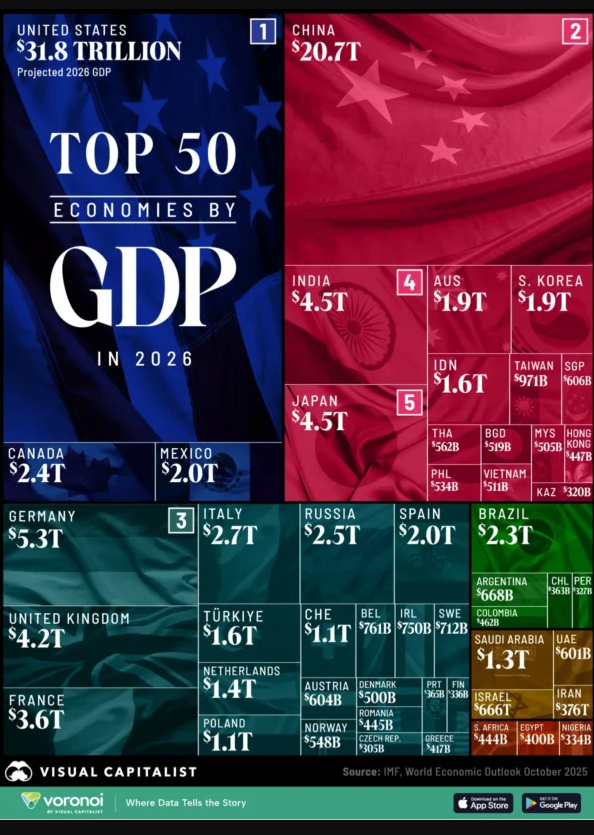
Visual Capitalist's "Ranked: The World's 50 Largest Economies by GDP in 2026" is a good example of this pattern. It doesn't try to show every country. It leads with the biggest figures, ranks the rest, and lets the scale of the top few economies do the persuading.
McKinsey Global Institute takes a similar approach in its At 250, Sustaining America's Competitive Edge report. Instead of a single number, the infographic anchors on a small handful of oversized stats.
The United States generates 26% of global GDP with just 4 percent of the world's population, is home to 59 of the world's top 100 firms by market capitalization, and spends 27% of the world's R&D dollars. Each number is large, isolated, and given room to breathe, so the reader absorbs one stat at a time instead of scanning a wall of figures.
2. Design Patterns to Borrow
- Oversized numbers signal what deserves attention before anyone reads a label.
- One or two anchor stats carry the argument, rather than a dozen competing figures.
- Consistent chart styles keep bar charts and rankings feeling like one unified system.
- Short annotations explain what a spike, drop, or ranking actually means for the reader.
Pro tip: When a single number carries your entire message, make it at least three times larger than any other element on the page. Scale alone creates hierarchy.
If you are working from a spreadsheet of your own, tools like Presentations.AI's Excel to PPT converter will read the data and pick an appropriate chart type automatically, which is a fast way to get from raw numbers to a first draft of a statistical infographic.
A statistical infographic succeeds when a reader can skim it in seconds and still walk away with the core insight. Everything else exists to support that one headline figure.
Timeline Infographic Examples
Timeline infographics show how something unfolds over time. Company histories, product roadmaps, and industry milestones all fit this format well. They give the sequence a shape, so viewers immediately understand what happened and in what order.
1. What Makes Them Work
Visual Capitalist's Timeline: The 30-Year History of the World Wide Web runs on a single connecting spine, with milestones such as Tim Berners-Lee's original 1989 proposal placed along it in chronological order. The eye never has to guess where to go next.
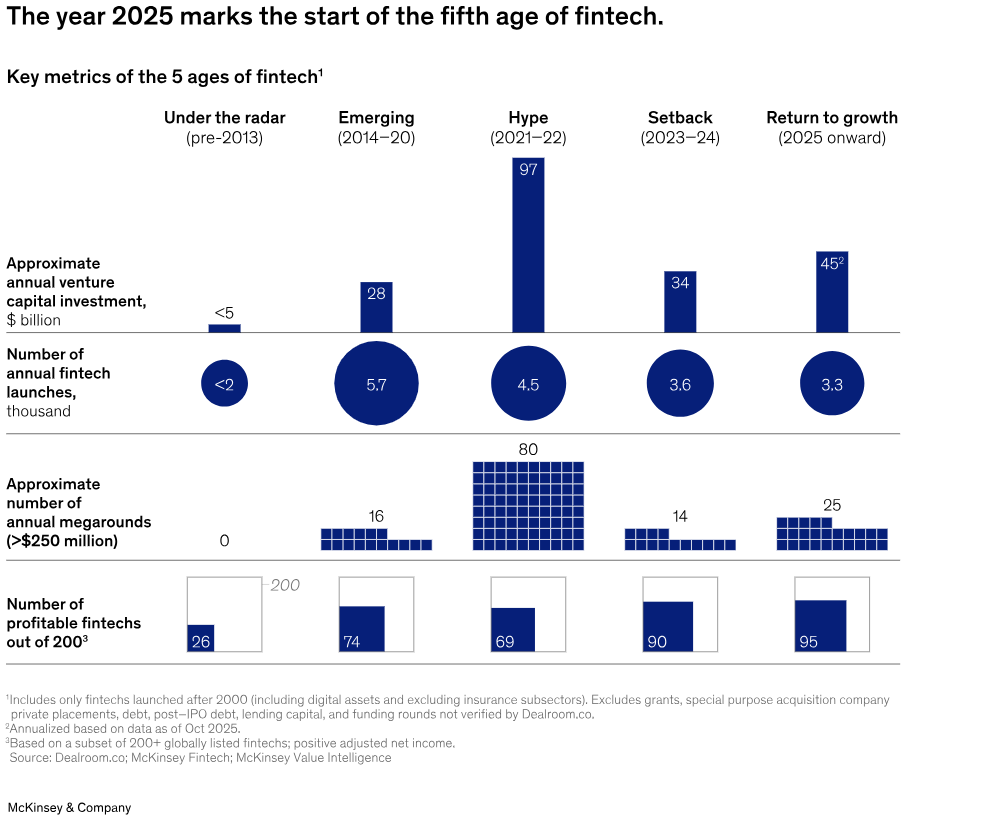
McKinsey's The $2 Trillion Fintech Future infographic does something a bit more advanced: it compares five distinct eras of fintech, from before 2013 through today, across four metrics: Venture investment, annual launches, large funding rounds, and the share of profitable companies. Each era gets its own column, so the reader can follow the chronology left to right while also comparing performance within each period.
2. Design Patterns to Borrow
- A continuous connecting line reinforces the idea that every event belongs to a single narrative.
- Consistent era or period blocks keep long timelines organized instead of overwhelming.
- Icons or small markers flag each milestone and add quick visual variety.
- A highlighted current period separates past from present on roadmap-style timelines.
Pro tip: Timelines work best when the number of milestones stays under ten. Beyond that, group related events into phases so the sequence stays easy to scan.
Timeline infographics turn abstract chronology into something concrete. When the path is clear and each milestone is treated consistently, viewers can take in an entire history at a glance.
Process Infographic Examples
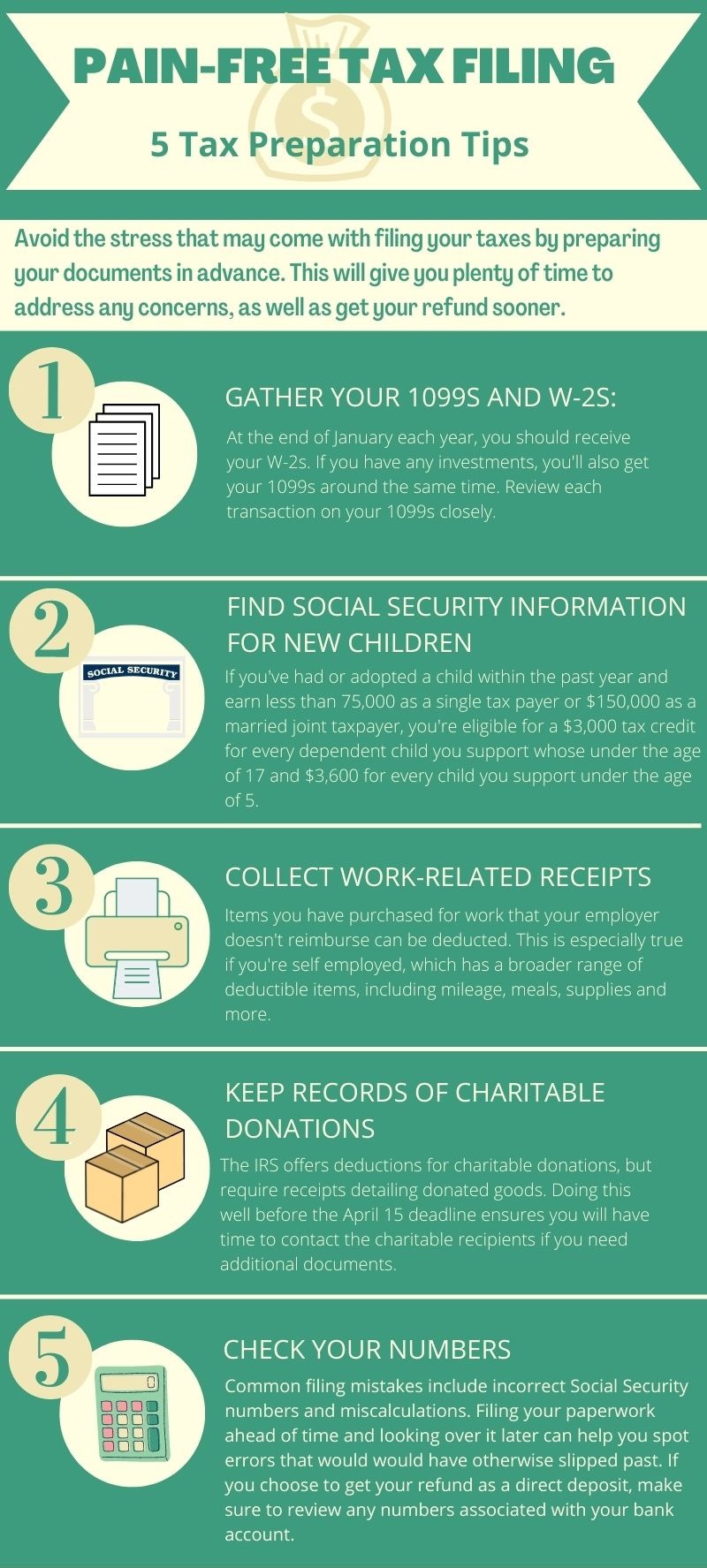
Process infographics explain how something works, step by step. Onboarding flows, workflows, and decision trees all rely on this format. They break a complex procedure into ordered stages that a viewer can follow without getting lost.
1. What Makes Them Work
Clarity of sequence matters more than anything else here. Numbered steps, directional arrows, and connected shapes tell the eye exactly where to move next. The strongest process infographics keep each step short, so the flow never stalls on dense text.
Good examples also show relationships between stages. An arrow that loops back signals a repeating cycle. A branching path shows a decision point. These visual cues carry meaning that a paragraph of instructions would take far longer to deliver.
2. Design Patterns to Borrow
- Clear numbering removes any doubt about where the process begins.
- Directional arrows guide movement and show cause-and-effect relationships between steps.
- Uniform shapes for each stage make the sequence feel deliberate and organized.
- Minimal text per step keeps the flow quick and the layout uncluttered.
Recreating a layout like this used to mean hours in design software, manually aligning arrows and boxes. With Presentations.AI's AI presentation maker, you describe the process in plain language, and the tool builds a polished, on-brand infographic in minutes, no arrows to align by hand, no designer required.
Pro tip: Process infographics thrive on order and simplicity. Number every step, show direction clearly, and keep the text tight so the sequence practically reads itself.
Comparison Infographic Examples
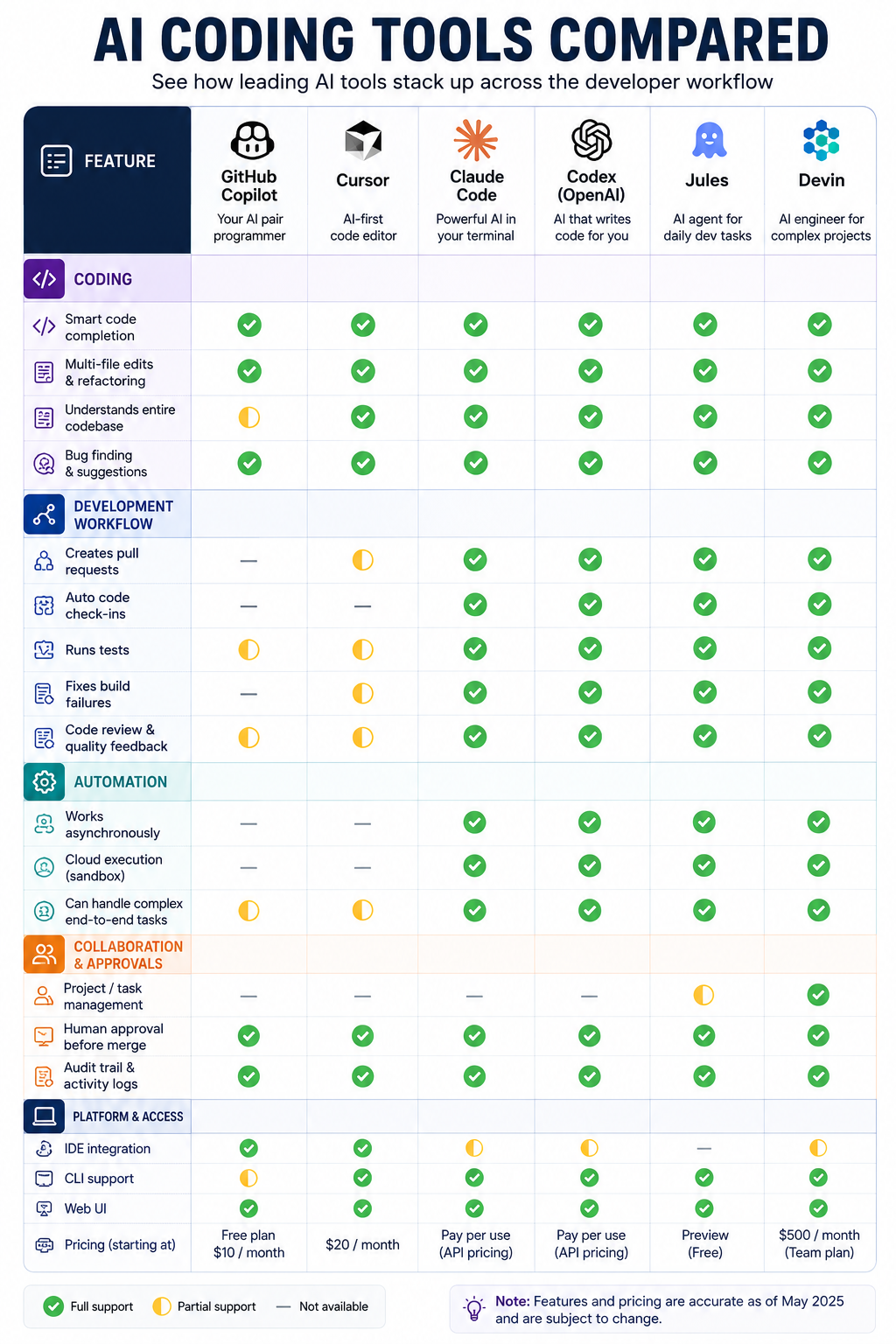
Comparison infographics put two or more options side by side. Product features, plan tiers, and before-and-after scenarios all suit this format. They help viewers weigh differences quickly and reach a decision with confidence.
1. What Makes Them Work
The strongest comparisons use symmetry. Each option occupies an equal column or panel, so nothing looks favored by accident. Shared rows or categories let the eye scan across and spot differences instantly.
Good comparison examples resist clutter. They compare only the attributes that matter, then use color or checkmarks to mark the standout option. The reader sees the trade-offs without reading a paragraph of explanation.
2. Design Patterns to Borrow
- Mirrored columns keep each option visually balanced and fair.
- Shared category rows make differences easy to scan left to right.
- Checkmarks and icons communicate presence or absence at a glance.
- A highlighted column gently steers attention toward a recommended choice.
Comparison infographics win when the structure does the work. Keep the columns even, the categories consistent, and the standout choice clearly marked.
More Infographic Types Worth Knowing
The four formats above cover the most common needs, but a few other infographic examples deserve a place in your toolkit. Each solves a communication problem that the others don't quite handle.
1. Hierarchical Infographics
These show structure and rank. Gartner's Top Strategic Technology Trends for 2026 is a clean example: ten individual trends are grouped under three parent themes, The Architect, The Synthesist, and The Vanguard, so a reader immediately understands both the ten specific items and how they relate to each other. Org charts and tiered diagrams follow the same logic.
2. Geographic Infographics
Maps turn location data into instant patterns. Regional sales figures or market coverage read faster on a map than in any table, and color shading reveals hot spots the eye finds immediately.
3. List Infographics
The simplest format is often the most shareable. A numbered list of tips or steps, styled with icons and color, tends to perform well on social media because it rewards skimming and travels easily across platforms.
Did You Know: Many widely shared social graphics are just well-designed lists. Clean numbering and a strong color system often matter more than complex underlying data.
Create Infographics For Your Next Deck with Presentations.AI
The lesson across every type is the same. Match the format to the message, and the design decisions tend to follow naturally.
Great infographic examples follow a repeatable framework. One clear message, a hierarchy that guides the eye, honest data storytelling, and color used with intent. Across statistical, timeline, process, and comparison formats, the same principles recur.
Learn to spot them, and you can adapt any example in this guide to your own reports, decks, and campaigns. With AI-powered tools such as Presentations.AI, you can move from studying these visuals to actually creating them without specialized design skills. Pick a format, define your message, and let the design follow from there.




![Chronicle Pricing, Plans, Token Limits [2026]](https://cdn.prod.website-files.com/63ca9a06fdc83037fe5f6073/6a4de6cddcee8e4e86939b49_chronicle-pricing.webp)