TL;DR
- Sales presentations fail when the story starts in the wrong place. The buyer loses interest before reaching the problem they actually care about.
- Structure beats design polish. The best decks follow a predictable Problem → Stakes → Solution → Proof → Ask arc a buyer can follow without a presenter.
- One-size-fits-all templates backfire. A cold outreach deck and an enterprise proposal need different layouts and proof points.
- Customization speed is the real bottleneck. Reps who adapt a proven format to a specific prospect in minutes close more deals.
- Your brand should appear automatically. In 2026, reps can skip font matching and slide rebuilds in PowerPoint.
- Examples in this post can be rebuilt in Presentations.AI. Start with real inputs like notes, docs, or CRM context, then let AI handle structure and branding.
Why Most Sales Presentations Fail
Many sales presentations still open the same way. Company history slide. Mission statement. Team photo. By the time you reach the problem your prospect cares about, they have already checked Slack twice. Mentally, they have moved on to the next meeting.
The examples in this post do the opposite. They lead with the buyer's world instead of the seller's ego. They also give you a repeatable way to turn scattered inputs into a deck that earns the next step. Those inputs include discovery notes, CRM context, product screenshots, and customer proof.
Here is the truth: most sales decks fail for reasons beyond ugly design. They start in the wrong place and take too long to become useful. The buyer walks away with nothing worth forwarding.
What separates a sales presentation that moves a deal forward from one that gets a polite "We'll circle back"? Prettier slides rarely make the difference. The real difference is whether a rep, founder, or revenue operator can turn messy notes and CRM data into a clear buyer-ready story before the window closes. After analyzing dozens of real-world decks across SaaS, services, and consulting, we found the patterns worth copying. We also mapped how to rebuild each one for your own pipeline in minutes with an AI presentation maker that turns raw notes, CRM context, docs, and URLs into structured, branded sales decks without the manual slide work.
Quick Comparison: Which Sales Deck Should You Use?
What Is a Sales Presentation?
A sales presentation is a structured, buyer-facing story built to move a specific deal forward. It differs from a general business presentation because it stays deal- and prospect-focused. It frames the buyer's problem and quantifies the stakes. Then it introduces your solution and ends with a clear next step.
Sales teams use these presentations across the full pipeline. Cold outreach earns a first conversation. Discovery and demo decks advance a live opportunity. Proposal decks survive a buying committee, and renewal decks anchor an existing customer to the value they have already realized. The format changes at each stage. The job stays the same: make the buyer understand the problem, believe the proof, and agree to what comes next.
What Should a Sales Presentation Include?
An effective sales presentation covers the same core building blocks regardless of format. Use this as a checklist when you build or audit any deck:
- Audience insight: evidence you understand the specific buyer, their role, and their world.
- Problem framing: the pain your prospect already feels, named clearly and early.
- Business stakes: the real cost of inaction in time, money, or risk.
- Solution narrative: how your product resolves the problem, framed as outcome, not feature list.
- Proof: customer stories, metrics, or benchmarks that make the claim credible.
- Differentiation: why your approach is meaningfully different from the status quo.
- Pricing or ROI context: the financial justification your champion needs internally.
- Objection handling: answers to the concerns the buyer has not yet voiced.
- Next-step CTA: one obvious, low-friction action the buyer can take now.
How We Selected These Examples
Effective sales decks require more than visual polish. We filtered with four criteria:
1. Structural clarity: Each example follows a recognizable narrative arc a buyer can follow without a presenter walking them through every slide. If a deck only works when someone is talking over it, it fails this test.
2. Real-world applicability: We prioritized examples from actual sales contexts: SaaS demos, agency pitches, enterprise proposals, investor-facing revenue decks, and partnership conversations.
3. Rebuildability: Every example here can be recreated or adapted using modern presentation tools. Where relevant, we call out how features like Brand Sync (which auto-pulls your brand's colors and fonts from your company URL) or AI-driven layout adaptation remove the grunt work of customizing these for your own pipeline.
4. Speed to customization: The best deck format earns its value only when reps adapt it quickly. We prioritized examples that can be personalized from existing inputs like CRM notes, call transcripts, and company URLs, with the deck holding steady rather than being rebuilt manually.
With that framing set, let's get into the examples. We start with the format most sales teams need first: the cold outreach deck that earns a second meeting.
Cold Outreach Decks That Earn a Second Meeting
Cold outreach decks have one of the hardest jobs in sales. They earn attention from someone who never asked for your pitch. These five examples fit that environment. They stay short, async-friendly, and focused on the buyer's problem.
Example 1: The Stat-led Opener
Best for: SDRs, outbound AEs, founders, and sales leaders sending async decks before a first call.

Format: 6–8 slides.
- Opens with industry-specific stats that quantify the problem (e.g., "Your support team is losing 11 hours per week to ticket routing")
- Followed by two slides unpacking why the status quo costs real money
- One slide introducing the solution at a headline level
- One customer proof point
- Calendar-link CTA
Why it works: It earns attention with specificity. A generic "companies waste time on X" slide gets skipped. A slide that names the prospect's actual pain with a number attached signals you did your homework. The short length respects the buyer's time and makes the entire deck scrollable in under 90 seconds.
Keep no more than a couple of your slides about you. Give the rest to the buyer's world. If your current cold deck has four company-about slides and two problem slides, flip it.
What to copy: Match the client's visual identity instead of yours. Sending a cold deck styled in the buyer's brand palette is an instant credibility signal that takes seconds instead of a manual design pass. Presentations.AI can apply a brand system from a company URL, so the deck looks intentional without manual formatting.
Example 2: The "Before / After" Narrative Deck
Best for: AEs, solution consultants, and agency teams selling a clear workflow change.
Format: 10 slides. Two-act structure.
- Act 1 (slides 1–5): paints a vivid "before" picture of the buyer's current workflow, using screenshots, process diagrams, or data to show friction.
- Act 2 (slides 6–10): shows the "after". Same workflow, streamlined, with measurable improvements from a comparable customer.
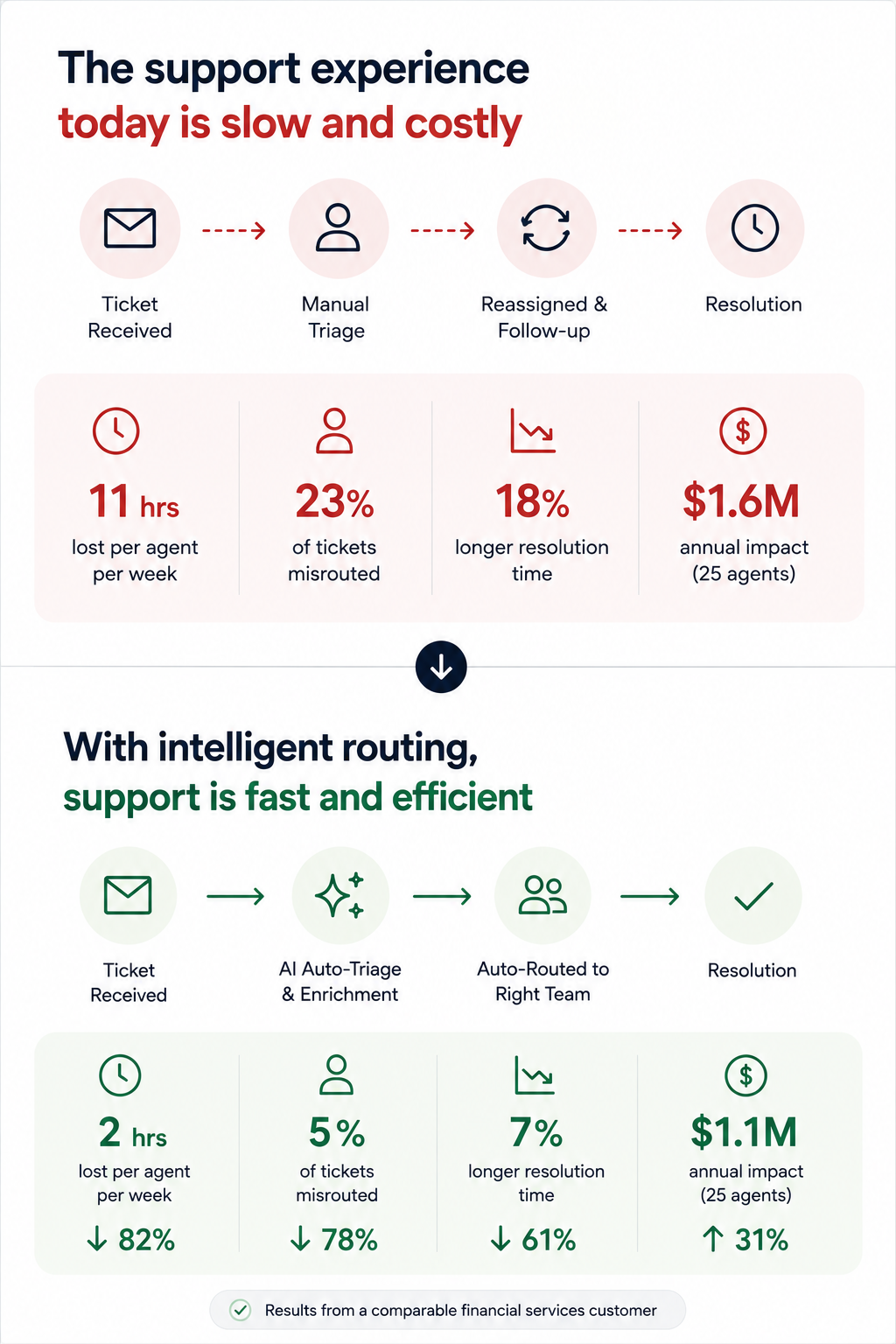
Why it works: It makes the change tangible even before a live demo. Prospects forward this format to internal stakeholders because it tells a self-contained story. The contrast structure is cognitively easy to follow, even for someone skimming at 6 PM on a Friday.
The key slide is the side-by-side transition, usually slide 5 or 6. A single "Current state → Future state" visual with a clear arrow does more persuasion work than three paragraphs of body copy.
Example 3: The Data-led Industry Brief
Best for: Enterprise sellers, consultative sellers, and founders running insight-led outbound.
Format: 7 slides disguised as a mini-report. Opens with a market trend or benchmark stat relevant to the prospect's industry. It spends three slides building the "so what?" behind the data, then pivots to how your product closes the gap, framed as insight instead of a pitch.
Why it works: It leads with value. The prospect opens it expecting to learn something. By the time your product appears on slide 5, you have already positioned yourself as someone who understands their market. This is the highest reply rate cold deck format we have seen in outbound sales orgs.
If the first slide of your cold outreach deck mentions your product name, you are pitching too early.
Example 4: The One-pager
Best for: Founders, sales leaders, and partner teams who need a forwardable artifact.
Format: Technically one slide, designed as a dense, scannable single page with modular content blocks. Those blocks cover a problem summary, a solution headline, three proof points, and a next-step CTA. It often exports as a PDF.
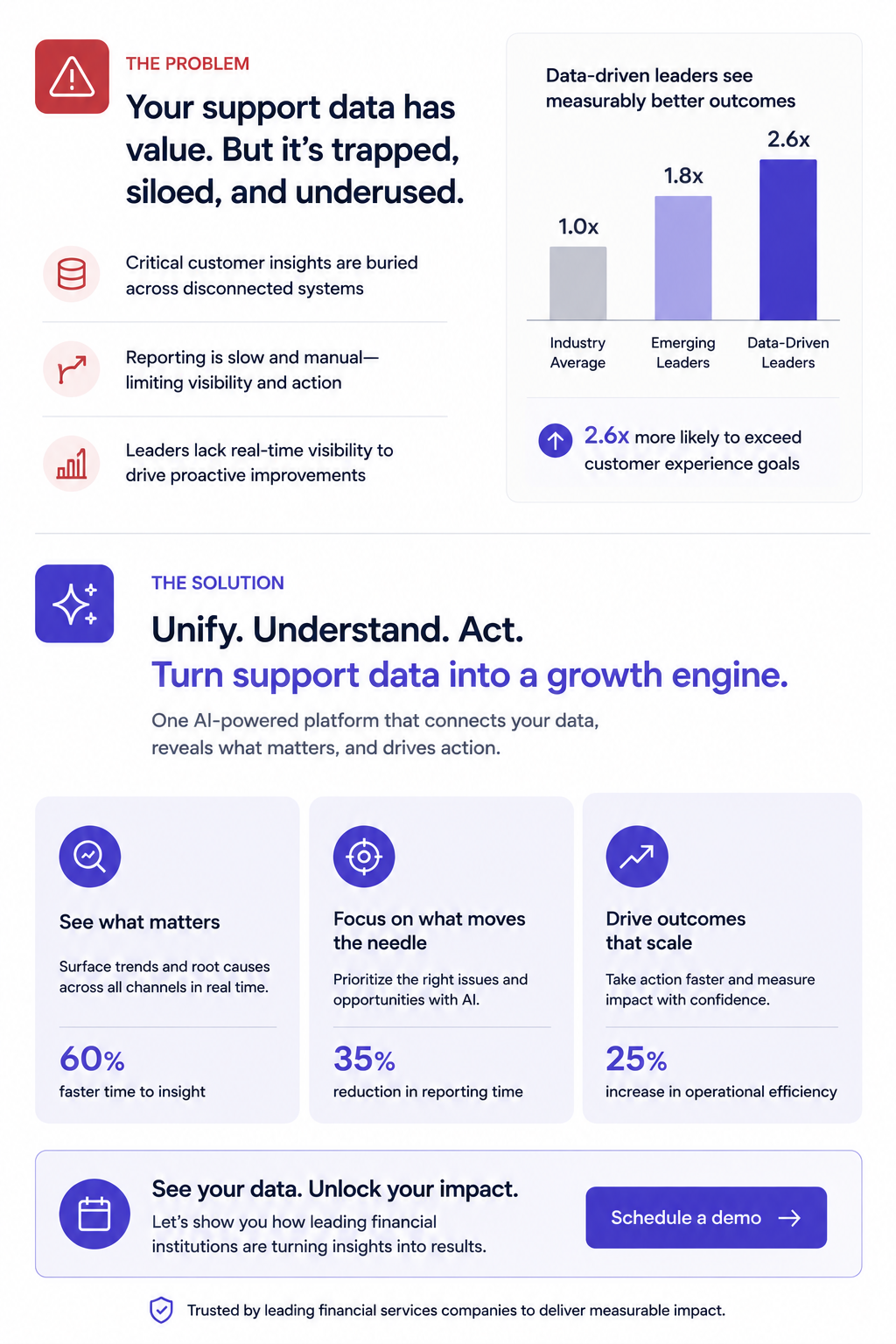
Why it works: Buyers share it. It is the deck equivalent of a business card. Someone can forward it in Slack or pull it up in a procurement review, and no scrolling is required.
Forcing your entire pitch into one slide reveals what is actually essential. Build this version even when you also send a longer deck, since it is the artifact most likely to survive inside the buyer's organization.
What to copy: Presentations.AI's anti-fragile templates keep these dense layouts intact when you swap content blocks for different verticals. One master one-pager, adapted per prospect, with layouts holding steady every time you change a headline.
Example 5: The Video-embedded Micro Deck
Best for: SDRs and account executives running warm, personalized outreach.
Format: 4–5 slides. Slide 1 is a personalized Loom or video thumbnail. Slides 2 through 4 reinforce the video's key points visually. They show the problem, a product screenshot, then a results stat. Slide 5 is the CTA.
Why it works: It combines the warmth of video outreach with the scanability of a deck. Buyers who skip the video still get the core argument. Buyers who watch get reinforcement. It covers both interaction styles within a single asset.
Every key point exists in two formats (spoken and visual). This proves powerful for async deals where each stakeholder consumes your material differently.
Demo Decks That Move the Deal Forward
Demo decks serve a different purpose than outreach decks. Your buyer already agreed to a meeting, and now the question is whether they will agree to a next meeting. These sales presentation examples fit live walkthroughs, screen shares, and the critical first 20 minutes of a discovery or demo call.
Example 6: The Discovery-first Demo Framework
Best for: AEs and sales engineers running live demos that need to adapt based on discovery.
Format: 12–15 slides, but you only show 8–10 per call. Opens with 2–3 discovery slides (questions for the prospect, not statements about your product). Then branches into relevant product sections based on the answers. Ends with a mutual action plan slide, not a pricing table.
Why it works: It turns a monologue into a conversation. The branching structure means reps show only relevant slides, avoiding the "we can skip this one" move that signals poor preparation. The discovery opening also surfaces objections early instead of letting them stack up during a rushed Q&A.
Build 5–6 interchangeable product sections (3 slides each) that reps can sequence based on what the prospect says in the first five minutes. This requires templates that stay intact when you reorder slides, exactly what anti-fragile layouts deliver.
Example 7: The ROI Calculator Deck
Best for: Enterprise AEs and revenue leaders selling into finance-gated deals.
Format: 10 slides. Follows a tight loop: Current cost → hidden cost → total cost of inaction → your product's cost → net savings → payback timeline. Slide 8 is always an interactive or semi-interactive calculation customized to the prospect's numbers (headcount, deal volume, average cycle time, whatever drives their cost).
Why it works: Finance gets involved in nearly every B2B deal over $25K. This deck gives your champion the exact ammunition they need for the budget conversation that happens without you in the room. The ROI slide gets screenshotted and dropped into internal justification docs more than any other single slide format.
The key slide is the payback timeline. Showing when the investment breaks even reframes the decision from "Should we spend this?" to "Can we afford to wait?"
A simple ROI calculation usually maps a handful of inputs to a single payback number:
What to automate: Paste your prospect's earnings report URL or company brief into Presentations.AI as a source input. Clip-E can pull relevant data points to populate the cost assumptions, saving you from the manual research loop that leads reps to skip ROI slides entirely.
Presentations.AI angle: Skip rebuilding ROI tables by hand. Use AI to pull assumptions from source docs and structure the calculation, then keep the numbers presentable across every version of the deck. That matters because ROI slides are usually the first thing reps abandon when prep time gets tight.
Example 8: The Competitive Displacement Deck
Best for: Strategic account teams displacing an incumbent vendor.
Format: 8–10 slides. Keep the competitor's name off every slide (critical). Frame the comparison around the capability gaps the prospect already expressed. Slide structure:
"What you told us matters" → "Where your current approach falls short" → "How our approach is architecturally different" → customer switch story → migration timeline.
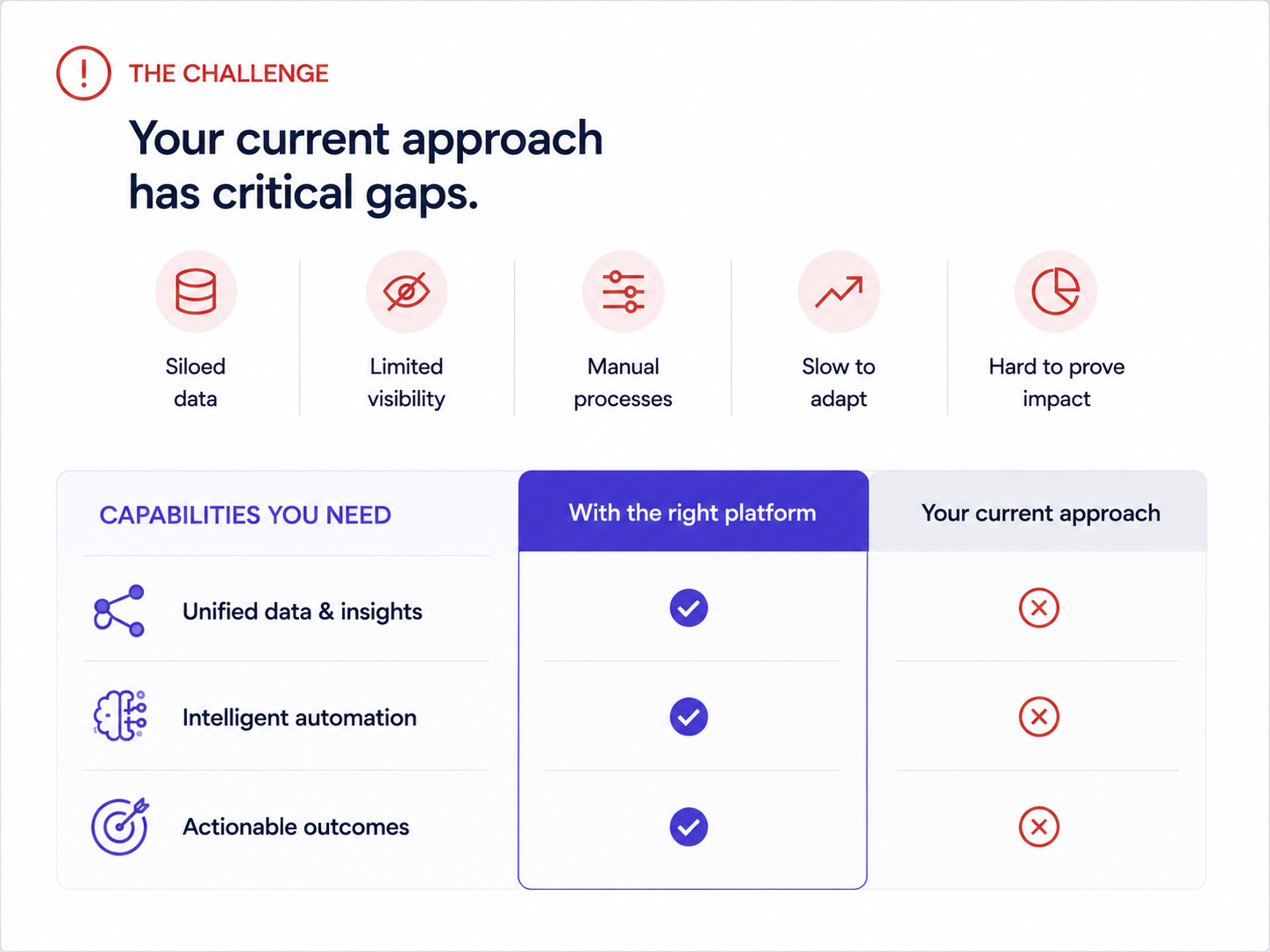
Why it works: Naming competitors invites defensiveness. Framing the conversation around the buyer's stated frustrations keeps it collaborative. The migration timeline slide is the secret weapon. It answers the unspoken objection ("switching sounds painful") before the prospect has to voice it.
One real example of a company that moved from a similar setup, with a timeline and a before/after metric, neutralizes more risk anxiety than any feature comparison grid.
Enterprise, Proposal, and Renewal Decks That Survive Internal Review
Committees decide enterprise deals and renewals, not individuals. These formats are built to be forwarded, skimmed by the right person, and anchored to realized value.
Example 9: The Multi-stakeholder Demo Deck
Best for: Enterprise sales teams navigating a buying committee.
Format: 14–16 slides with clearly labeled "sections" for different personas:
- 3-slide executive summary for the VP
- 5-slide technical deep-dive for the implementation team
- 3-slide adoption/rollout plan for the end-user champion
Each section is visually distinct (With a different accent color or header treatment).
Why it works: Enterprise deals have 6–10 decision-makers. If you send a monolithic deck and expect stakeholders to hunt for what is relevant, most skim past it. This segmented format lets your champion say, "Skip to slide 9, that's the part for our team," and immediately shortens internal review cycles.
Use this persona map to decide what each stakeholder needs to see:
Even a simple color shift in the header bar signals "this part is for you" and gives the deck a built-in navigation system. Brand Sync handles this automatically. Set your section palette once, and it propagates across every slide while you skip manual color picking.
Example 10: The Renewal / Expansion Deck
Best for: Customer success managers and account managers preparing renewal, QBR, or expansion conversations.
Format: 6–8 slides. Used 60–90 days before contract renewal.
- Slide 1: Recap of original goals when the customer signed.
- Slide 2: Usage data and adoption metrics.
- Slide 3: Outcomes delivered (tied to their stated KPIs).
- Slide 4: What's changed since they started (new features, expanded capabilities).
- Slide 5: Expansion opportunity. What they're not using yet and what it would unlock.
- Slide 6: Renewal terms and next steps
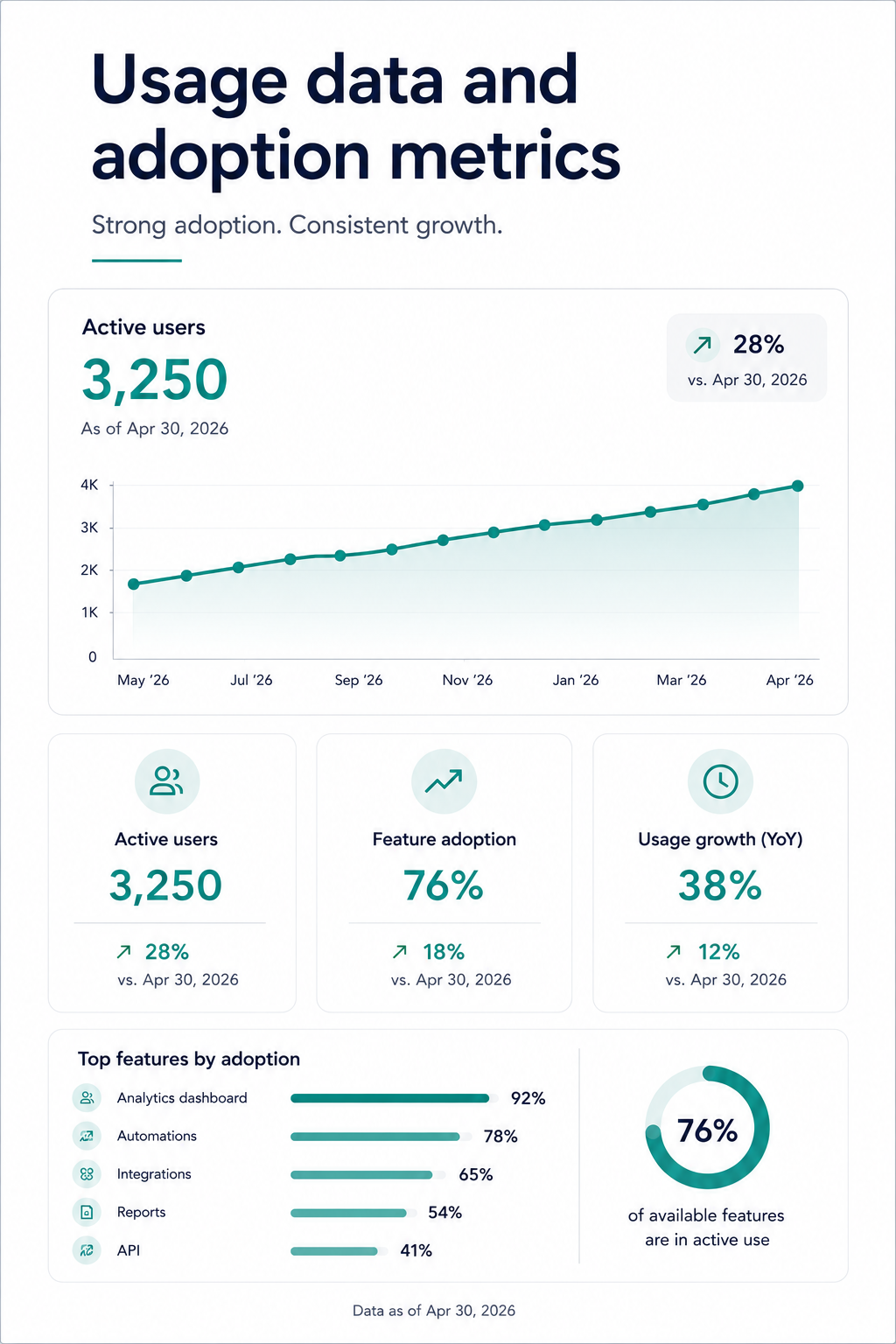
Why it works: Renewal conversations that start with "your contract is expiring" put the customer in evaluation mode. Renewal conversations that start with "here's what you've accomplished" put them in appreciation mode. This deck structure anchors the renewal decision to realized value, making price sensitivity secondary.
Show the customer their own engagement numbers. Logins, features used, workflows completed. It is hard to argue against a tool when you are looking at proof that your team uses it 400 times a month.
Presentations.AI angle: Renewal decks earn their value only when the usage data is current. Use AI-assisted refresh workflows to update adoption numbers and KPI slides while you skip rebuilding the deck from scratch.
How to Create a Sales Presentation in 5 Steps
Building a strong sales presentation takes a repeatable process, not a template library. Here is a brand-neutral framework that works across every format above:
- Research the buyer. Gather the specifics from CRM notes, call transcripts, and the prospect's own website. Capture role, industry, current tools, and stated pain before you write a single slide.
- Define the objective. Decide the one job this deck must do: earn a meeting, advance a demo, justify budget, or renew. One deck, one goal.
- Build the narrative arc. Sequence the story as Problem → Stakes → Solution → Proof → Ask, so the buyer can follow it without you talking over every slide.
- Choose the right format and design for clarity. Match the deck type to the sales stage and keep slides simple. Lead with the buyer's world instead of your company history.
- Rehearse and adapt. Practice the transitions, then adjust slide order and proof points based on how the buyer reacts and what objections surface.
Sales Presentation Outline: A Slide-by-Slide Framework
When you need a single reusable structure, copy this universal B2B sales presentation outline and adapt the depth to your sales stage:
- Title / personalization slide: the prospect's name, logo, and the specific reason for the conversation.
- Buyer problem: the pain they already feel, named clearly.
- Cost of inaction: what the status quo costs in time, money, or risk.
- Desired outcome: the future state the buyer wants.
- Solution overview: how you close the gap, framed as outcome.
- Proof: a comparable customer story with measurable results.
- ROI: the financial justification and payback timeline.
- Implementation plan: how switching or onboarding actually works.
- Objections / risks: the concerns addressed before they are voiced.
- Next steps: one clear, low-friction call to action.
Sales Presentation Design Mistakes That Lower Close Rates
Knowing what to skip is as valuable as knowing what to emulate. These are the mistakes that quietly kill close rates, each with a fix:
- Opening with company history: lead with the buyer's problem instead.
- Too much text per slide: cut to one idea per slide and let the visual carry it.
- Leading with features: frame everything as an outcome the buyer cares about.
- Burying proof points: surface your strongest customer result early.
- Weak or missing CTA: end every deck with one obvious next step.
- Inconsistent branding: apply colors, fonts, and logo automatically, not slide by slide.
- Unclear data visuals: use a single chart with a clear takeaway, not a wall of numbers.
- Ignoring the export: test the .pptx or PDF so formatting survives when the deck leaves your hands.
Sales Presentation vs. Pitch Deck: What Is the Difference?
The terms get used interchangeably, though they solve different problems. A sales presentation stays buyer- and deal-focused. A pitch deck usually focuses on company vision and fundraising.
What the Best Sales Presentation Examples Have in Common
After walking through ten different formats and use cases, a few structural principles show up in every high-performing sales presentation:
The buyer's problem always comes before your product. Every effective sales deck on this list opens with the buyer's world before the product overview. The strongest examples spend 40–60% of their slides in the buyer's world. Their pain, their cost, their workflow friction, all of it before introducing a solution.
Every deck has exactly one job: Cold outreach decks earn a second meeting. Demo decks move to the next step. Proposal decks survive the committee. Renewal decks anchor to value delivered.
Customization speed: Manually matching brand colors, swapping logos, and reformatting layouts for each prospect creates an invisible tax that kills deck adoption across sales teams. The reps who close consistently spend minutes on customization and hours on the actual conversation. Design work stays off their calendar.
Manual slide work is the old workflow: In PowerPoint or Google Slides, every prospect variation creates more formatting debt: logos, layouts, chart updates, proof points, export checks. AI-driven presentation workflows remove that drag by turning the source material into a structured, branded deck from the start.
Output format flexibility is non-negotiable: You need decks that stay visually engaging on screen and structurally intact when exported as .pptx or PDF. If your presentation tool produces beautiful web renders but broken PowerPoint files, you lose control of your narrative the moment it leaves your hands.
How to Create a Sales Presentation From These Examples
Studying examples is useful. Rebuilding them for your pipeline is where the value compounds. Here is a practical workflow that takes you from "I like that structure" to "I just sent it to my prospect", without a design detour.
Step 1: Pick the format that matches your sales stage. Sending a cold outreach to someone who has never heard of you? Start with examples 1–5. Prepping for a live demo? Use 6–8. Facing a buying committee? Use examples 9–10.
Step 2: Start with your content, not a blank canvas. The fastest path from example to finished deck is feeding your existing material. This could be a call transcript, a proposal doc, or even a competitor's landing page URL.
Step 3: Let your brand appear automatically. Drop your company URL into Presentations.AI's Brand Sync, and your colors, fonts, and logo carry across the deck without manual formatting. Building for a specific prospect? Use their URL instead.
Step 4: Iterate conversationally, not slide-by-slide. Instead of clicking into each slide to make edits, use features such as Clip-E to make changes across the deck by describing what you want. "Make the ROI section more prominent." "Add a customer proof point after the problem slide." "Shorten this to 6 slides for the exec version." The deck adapts while the layout holds.
Step 5: Export clean and share smart. Export as .pptx for buyers who live in PowerPoint. Share a tracked link for buyers who view it in-browser. Either way, built-in analytics let you see which slides get viewed, how long prospects spend on the pricing page, and whether the deck got forwarded.
Conclusion: Start With the Right Sales Presentation Example for Your Next Deal
The line across all ten examples is straightforward. The buyer's problem comes first, and the structure does the persuasion work. Customization happens fast enough that reps actually do it. This takes no design talent and no hours of prep. It takes the right starting point and a tool that handles the repetitive work so you can focus on the conversation.
A cold one-pager for a new prospect or an enterprise proposal for a six-person committee both rely on the same principle: the format does half the selling before you open your mouth.
That is the point of Presentations.AI. Give the AI your raw material, let it structure the story, and let it apply the brand and adapt the layout to produce a deck your buyer can act on. Presentations.AI makes that the default: source material in, structured sales deck out, with your brand applied automatically. Manual slide cleanup should stay out of the way of your next deal.