Quarterly business reviews should be an opportunity to demonstrate value, reset priorities, and earn trust. Instead, they often turn into bloated slide marathons where stakeholders zone out by slide six.
When figuring out how to present a quarterly business review that actually moves the relationship forward, the problem usually starts with structure, flow, and how the story lands.
This guide walks through everything you need to run a QBR that holds attention: what a QBR is, who it is for, the must-have slides, and how to sequence the narrative. You will also get a sample QBR outline that you can adapt this week. For teams with tight prep time, there is a section on how an AI-powered presentation maker like Presentations.AI can build a polished QBR deck in a fraction of the time it takes.
Key Takeaways
- A QBR aligns clients or leadership on goals, wins, misses, and the next quarter through a focused, data-led presentation flow.
- Strong QBR decks follow a tight structure: agenda, goals recap, performance metrics, wins, misses, learnings, and the next-quarter plan.
- Engagement comes from storytelling. Frame data as outcomes, invite discussion, and end with clear next steps.
- A sample QBR outline saves prep time and ensures every stakeholder leaves the room with the same understanding of progress.
- Presentations.AI turns your QBR notes into a polished, on-brand deck in minutes, so prep time stops being the bottleneck.
What Is a Quarterly Business Review?
A Quarterly Business Review is a structured meeting held every three months to review performance, share insights, and align on what comes next. It is part status update, part strategic conversation. The goal is to connect results to outcomes the audience cares about, then agree on priorities for the next 90 days.
Done well, a QBR becomes a trust-building moment. Done poorly, it becomes a slide-by-slide data dump that leaves everyone checking their inbox.
Who QBRs are for
QBRs typically serve two distinct audiences, and the framing changes for each.
- Clients and customers: Customer Success and Account teams use QBRs to demonstrate ROI, surface adoption gaps, and position renewal or expansion conversations. The audience usually includes the client's executive sponsor, day-to-day buyer, and sometimes finance.
- Internal leadership: Department heads run QBRs for the C-suite or board to review departmental performance, budget impact, and strategic bets. The audience expects sharper metrics, clear accountability, and a forward-looking plan.
What separates a QBR from a regular status update
A weekly check-in covers tasks. A QBR covers outcomes. It zooms out to answer four questions every stakeholder is silently asking:
- Did we hit what we said we would hit?
- Where did we fall short, and why?
- What did we learn?
- What are we doing about it next quarter?
Pro Tip: If your QBR cannot answer those four questions in under 30 minutes, the deck is doing too much. Cut until it can.
Knowing who is in the room and what they need to walk away with is the foundation of every slide that follows.
Key Slides to Include in a QBR Presentation
Every QBR deck needs a core set of slides that map directly to the questions stakeholders care about. Skip these, and the conversation drifts. Overbuild them, and the room loses focus. Below is the slide lineup that consistently works for both client-facing and internal QBRs.
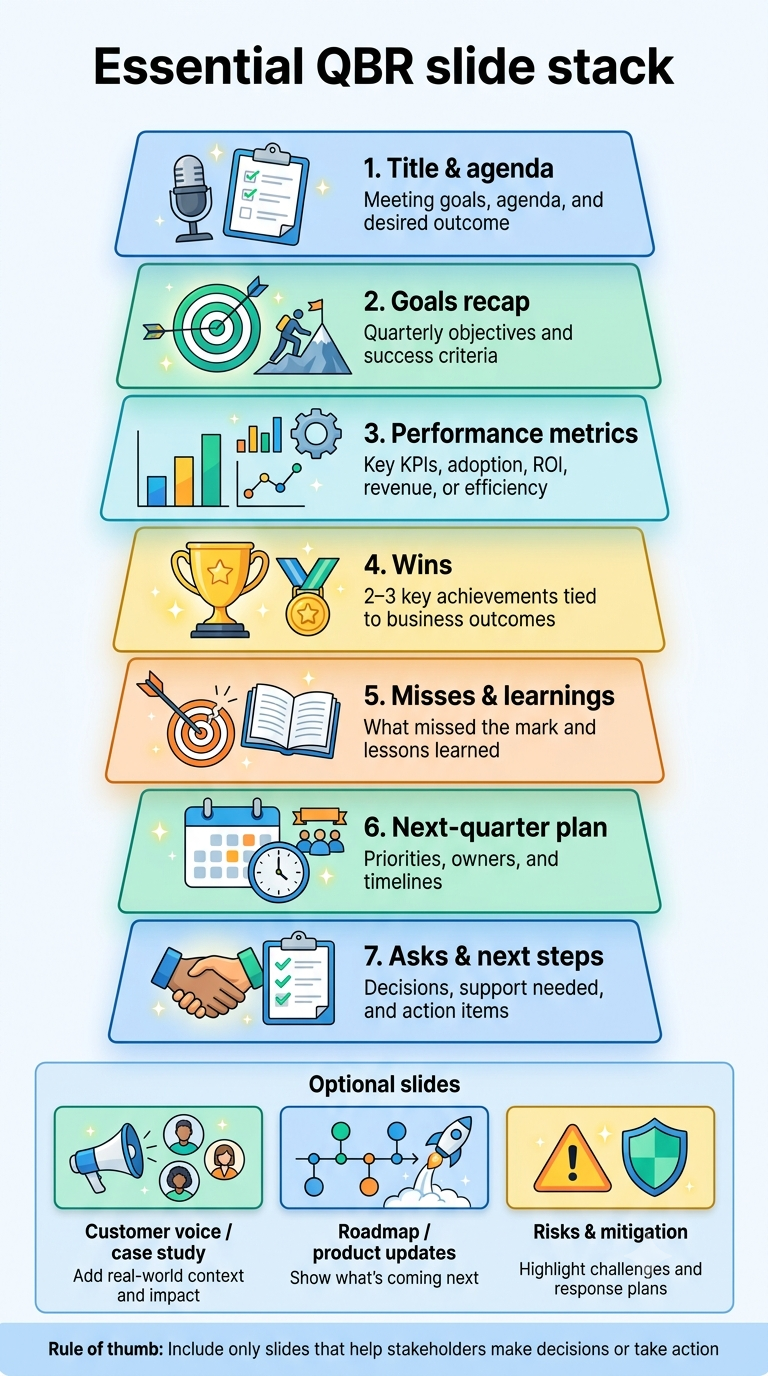
The essential QBR slide stack
- Title and agenda slide: Set expectations in 60 seconds. List the four to five sections you will cover and the outcome you want from the meeting.
- Goals recap slide: Restate the goals agreed to at the start of the quarter. This anchors everything that follows in a shared definition of success.
- Performance metrics slide: Show the KPIs that matter to this audience. For clients, lean on adoption, usage, and ROI. For leadership, lean on revenue, pipeline, and efficiency.
- Wins slide: Highlight two or three concrete outcomes. Tie each win to a business result.
- Misses and learnings slide: Name what did not land and explain why. Stakeholders trust the team more when issues are surfaced openly.
- Next quarter plan slide: Lay out priorities, owners, and timelines. This is the slide everyone screenshots.
- Asks and next steps slide: Close with the decisions or resources you need. End every QBR with a clear ask.
Optional slides worth considering
Depending on the audience, a few extras can sharpen the story.
- Customer voice or case study slide: Useful for internal QBRs to bring real-world context.
- Roadmap or product update slide: Strong for client QBRs tied to a SaaS relationship.
- Risk and mitigation slide: Valuable when leadership wants visibility into what could derail next quarter.
Pro Tip: Cap your QBR deck at 12-15 slides. If a slide does not answer one of the four core questions, move it to the appendix.
The goal is to cover what matters and leave room for conversation.
How to Structure the Flow of a QBR Presentation
Slides are the ingredients. Flow is the recipe. A QBR that lands feels like a story with a clear arc. The structure below keeps the narrative tight and the audience engaged from the opening to the close. Building a solid presentation outline before you design a single slide makes this stage much faster.
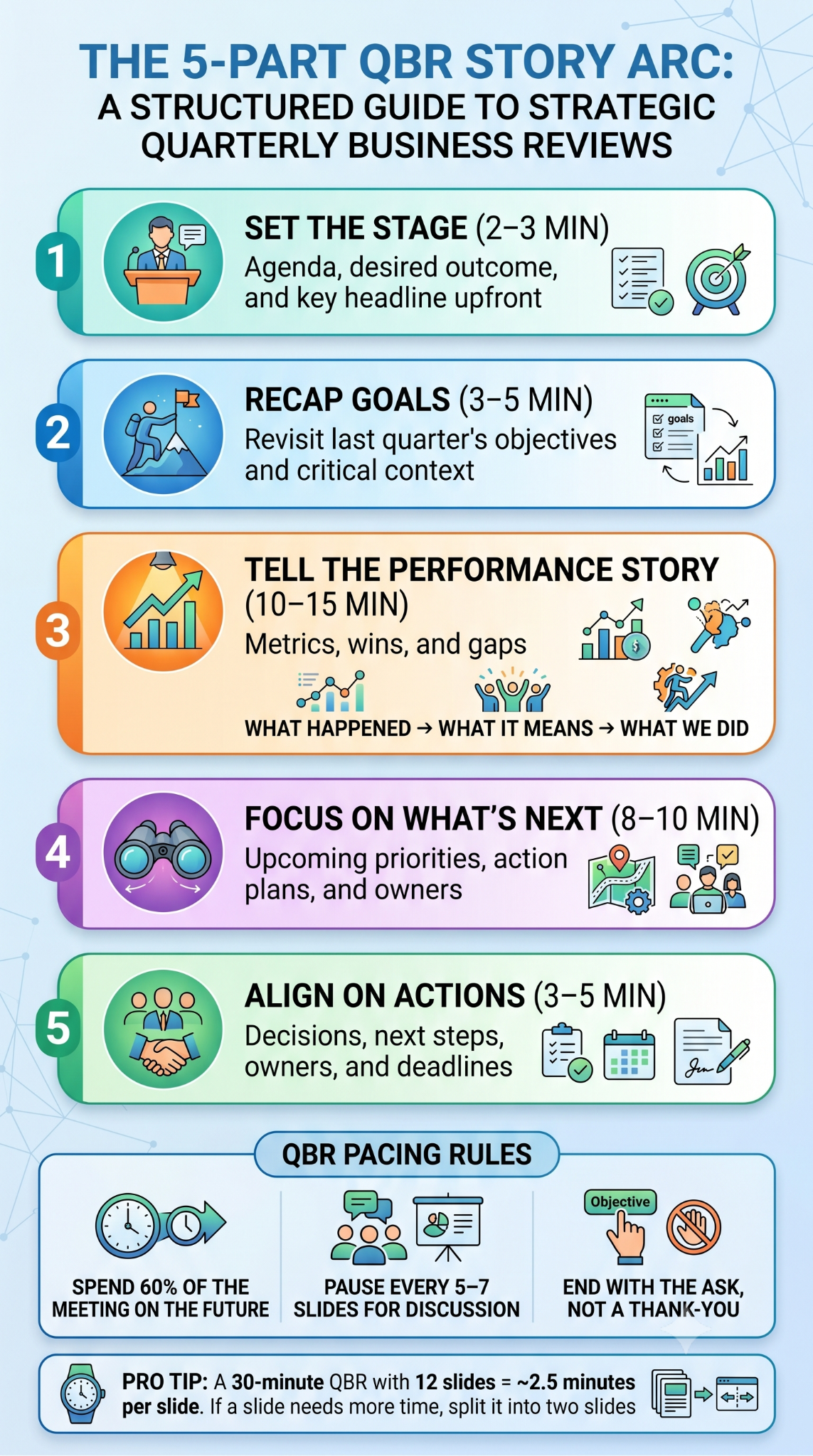
The five-part QBR narrative arc
1. Frame the meeting (2-3 minutes)
Open with the agenda and the desired outcome. State the headline result up front so the audience has a thesis to anchor against. Avoid long introductions.
2. Recap goals and context (3-5 minutes)
Remind the room of what you committed to last quarter and any context that shaped execution. Keep it short. Stakeholders remember less than you think, and a full history lesson adds no value.
3. Show performance and tell the story (10-15 minutes)
This is the core of the QBR. Walk through metrics, wins, and misses in a connected narrative. Avoid reading numbers off the slide. Frame each data point as: here is what we saw, here is what it means, here is what we did.
4. Look forward (8-10 minutes)
Shift the energy to the next quarter. Present the plan, the priorities, and the owners. Stakeholders lean in here. Spend more time on this section than most teams expect.
5. Align on next steps (3-5 minutes)
Close with decisions, asks, and follow-ups. Confirm owners and timelines on the call so nothing gets lost in the recap email.
Pacing rules that keep the room with you
- Spend 60% of the time on forward-looking content. Backward-looking data is necessary, but not what stakeholders are paying attention to.
- Pause every 5-7 slides for input. A QBR is a conversation. Build in checkpoints.
- End of the task. The last thing the room hears should be the decision you need.
Pro Tip: A 30-minute QBR with 12 slides averages 2.5 minutes per slide. If your slide needs more than that, it is probably two slides.
Strong flow makes a mid-sized deck feel sharp. Weak flow makes even a great deck feel exhausting.
Tips for Keeping Clients or Leadership Engaged
The best QBR decks still fall flat if the delivery feels like a recital. Engagement is built through framing, interaction, and presence. These tactics work whether you are presenting to a client executive or your own CEO, and they are the kind of presentation skills that compound over time.
Lead with outcomes
Stakeholders care about what efforts produced, not about the fact that the team ran 14 campaigns or shipped 22 tickets. Reframe every win and metric as a business outcome.
- Instead of: "We launched three onboarding flows."
- Say: "We launched three onboarding flows, which lifted activation by 18% and shortened time-to-value by a week."
Make the data tell a story
Numbers without narrative create glazed-over eyes. Pair every metric with a one-line interpretation: what changed, why it changed, and what it means going forward.
Invite interaction early
If the first 10 minutes are pure monologue, the room settles into passive mode. Ask a question in slide three. It can be simple: "Does this match what you are seeing on your side?" That single moment shifts the energy from presentation to conversation.
Address the misses directly
Burying or softening misses erodes trust faster than the miss itself. Name what did not work, explain the root cause, and show the corrective action. Stakeholders consistently rate transparency higher than performance.
Manage the room
- Watch for disengagement signals: phones out, side conversations, glazed expressions. Pause and re-engage with a question.
- Use names. Direct a comment or question to a specific person to bring them back in.
- Cut your slide if the conversation is better. A great QBR sometimes means skipping slide 9 because the dialogue on slide 8 is more valuable.
Close with clarity
End every QBR with the top priorities for next quarter and the one decision you need from the room on the final slide. Owners belong there, too. That slide is what stakeholders will reference after the meeting.
Pro Tip: Send the deck after the meeting. Sharing slides upfront tempts stakeholders to skim ahead and disengage from the live story you are trying to tell.
Sample QBR Outline You Can Adapt This Week
Below is a plug-and-play QBR outline that works for both client and internal audiences. Swap the placeholders for your own context, and you have a 30-minute deck ready to go.
12-slide QBR template
How to adapt the outline
- For client QBRs: Lean more heavily on ROI and the roadmap. Trim the internal risk slide.
- For leadership QBRs: Lead heavier on revenue and resource asks. Trim the customer voice slide.
- For shorter 20-minute slots: Combine slides 5 and, and move slide 11 to the appendix.
Pro Tip: Build the outline once as a master template, then duplicate it each quarter. Reusing the structure speeds prep and trains stakeholders on what to expect.
A consistent outline is the difference between a QBR that feels rehearsed and one that feels reinvented every 90 days.
How AI Can Help You Build a Polished QBR Deck Fast
QBR prep usually takes two to three working days. Pulling metrics, drafting slides, and chasing input across teams turns a 30-minute meeting into a week-long project. AI changes that math.
Where AI saves the most time
- Drafting the narrative: Feed your goals, metrics, and misses into an AI tool and get a first-pass storyline in minutes.
- Slide structure: An AI slide creator can generate a full QBR outline aligned to the 12-slide template above, then fill in talking points.
- Design consistency: On-brand templates, automatic formatting, and chart layouts remove the manual polish step.
- Iteration: Adjusting tone for a client versus an internal audience takes a single prompt.
How Presentations.AI fits into QBR prep
The AI presentation maker at Presentations.AI is built for exactly this kind of high-stakes, recurring deck. Drop in your quarter's notes, metrics, and goals, and it generates a structured QBR deck with the slide flow already mapped out.
You can start from a QBR-ready template and customize sections in natural language. Brand colors, fonts, and logos apply across every slide in one click. You can swap layouts, regenerate slides, or shift tone without rebuilding the deck, and export to PowerPoint, PDF, or a live share link when you are ready.
Customer Success teams running 20 or more QBRs a quarter, or department heads juggling multiple leadership reviews, see time savings that compound fast.
Pro Tip: AI handles the structure and polish. Your job stays where it matters: the story, the insights, and the conversation with the room.
Build the System Once, Use It Every Quarter
A strong QBR relies on a clear story, a tight flow, and a room that leaves the audience aligned on what comes next. When the structure is right, and data is framed as outcomes, the meeting stops feeling like a report and starts working as a strategic conversation.
The slide stack, narrative arc, engagement tactics, and sample outline in this guide give you a repeatable system you can run every quarter. Pair that with an AI-powered deck builder, and QBR prep stops being the week-long grind it once was. Every QBR is a chance to prove value, reset priorities, and earn the next quarter of trust. The structure does most of the heavy lifting once it is built well.