


TL;DR
- Prezi is built for non-linear, zooming canvas presentations. Its AI generates an outline and populates slides, but PPTX export flattens every zoom effect into static frames. If your workflow ends in a PowerPoint file, that is a blocker.
- Beautiful.ai automates layout and design through its Smart Slides system. The first draft is solid. After that, the AI steps aside, and manual editing takes over.
- Presentations.ai is built exclusively for business-critical slide creation. Brand Sync applies your visual identity automatically from a URL, Clip-E acts as a full AI collaborator throughout the process, and PowerPoint export is high-fidelity from the start.
- For professionals, sales teams, and enterprises that need persuasion-structured, brand-consistent presentations they can actually deliver, Presentations.ai is the strongest choice in 2026.
Most searches for Prezi vs Beautiful.ai start the same way. Prezi’s USP is the zooming canvas, while Beautiful.ai's design automation is the smarter move for business decks. Or you find Beautiful.ai’s $40/user/month Team plan steep, and are circling back to Prezi's lower price point.
Prezi still offers something unique: a spatial, non-linear format that no other tool replicates. Beautiful.ai solves a different problem by automating the layout decisions that slow non-designers down, so they can get a polished deck out the door quickly.
But neither tool was built with AI at its core, and that gap shows in 2026. If you are looking for a presentation tool where AI drives the content, structure, and brand consistency from start to finish, there is a third AI-native option worth serious attention: Presentations.ai.
Quick Overview
| Tool | Best For | AI Features | Starting Price |
|---|---|---|---|
| Prezi | Educators, speakers, creative storytellers | Prompt-to-canvas + AI text tools | Free / $15/month (Plus) |
| Beautiful.ai | Non-designers, solo consultants, sales teams | DesignerBot layout automation + draft generation | $12/month (annual) |
| Presentations.ai | Professionals, sales teams, enterprises | Full AI collaborator (Clip-E) + Brand Sync | Free / $240/year (Pro) |
What is Prezi?
Prezi launched in 2009 with a single differentiating idea: instead of advancing through a stack of linear slides, you navigate across an open, spatial canvas, zooming in and out of topics as the story unfolds. That Zooming User Interface is still what sets Prezi apart in 2026. For educators, public speakers, and creative presenters who need their audience to feel engaged rather than just follow it slide by slide, it remains a compelling format.
The product has expanded over the years. Prezi Video lets presenters appear on screen alongside their content during live calls. Prezi Design handles infographics and data visuals. AI features, added in recent updates, allow users to generate a presentation from a prompt or an uploaded file, with an editable outline step before the final deck is built.
The limitations are significant for business buyers, though. PPTX export exists, but zoom effects do not survive the conversion. Every zoomed frame becomes a flat, static slide, and formatting shifts are common. Collaboration requires teammates to have Prezi accounts for full co-editing access. And the AI, while useful for generating a starting structure, is surface-level compared to tools purpose-built for AI-driven creation.
Prezi is best understood as a storytelling and presentation delivery tool. It shines when the format itself is part of the message. It is a harder fit for teams producing high-volume, brand-consistent business decks that need to end up in someone's inbox as a clean .pptx file.
If you’d like to compare Prezi and Presentations.ai in depth, head to this page.
What is Beautiful.ai?

Beautiful.ai is a cloud-based presentation tool built around Smart Slides: intelligent templates that automatically reflow and rebalance their layouts as you add or remove content. Add a bullet point, and the spacing adjusts. Swap in an image, and the text repositions. The design logic handles itself, which is the core value proposition for non-designers who need professional output without spending time on formatting.
DesignerBot, its AI feature, generates a presentation from a text prompt and populates slides with organized content. The first draft is typically workable for standard deck types and covers 70-80% of what you need. Once that draft is in place, however, the AI steps back. Adding new AI-generated slides after the initial creation requires manual workarounds, and iterating on the deck through conversation is not an option.
Beautiful.ai sits in the middle ground. It is smarter than a traditional slide editor, but less autonomous than a full AI generation platform. The constraint that makes it consistent, the layout logic you cannot override, is also the ceiling that limits it for users who need unconventional or custom slide structures.
One area worth flagging before committing: PowerPoint export is available on all paid plans, but formatting issues are a recurring complaint in user reviews. If .pptx delivery is central to your workflow, test the export quality on a real deck before signing up.
If you’d like a deep-dive comparison between Beautiful.ai and Presentations.ai, head over to this page.
What is Presentations.ai?
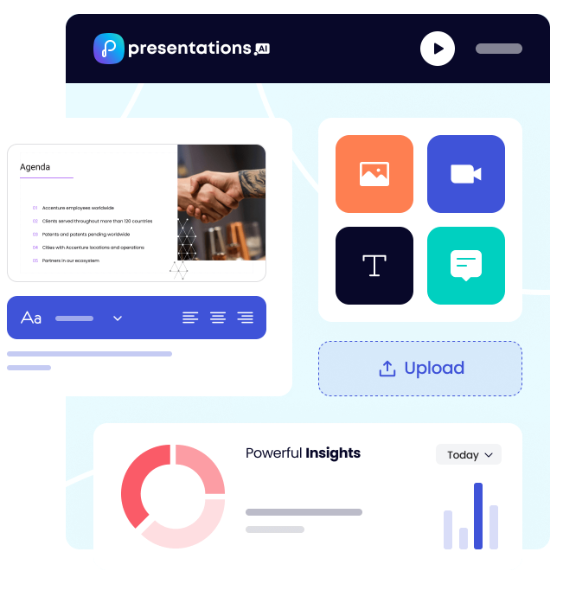
Presentations.ai is an AI-native platform built specifically for business-critical slide creation: investor pitches, sales decks, board presentations, and any deck where the output needs to move a decision. It has been focused exclusively on this format since 2019, which means the AI and the product have been shaped by a single use case rather than adapted from a broader context.
The platform's AI, Clip-E, serves as a collaborator throughout the entire deck-creation process, not just at the first-draft stage. Generate from a prompt, import a PDF, paste a URL, or upload a Word document, and Clip-E builds a structured, brand-consistent deck. From there, you can refine, add slides, and rework content through natural conversation without leaving the platform.
Brand Sync is another differentiating feature. It reads your company URL and automatically applies your colors, fonts, and logos across every deck your team creates. No manual theme setup per presentation. No brand kit to remember to select. Every deck is on-brand from slide one.
Presentations.ai is SOC 2 Type II certified and GDPR-ready, with full audit trails and granular access controls. For enterprise buyers navigating procurement and security reviews, those credentials meaningfully reduce friction.
Prezi vs Beautiful.ai vs Presentations.ai: Feature-by-Feature Comparison
AI-Powered Slide Generation
Prezi AI generates a deck from a prompt, a PDF, a Word file, or an uploaded PowerPoint, with an editable outline step before the final build. That structural preview is useful, but post-generation iteration through conversation isn't available.
Beautiful.ai's DesignerBot produces a usable first draft from a prompt, but adding new AI-generated slides after that initial output requires workarounds.
Presentations.AI's Clip-E stays engaged throughout: generate from a prompt, a URL, a PDF, or a Word doc, then keep refining through natural conversation without leaving the platform.
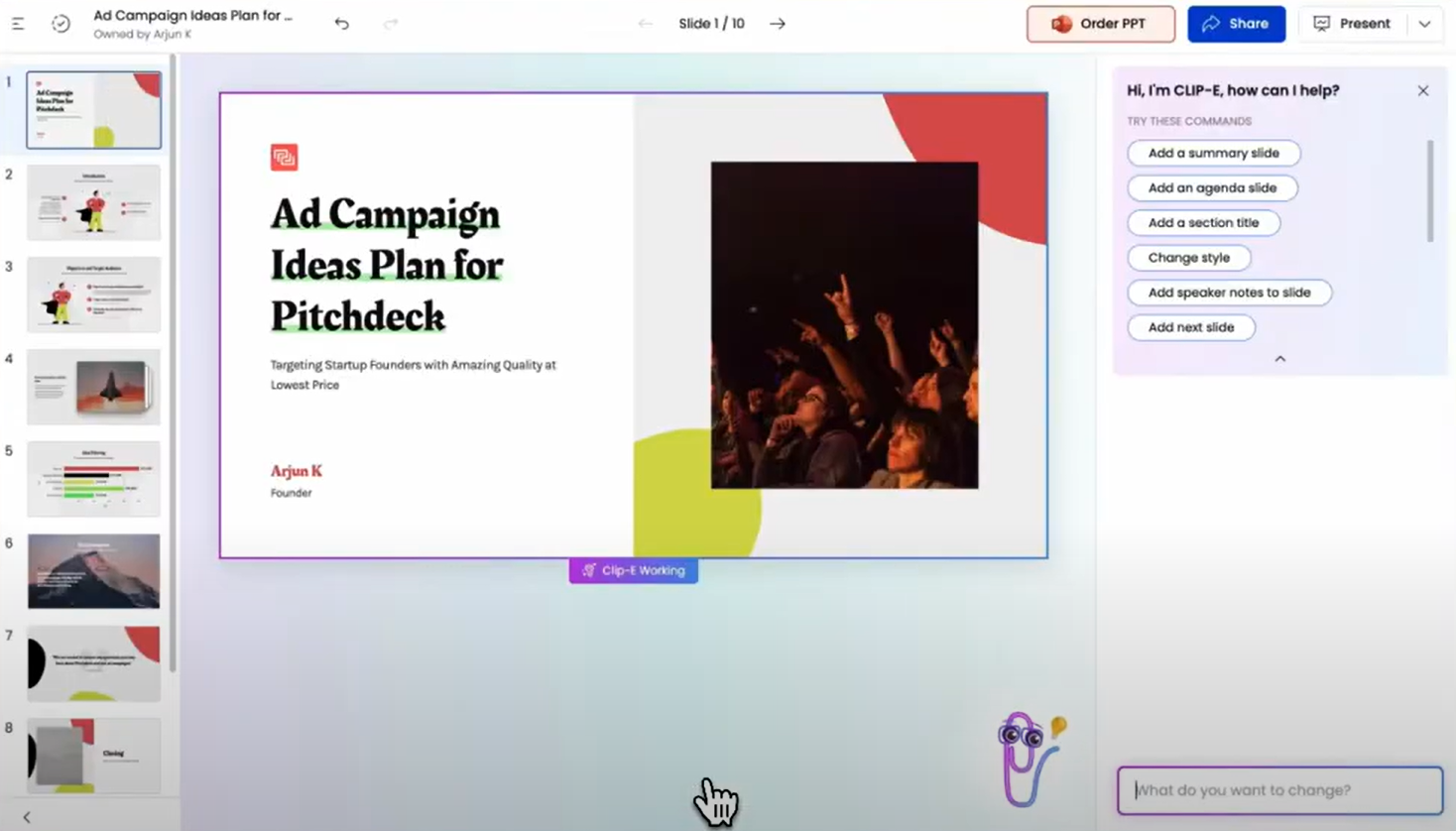
Winner: Presentations.AI — the only tool where the AI collaborates with you from first draft to final slide.
Design Quality and Customization
Prezi's open canvas creates a visually distinctive experience that slide-based tools can't replicate, though you work within its spatial logic rather than freely. Beautiful.ai's Smart Slides system produces consistently polished output automatically, which works well for standard business decks but becomes a ceiling for unconventional layouts. Presentations.AI offers anti-fragile templates, Brand Sync, and 10,000+ professional templates, but Prezi's canvas format is genuinely one-of-a-kind for presenters who want to stand out.
Winner: Prezi — no other tool matches its visual distinctiveness for the right use case.
Collaboration and Team Features
Prezi's co-editing requires teammates to have accounts, and real-time cursor tracking isn't available. Beautiful.ai has mature collaboration features on the Team plan, but the jump from $12/month Pro to $40/user/month Team is steep, with all meaningful collaboration locked behind it. Presentations.AI includes team collaboration, real-time sync, and Clip-E access for every user at the Starter level, with no premium gate.
Winner: Presentations.AI — full team collaboration without the per-seat pricing wall.
Export and Integration Options
Prezi's PPTX export flattens the spatial format entirely: zoom effects are lost, each frame becomes a static slide, and formatting shifts are common. This is a hard blocker for teams whose workflow ends in a .pptx file. Beautiful.ai exports to PowerPoint and PDF on paid plans, though text and alignment issues during export are a documented pain point. Presentations.AI's PowerPoint export is built from the ground up for .pptx fidelity.
Winner: Presentations.AI — the only tool built specifically for clean, reliable PowerPoint output.
Ease of Use and Learning Curve
Prezi's spatial format has a steeper learning curve than any slide-based tool, and new users typically need several presentations before output feels natural. Beautiful.ai has the shortest onboarding of the three: Smart Slides handle design automatically, and most users report going from idea to a presentable deck in under an hour. Presentations.AI's conversational Clip-E interface is accessible from day one, but Beautiful.ai's constrained system is marginally faster for users who just need something polished without any setup.
Winner: Beautiful.ai — the fastest path from blank page to presentable deck.
Full Comparison Table: Prezi vs Beautiful vs Presentations.AI
| Capability | Prezi | Beautiful.ai | Presentations.ai |
|---|---|---|---|
| Core Approach | Non-linear zooming canvas for visual storytelling | Template automation: smart layouts that adapt to content | AI-driven content structuring and generation, exclusively for business presentations |
| Typical Use Cases | Education, public speaking, creative presentations | Sales decks, client presentations, internal updates | Board decks, investor pitches, enterprise sales |
| Document Import | PDF, PPT, Word (text only, image-based files excluded) | Basic text input | PDF, Word, URL conversion |
| Brand Management | Manual per presentation | Manual Brand Kit setup | Automatic from company URL; one-time setup, perpetual consistency |
| PowerPoint Export | Available, but zoom effects flatten to static slides | Available; users report formatting and alignment issues | High-fidelity, one-click, boardroom-ready |
| Template Library | 200+ templates | Professional but limited selection | 10,000+ professional presentation templates |
| AI Output Quality | Structural outline with editable draft; needs editing for business use | Layout scaffolding with solid first draft; AI stops there | Trained on business persuasion architecture; business-ready with minimal editing |
| AI Iteration After First Draft | Limited; no conversational interface | Not available after initial generation | Full conversational iteration throughout |
| Stock Images / Animations | Unsplash and Noun Project library; limited animation types | Moderate library; manual animation configuration | Vast design libraries and automatic professional animations |
| Collaboration | Basic; full co-editing requires Prezi accounts | Real-time co-editing on Team plan only ($40/user/mo) | Real-time team workflows at the Starter level |
| Enterprise Security | Standard; no SOC 2 | Standard security | SOC 2 Type II certified, GDPR-ready, full audit trails |
| Data Ownership | Standard terms | Standard terms | Users retain full ownership |
| Free Plan | Yes: 500 AI credits, public presentations | No: 14-day trial only (credit card required) | Yes: unlimited users, up to 5 presentations, no card |
| Hidden Costs | Collaboration locked behind the Teams plan; annual billing friction | Export cleanup; team plan triples per-user cost | None |
| Fortune 500 Adoption | Moderate; strong in education | Moderate | Widespread for business presentations |
| Best For | Educators, speakers, and creative storytellers who present live | Teams needing design consistency without design skills | Teams that need business-critical, persuasion-structured presentations |
Pricing Comparison: Prezi vs Beautiful.ai vs Presentations.ai
Headline numbers in this category rarely tell the full story. The real cost surfaces when you need collaboration, brand controls, or a clean PowerPoint file at the end. Here is how the three tools handle each of those requirements.
Prezi Pricing
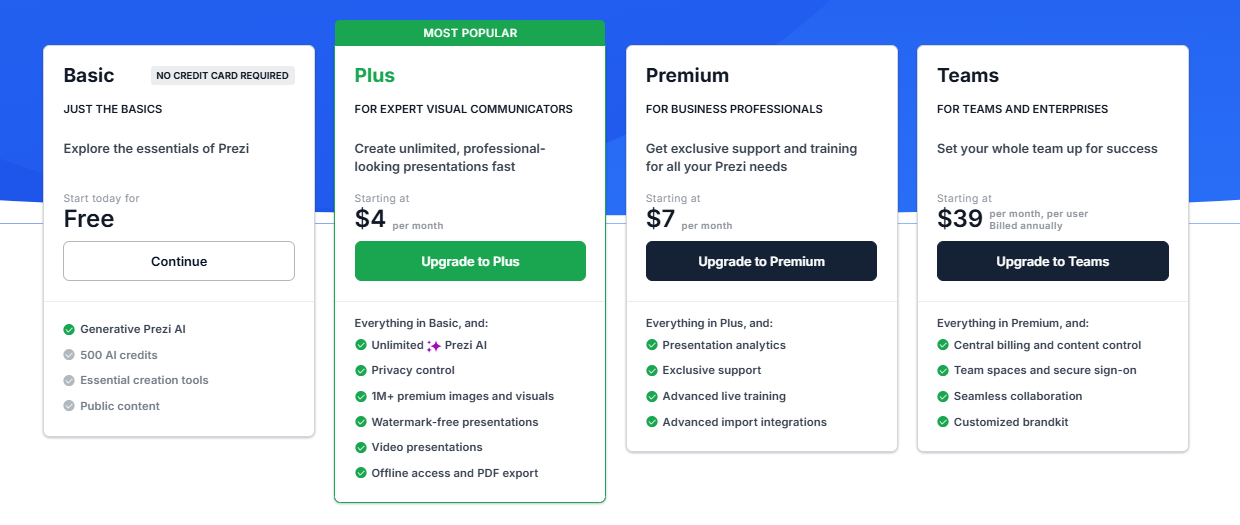
Prezi offers three individual paid plans and a Business tier, all with a 14-day free trial. The free Basic plan includes 500 AI credits and public presentations, which is enough to evaluate the format.
- Basic: Free. 500 AI credits (non-renewable), public presentations, limited features, no offline access or PDF export.
- Plus: $4/month. Removes Prezi branding, adds offline access via the desktop app, PDF export, voiceover, unlimited AI credits, and custom color themes. This is the minimum plan for meaningful professional use.
- Premium: $7/month. Adds Prezi Analytics, priority support, and advanced import integrations.
- Teams: $39/month. Centralized billing, advanced collaboration, dedicated support, and enterprise controls.
What to watch out for: Annual billing is the norm on paid plans, and multiple user reports flag difficulty canceling before auto-renewal. PDF export is locked behind the Plus plan; the free plan does not include it. PPTX export is available but produces flat, static slides with formatting issues, adding manual cleanup time that is not reflected in the price.
Beautiful.ai Pricing
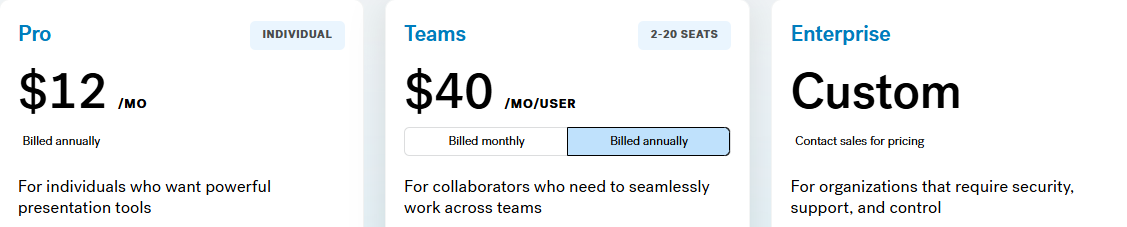
Beautiful.ai has three tiers: Pro, Team, and Enterprise. There is no free plan. A 14-day trial is available, but it requires a credit card and automatically converts to an annual subscription if not cancelled.
- Pro: $12/month (annual) or $45/month (monthly). Unlimited slides, Smart Slides, AI generation, custom fonts, PowerPoint and PDF export, viewer analytics. Single user only.
- Team: $40/user/month (annual) or $50/user/month (monthly). Adds real-time collaboration, Brand Kit, shared libraries, admin controls, and engagement analytics. The jump from Pro to Team more than triples the per-user cost.
- Enterprise: Custom pricing. SSO, SCIM, dedicated account management, priority support, and advanced security.
What to watch out for: A team of five on the Team plan costs $2,400 per year. That is a significant commitment, particularly for a tool where AI depth is limited compared with newer competitors and where PowerPoint export quality remains an open issue.
Presentations.ai Pricing
Presentations.ai keeps its structure simple: three tiers with no monthly billing option. Plans are available on an annual basis.
- Starter: Free. Unlimited users, limited AI credits, brand themes, team collaboration, and basic functionality. Up to 5 presentations, no credit card required.
- Pro: $240/year (one user). Equivalent to $20/month. Additional AI credits, Pro templates, custom fonts and colors, analytics, PDF export, and high-fidelity PowerPoint export.
- Enterprise: Custom pricing. Unlimited AI credits, company-wide templates, admin capabilities, dedicated support, enterprise security, and compliance documentation.
The Starter plan is genuinely multi-user, making it a practical way for an entire team to evaluate the platform before committing to a budget. At $240/year, the Pro plan is meaningfully cheaper than Beautiful.ai's Team plan per user and roughly on par with Prezi's Plus tier, while delivering substantially more AI capabilities and better PowerPoint export fidelity.
Which Tool is Best for Your Use Case?
Best for Startups and Pitch Decks
Investor decks need two things in equal measure: a clear argument and a polished look. Presentations.ai delivers both from a single prompt. Clip-E generates a persuasion-structured pitch deck, and you can iterate on the narrative in natural language without manually toggling between slides. The Pro plan at $240/year is accessible for early-stage founders, and the output looks intentionally designed.
Beautiful.ai is a credible second option for founders who already know what they want to say and need it formatted quickly. Prezi is a harder fit for pitch workflows: the zooming format is memorable in a live demo, but typically not what investors expect to receive as a file for follow-up review.
Best for Sales Teams
Sales teams need decks that are quick to build, consistent across all reps, and trackable once shared. Presentations.ai covers all three: AI-driven creation from a prompt or an existing document, Brand Sync for team-wide visual consistency, and viewer analytics on paid plans.
Beautiful.ai is also a credible option for sales teams that value Smart Slides' consistency and built-in engagement tracking. The per-user cost on the Team plan is the main consideration. Prezi is less suited to sales deck workflows, particularly when the output needs to be an editable PowerPoint file.
Best for Marketing Teams
Marketing teams live and die by brand consistency. Presentations.ai's Brand Sync removes the manual step of applying brand guidelines to each new deck, a step that compounds in value as presentation volume increases. Every deck auto-aligns with the brand from the first slide, whether it is built by the head of marketing or someone in a regional office.
Beautiful.ai's Brand Kit is a solid alternative for teams with simpler brand management needs and a preference for design automation. Prezi's format works well for marketing teams creating conference keynotes or product launch presentations where the visual experience is part of the message. For high-volume, brand-critical business decks, the Brand Sync advantage is hard to replicate manually.
Best for Enterprise and Large Teams
Presentations.ai at the Enterprise tier provides unlimited AI credits, company-wide templates, admin controls, complete audit trails, SOC 2 Type II certification, and GDPR-ready compliance documentation. Those credentials matter in security reviews, and the data ownership terms are unambiguous: users retain full rights to their content.
Beautiful.ai's Enterprise plan covers SSO, SCIM, and dedicated account management. Prezi offers Business tier pricing on request with enterprise controls, though it lacks SOC 2 Type II certification. For IT and procurement teams conducting formal security evaluations, Presentations.ai reduces the friction in that process more than either competitor does.
Best for Individuals and Freelancers
Prezi's free plan and $15/month Plus tier are genuinely accessible for solo users who want to create visually distinctive presentations without a large investment. Beautiful.ai has no free plan and requires a credit card for its 14-day trial.
Presentations.ai's free Starter plan supports unlimited users and includes team collaboration and brand themes. For solo professionals who regularly create business decks,
Presentations.ai Pro at $20/month offers the broadest feature set for the price, combining AI generation, high-fidelity PPTX export, and brand management in a single plan.
Why Presentations.ai is the Smarter Choice Over Prezi and Beautiful.ai in 2026
Prezi and Beautiful.ai each have genuine strengths within defined use cases. Prezi's non-linear canvas is unlike anything else available, and Beautiful.ai is the fastest path from a blank prompt to a polished deck for non-designers. But Presentations.AI is the only tool in this comparison built specifically for professional business presentations that are persuasive, on-brand, and ready to deliver with minimal editing time.
- Brand Sync reads your company URL and automatically applies your visual identity to every deck. Prezi requires manual theme setup per presentation; Beautiful.ai's Brand Kit requires deliberate selection each time.
- Clip-E stays engaged throughout the process. Prezi's AI generates a starting structure and steps back. Beautiful.ai's DesignerBot stops at the first draft.
- Multi-source input lets you turn a PDF, Word document, URL, or plain text prompt into a polished deck. Neither Prezi nor Beautiful.ai supports all four input types.
- PowerPoint export is built for clean .pptx fidelity. Prezi flattens zoom effects into static slides. Beautiful.ai's export produces formatting issues that require cleanup.
- The free Starter plan is genuinely multi-user with no credit card required. Beautiful.ai has no free plan. Prezi's free tier excludes PDF export and limits presentations to public visibility.
Choose Prezi if you:
- Regularly present live to audiences and want the zooming canvas to be part of the experience
- Work in education, public speaking, or creative industries where non-linear storytelling sets you apart
- Do not need to deliver polished, editable PowerPoint files as a regular output
- Want an accessible individual plan with a distinctive format
Choose Beautiful.ai if you:
- Create decks solo and need consistent, polished output every time with minimal formatting effort
- Value viewer engagement analytics for sales follow-up
- Are comfortable with a credit card required for the trial, and no free plan to evaluate upfront
- Have straightforward brand requirements: colors, fonts, logos applied manually
Choose Presentations.ai if you:
- Want AI that structures decks for persuasion, not just fills in slides with generated content
- Need brand consistency to be automatic, not dependent on remembering to apply a theme
- Regularly convert PDFs, Word documents, or URLs into presentation format
- Are building business-critical decks: pitches, sales presentations, board updates
- Need high-fidelity PowerPoint export and enterprise-grade data ownership terms






