What happens when a proposal, pitch, or product idea has to compete for someone's attention in under a minute? Nobody has time to go through an entire deck before deciding whether something is worth their time.
Attention is short, inboxes are crowded, and decision-makers skim before they commit. That is why the one pager has become such a useful format. Done well, it delivers everything someone needs to know on a single, focused page.
A great one pager goes beyond fitting less text on a page. It combines layout, content hierarchy, and visual design into a deliberate whole. The tricky part is knowing what good actually looks like before building one.
This guide walks through real one pager examples across common use cases, from business proposals to startup pitches to event recaps. Each one is broken down to show what makes it work, so the thinking behind it can be borrowed and applied to the next page to build.
Key Takeaways
- A one pager condenses a core message into a single, scannable page that readers can absorb in under a minute.
- The best one pager examples share strong content hierarchy, generous white space, and one clear focal point per section.
- Different goals need different layouts. Proposals, product overviews, and startup pitches each follow distinct structural patterns.
- Visual design carries as much weight as copy. Typography, color, and alignment guide the eye's movement.
- Presentations.AI lets anyone turn these one pager examples into polished, on-brand documents in minutes, no design skills required.
What Is a One Pager (And Why It Works So Well)
A one pager is a single-page document that communicates a complete idea. It’s similar to the highlight reel of a 2-hour podcast. Rather than making readers go through pages of detail, it delivers the essentials in a format they can scan in seconds and remember for hours.
One pagers appear across every business function once you start looking. Sales teams use them to summarize an offer. Founders hand them to investors. Marketers use them to explain a product. Event organizers use them to recap outcomes. The format flexes to fit almost any goal.
1. Why a Single Page Beats a Long Document
The power of a one pager comes from constraint. When there is only one page, every element has to earn its place. That forces clarity. Here is why the format works so consistently:
- It respects the reader's time. Busy people skim first and read later. A one pager gives them everything upfront.
- It sharpens the thinking behind it. Fitting a message onto one page means cutting the noise and keeping only what matters.
- It travels easily. A single page is simple to email, print, or drop into a chat without overwhelming anyone.
- It creates a strong first impression. A clean, focused page signals that the sender values clarity and knows the material.
2. The Three Ingredients Every Good One Pager Shares
No matter the use case, the strongest one pagers get three things right. These are the same qualities to look for in every example that follows.
- Layout: A logical flow that guides the eye from the headline to the key points to the next step.
- Content hierarchy: A clear order of importance so the most critical information stands out first.
- Visual design: Typography, color, and spacing that make the page inviting rather than crowded.
Pro tip: Before designing anything, write the one-sentence goal at the top of a blank page. If a section does not support that goal, cut it. Constraint is the best editor.
Get these three elements working together, and a single page can do the job of an entire deck. The sections ahead show what that looks like in practice, one real-world example at a time.
Business Proposal One Pager Examples
A business proposal one pager has one job, and that is to convince a busy client to say yes. It must summarize the opportunity, the plan, and the value without burying the reader in fine print. The best examples feel less like paperwork and more like a confident handshake on paper.
HubSpot's one-pager for its LinkedIn Ads integration is a strong real-world example of this format. A dark blue header banner opens with a benefit-led headline, "Grow your business with HubSpot for LinkedIn Ads," paired with a one-sentence subhead that states the outcome: Managing LinkedIn ads alongside all other campaigns in one place.
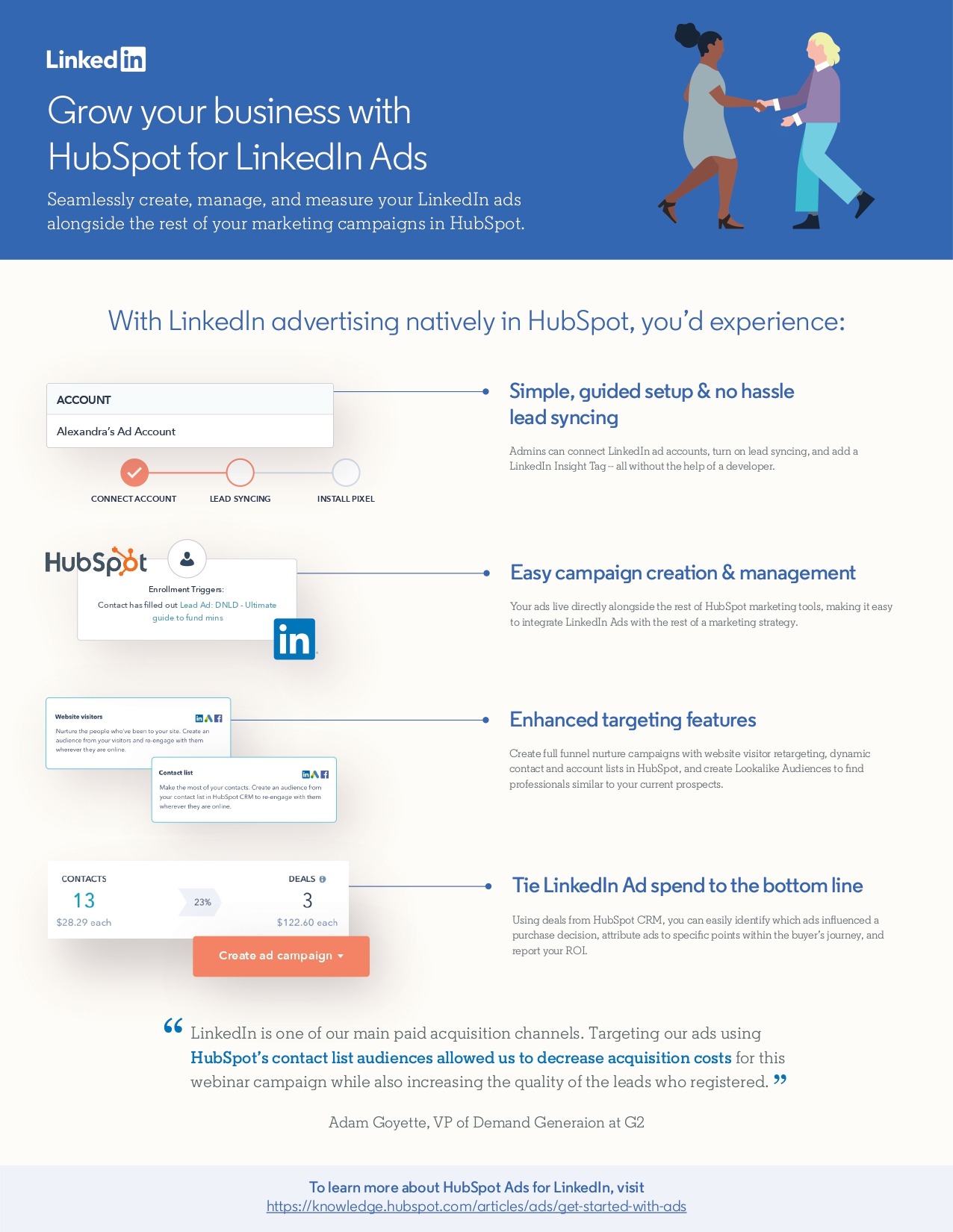
Below that, four feature blocks walk through setup, campaign management, targeting, and reporting, each paired with a product screenshot rather than a generic icon. A named customer quote with a specific result closes the page, followed by a simple call to action pointing readers to a resource link.
- Layout: A full-width header sets the outcome before any feature gets introduced, and the four supporting blocks run down the page in a single, scannable column.
- Content hierarchy: The headline promises the outcome, the four blocks explain how, and the testimonial proves it works.
- Visual design: Real product screenshots replace stock icons, so the reader sees the actual interface rather than an abstraction.
Pro tip: The quote from G2's VP of Demand Generation does more work than any feature bullet. A named person, a named company, and a specific result (lower acquisition costs, better lead quality) make the pitch credible in a way that adjectives cannot.
The takeaway is simple. A proposal page works best when it reads like a conversation about the client's problem instead of a list of services, and this one earns trust by showing the real product doing real work instead of describing it.
Product Overview One Pager Examples
A product overview one pager explains what something is and why it matters quickly. It usually lands in front of prospects who are still deciding whether to care. Clarity beats cleverness every time. The best examples answer two questions instantly. What they do and who they help.
What This Format Does Well
Caterpillar's one-pager for its MineStar Detect object detection system is a clean, real example of this pattern. It opens with a bold headline about blind spots on heavy equipment, uses side-by-side diagrams to show operator visibility with and without the technology, and closes with a stat block led by a 95 percent reduction in speeding events.
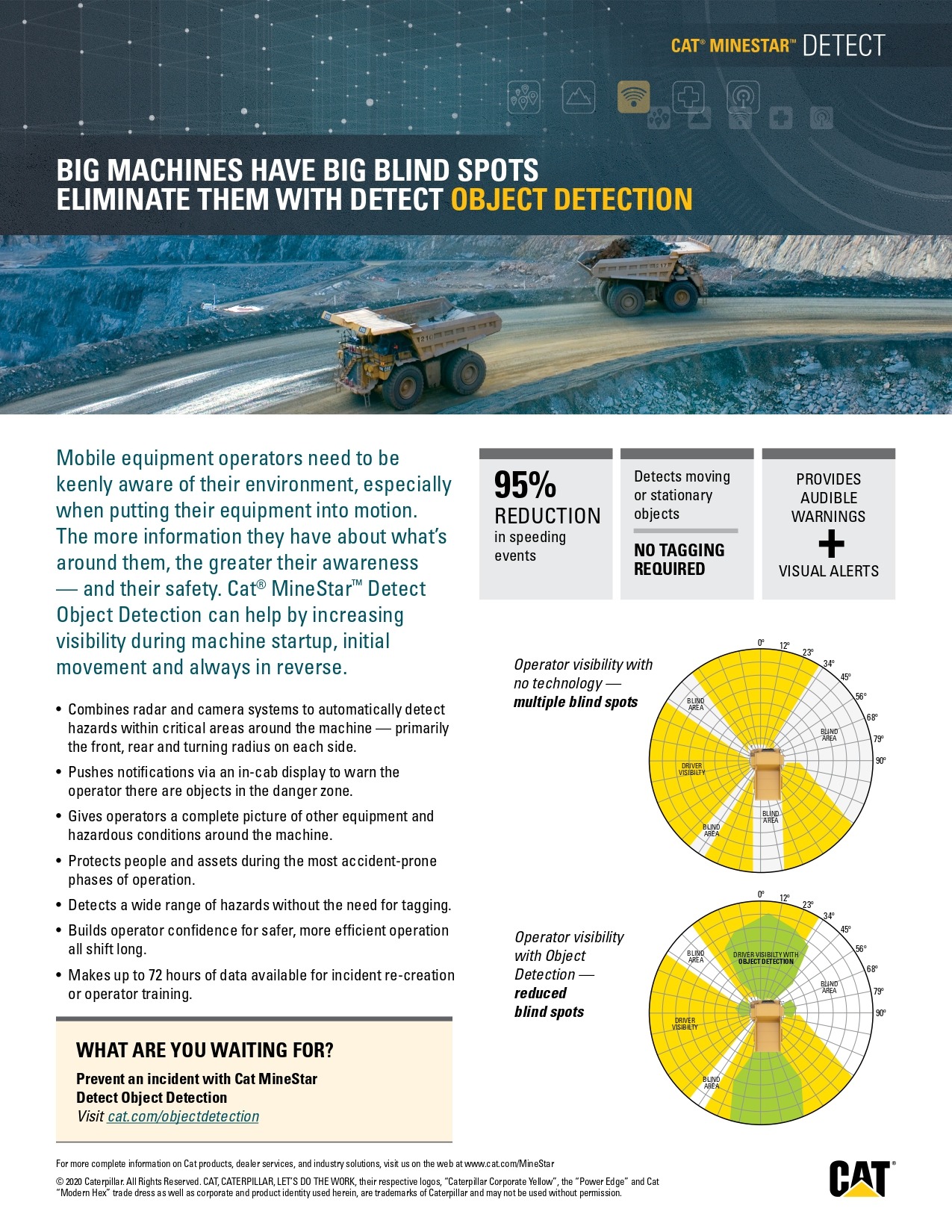
- Layout: The diagram comes first, putting the hazard in front of the reader before any copy explains it.
- Content hierarchy: The safety stat leads, features follow, and the call to action closes the page.
- Visual design: Bold numbers and directional icons carry more weight than paragraphs, so the safety case reads at a glance.
Pro Tip: Rewrite every feature as a benefit before it goes on the page. “Automated reports” becomes “spend less time in spreadsheets.” Outcomes convince readers far more often than functions do.
Get this balance right, and a product page does double duty. It informs the curious and nudges the ready, all within a single glance.
Startup Pitch One Pager Examples
A startup pitch one pager has to earn attention fast on paper. Investors see hundreds of them, so a single page has only seconds to make an impression. The goal is to communicate a big opportunity and a credible team without drowning in detail. When the pitch exceeds one page, tools built specifically for pitch decks can carry the same story into a full investor deck without having to start over. The best examples feel ambitious and grounded.
What This Format Does Well
A great pitch one pager opens with a one-line description of the company and the problem it solves. Next comes the market size, followed by the product and traction shown through simple metrics. A short team section signals capability. A funding ask closes the page with a specific number and a breakdown of how the funds will be used.
- Layout: A left-to-right or grid structure lets investors jump to the section they care about.
- Content hierarchy: Problem and market lead, because that is what investors weigh first.
- Visual design: Charts and bold numbers replace paragraphs, making traction impossible to miss.
Did You Know: Many investors decide whether to keep reading within the first few lines of a pitch. A sharp opening sentence often matters more than the deck that follows.
The lesson across every startup pitch example is focus. A single page forces founders to prove the opportunity is real and the plan is clear.
Event Summary One Pager Examples
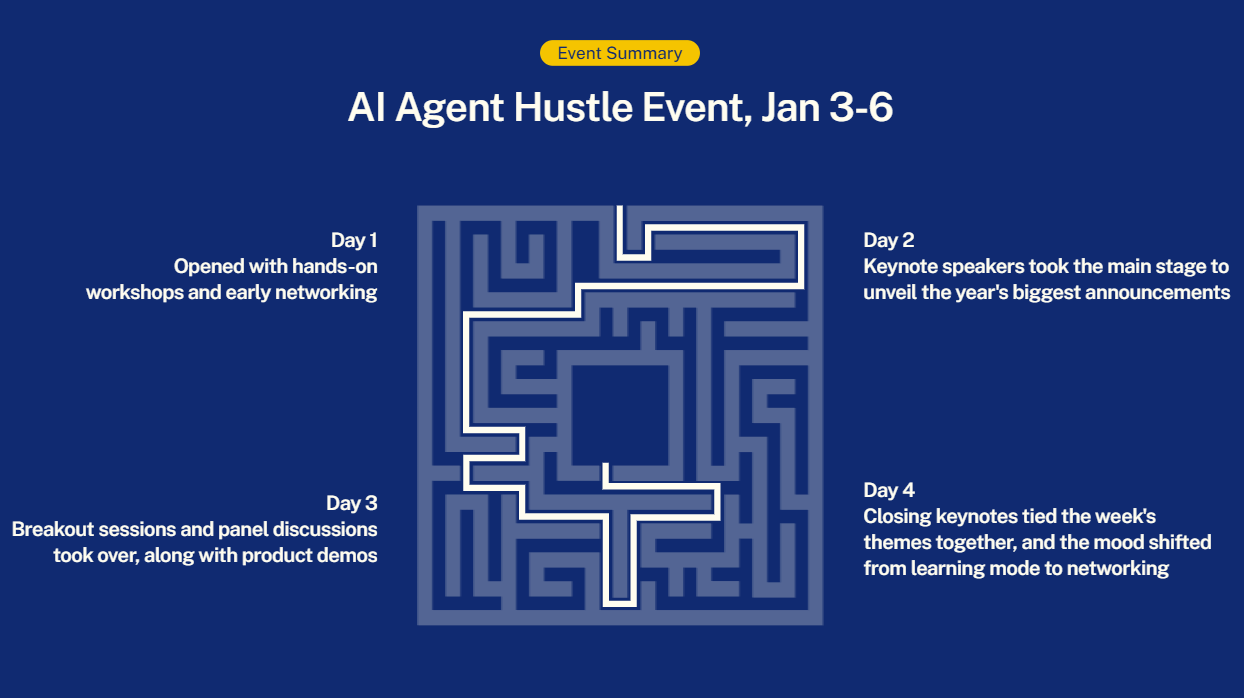
An event summary one pager captures the value of something that already happened. It turns a full day of talks, booths, and conversations into a snapshot stakeholders can grasp instantly. The goal stays consistent across a conference recap or an internal offsite: results matter more than a list of what happened.
What This Format Does Well
A polished event recap opens with the event name, date, and a headline result. Below it, key numbers tell the story: attendees and measurable outcomes. A highlights section pulls out standout moments or quotes. A closing block points to next steps, such as a replay link or the next event date.
- Layout: A banner-style header sets the scene before the recap details unfold.
- Content hierarchy: Results lead, highlights support, and the next action anchors the bottom.
- Visual design: Photos and stat callouts break up text and bring the energy of the event onto the page.
Pro tip: An event summary works as a reporting tool and a marketing asset at once. Design it so someone who missed the event still feels what they missed.
The best event one pagers prove that a single page can preserve momentum. They keep the conversation going long after the room empties out.
More One Pager Formats Worth Borrowing From
The four core use cases above cover the most common needs, and the format stretches much further. Once the pattern is clear, it adapts to almost any goal. Here are a few more one pager examples worth keeping in the back pocket.
- Marketing campaign brief: Aligns a team fast with objective, audience, channels, and timeline on one page.
- Project status report: Shows progress, blockers, and next milestones so stakeholders stay informed at a glance.
- Personal resume or bio: Distills a career into a scannable snapshot for hiring managers and partners.
- Case study summary: Pairs a client challenge with results, giving sales teams a quick trust builder.
- Company fact sheet: Introduces a brand to press, partners, and new hires with the essentials in one view.
The Common Thread Across Every Example
Look across all of these and a pattern emerges. Each one leads with the outcome and orders information by importance. Visual design guides the eye throughout. The subject changes, but the discipline stays the same. Master the structure once and any of these can be built in a fraction of the time.
Every strong one pager, regardless of use case, gets three things right. A clear goal, a logical hierarchy, and clean visual design. Nail those and the format works anywhere.
How to Create One Pager Examples Like These in Minutes
Studying great examples is one thing. Building one from a blank page is another. Layout decisions, spacing, color choices, and typography can eat hours, especially without a design background. That is the gap an AI presentation maker is built to close.
Why This Approach Works
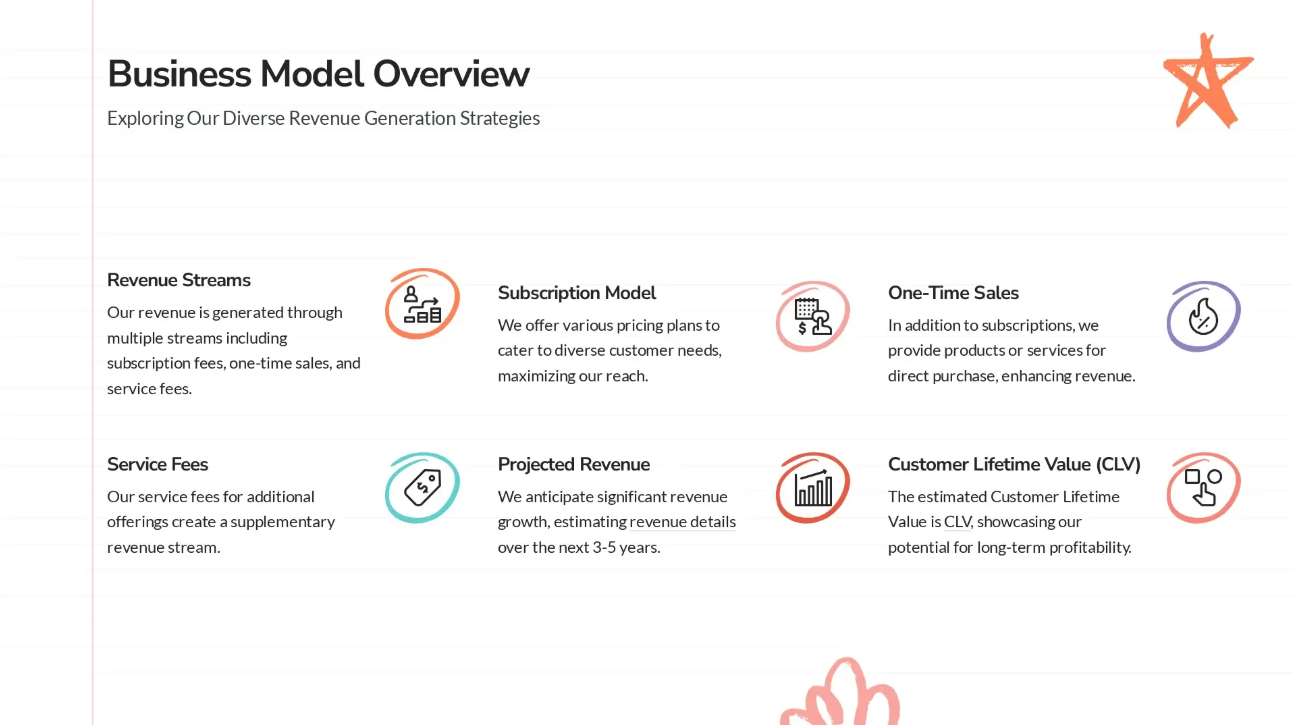
Presentations.AI turns a rough idea into a polished one pager within minutes. A short description of the need is enough for the AI to generate a structured, on-brand page with the hierarchy and layout already handled. From there, editing, swapping sections, and refining takes it the rest of the way.
- No design skills required. The tool handles alignment, spacing, and visual balance, leaving the message as the only real focus.
- Built-in structure. Layouts follow the same proven patterns shown in the examples above.
- On-brand by default. Colors, fonts, and styling stay consistent, so every page looks intentional.
- Quick to iterate. Changing the angle and regenerating takes seconds instead of rebuilding from scratch.
Pro Tip: Start with the one sentence goal, then let the AI draft the structure. Editing a strong first draft is always quicker than staring at an empty page.
The result is simple. The professional one pagers worth admiring become something anyone can produce themselves, repeatedly, whatever the use case.
The One Pager Principles Worth Taking With You
The examples in this guide share more than a single-page format. They share a discipline: know the one message that matters, order information by importance, and let clean visual design guide the reader through it. That discipline respects the reader's time and makes the outcome effortless to find.
No design background is required to apply it. Pick the use case closest to the goal at hand, borrow the structure that fits, and focus on the one message that needs to land. The right tools can handle the layout and polish from there.
A single page, done well, can open doors, close deals, and win attention. The next great one pager example could be the one built next.




![Chronicle Pricing, Plans, Token Limits [2026]](https://cdn.prod.website-files.com/63ca9a06fdc83037fe5f6073/6a4de6cddcee8e4e86939b49_chronicle-pricing.webp)