TL;DR
- Beautiful.ai limits free access to a 14-day trial. The trial requires a credit card and converts to paid unless you cancel.
- Six pricing paths exist: Pro at $12/mo annual, Single Presentation at $45/mo, Team at $40/seat/mo annual, SMB 50 at $6,000/year, SMB 100 at $12,000/year, and Enterprise at custom rates.
- All paid plans include unlimited AI generation, but output is shaped by the 300+ Smart Slide library, so creative flexibility has a ceiling.
- PowerPoint export is available on all paid plans, though some users report cleanup is needed. Test export quality before committing if you share .pptx files.
- Presentations.AI offers three tiers: Starter (free, unlimited users, no card), Pro ($240/year, one user), and Enterprise (custom).
- Beautiful.ai wins on headline price. Presentations.AI leads on document import and brand automation for business teams.
The short version: Beautiful.ai formats slides, Presentations.AI turns source material into decks
Beautiful.ai is strongest when you are building from scratch and want design automation. Presentations.AI is stronger when your deck starts from existing material like a PDF or Word doc. It turns that source into a structured, on-brand presentation quickly.
That distinction matters more than the monthly price, especially for teams creating high-stakes business decks under time pressure.
You are comparing these tools for a real task. You are probably turning a report or a strategy doc into a deck someone can use in a meeting.
That is where pricing gets tricky. A cheaper plan can still cost you hours. You may copy-paste content, rebuild slides, and apply brand rules by hand. Beautiful.ai asks for your credit card before you create a single slide. Understand what you are buying before you hand it over.
This guide answers the following questions:
- Does the Smart Slide system actually hold up for business presentations, or does it box you in?
- What happens to your PowerPoint file after you export?
- Where does brand control start and where does it stop, depending on which plan you are on?
- How does the total cost of ownership compare against Presentations.AI when you weigh features against price?
Beautiful.ai vs. Presentations.AI at a glance
| Decision factor | Beautiful.ai | Presentations.AI |
|---|---|---|
| Best starting point | Blank deck or selected Smart Slide layout | Existing docs, PDFs, URLs, notes, and raw text |
| Best for | Clean slide design from structured inputs | Turning messy business content into on-brand decks |
| Brand control | Manual theme setup; stronger controls at higher tiers | Brand Sync from company URL |
| Workflow risk | Potential copy-paste and export cleanup | Designed to reduce manual deck-building steps |
Free Trial Terms and Cancellation Details
Beautiful.ai limits free access to a 14-day trial. Every path into the product starts with that trial, and it requires a credit card. The card is charged automatically when the trial ends unless you cancel first. Set a reminder if you are only evaluating.
The trial gives you the full Pro feature set, which makes it a genuine test of what you are buying. Just be deliberate about the conversion date.
| Trial factor | Beautiful.ai |
|---|---|
| Permanent free plan | No |
| Trial length | 14 days |
| Credit card required | Yes |
| Billing after trial | Converts to a paid plan unless cancelled |
| Features during trial | Full Pro feature set |
| Best for | Testing the complete Pro experience before committing |
Beautiful.ai Overview
Beautiful.ai is a browser-based presentation tool that automates slide design through a proprietary Smart Slide system. The premise is simple: choose a layout type, add your content, and let the tool handle the formatting. The result is visually consistent output without requiring a designer in the loop.
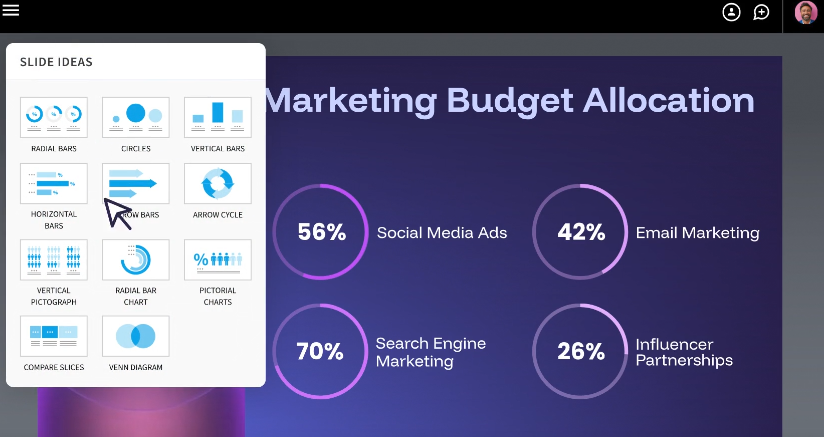
The platform has expanded its offering over time to include AI-powered content generation, live data linking, multi-language support, and team collaboration features. It serves a broad range of users, from solo professionals to enterprise organizations.
Who typically uses Beautiful.ai?
Beautiful.ai's primary audience is sales teams, marketing teams, consultants, and agencies that produce large volumes of presentations where visual consistency matters. It is also commonly adopted by non-designers who need professional output without the learning curve of tools like PowerPoint or Keynote. If you want a fuller assessment of how the tool performs beyond its pricing, our complete Beautiful.ai review covers its strengths and limitations in detail.
What Are Smart Slides in Beautiful.ai?
Smart Slides are the foundation of how Beautiful.ai works, and understanding them is essential before evaluating any plan.
A Smart Slide is a purpose-built layout that adapts to your content in real time. Rather than manually positioning text boxes and images on a blank canvas, you select a slide type, such as a comparison, a timeline, a team roster, or a data chart, and the layout reflows automatically as content is added or edited. Beautiful.ai offers more than 300 Smart Slide layouts covering most standard presentation formats.
Classic Slides are also available on all plans. These give you a blank canvas with no automated formatting, useful when your content does not fit into a Smart Slide layout.
The Smart Slide system is fast and produces clean results for straightforward content. The trade-off is that it works best when your content fits the available structures. Push it too far outside those structures, and you will find yourself fighting the template rather than working with it.
Beautiful.ai Pricing Plans and What You Get
Beautiful.ai offers three plan categories: Pro (Individual), Teams (2-20 seats), and Enterprise (Custom).
There is no free plan. Every path into Beautiful.ai starts with a 14-day trial that requires a credit card, and the card is charged automatically at the end of the trial unless you cancel. Keep that in mind as you evaluate.
In addition, there are two pricing variants:
- Two SMB plans with flat rates for small businesses
- Single-use plan for one-off projects
Beautiful.ai Pricing Plans At a Glance (Billed Annually)
| Plan | Who It's For | Price | What It Unlocks |
|---|---|---|---|
| Pro | Individual users | $12/mo (billed annually) |
|
| One | One-off projects | $45 (monthly, cancel anytime) | Everything in Pro, no annual commitment |
| Team | Teams of 2 to 20 | $40/seat/mo (billed annually) | Everything in Pro, plus:
|
| SMB 50 | Companies up to 50 employees | $6,000/year (flat rate) | All Team features, full access for all users, dedicated onboarding, priority support |
| SMB 100 | Companies up to 100 employees | $12,000/year (flat rate) | Same as above |
| Enterprise | Larger organizations with compliance needs | Custom | SSO, SOC 2 Type II, SCIM, audit logs, authentication (SSO, SCIM) |
The jump from Pro to Team is significant, both in price and in what unlocks. Collaboration features, centralized libraries, and analytics are all Team-tier and above. the SMB plans offer a middle path worth considering for smaller organizations that want team-wide access without per-seat pricing. With that context in place, here is what each plan includes in practice.
Key Features Included in Each Plan
Price is only half the picture. What you actually receive changes meaningfully across tiers, so map the feature you need to the tier that includes it before you commit.
| Feature | Pro | Team | Enterprise |
|---|---|---|---|
| Unlimited AI generation | Yes | Yes | Yes |
| Smart Slides and templates | Yes | Yes | Yes |
| PowerPoint and PDF export | Yes | Yes | Yes |
| Real-time collaboration and shared libraries | No | Yes | Yes |
| Live data linking and version control | No | Yes | Yes |
| Viewer analytics | Yes | Yes | Yes |
| Enforced brand guardrails | No | No | Yes |
| SSO, SCIM, SOC 2 Type II, audit logs | No | No | Yes |
How AI Generation Works
Beautiful.ai takes a different approach to AI than credit-based tools like Gamma. If you want the other side of that comparison, our breakdown of how Gamma's pricing works explains the credit-and-card model in detail. The plan skips credit tracking and monthly caps. All paid plans include unlimited AI content generation. It covers the AI writing assistant and DesignerBot slide generation. AI image generation and language translation are included too.
DesignerBot can generate a full presentation from a text prompt or create and modify individual slides on demand. The AI writing assistant handles in-slide editing and rewrites. AI image generation produces custom visuals without leaving the platform.
Unlimited generation stops short of unlimited flexibility. DesignerBot creates slides within the Smart Slide system, so AI-generated output is shaped by the same 300+ layout library available to manual users. If you need a layout missing from that library, AI generation leaves you stuck. Classic Slides remain the fallback for truly custom requirements.
Pros and Cons Before You Subscribe
If you are close to a decision, here is the risk-benefit summary in plain terms.
Pros
- Design automation through Smart Slides produces clean, consistent output without a designer.
- Predictable annual pricing, with Pro at $12/month billed annually.
- Unlimited AI generation on all paid plans, with zero credit tracking.
- Solid team collaboration and centralized libraries from the Team tier.
- SMB flat-rate plans give smaller organizations team-wide access without per-seat math.
Cons
- The trial replaces any free plan and requires a credit card that auto-charges unless cancelled.
- Some users report PowerPoint exports need cleanup before external delivery.
- Layout flexibility is capped by the 300+ Smart Slide library.
- Enforced brand guardrails are locked behind the Enterprise tier.
- The $45/month one-off rate is steep for occasional users.
How Does Beautiful.ai Stack Up Against the Competition?
Beautiful.ai's pricing tells only part of its competitive story. The more useful question is how it stacks up against the alternatives, particularly if your needs go beyond design automation.
The more relevant comparison for business teams is Presentations.AI, because the two products solve the presentation problem in different ways. Beautiful.ai is strongest when you are building from predefined slide layouts. Presentations.AI is stronger when the work starts with existing material and needs to become a structured, on-brand deck quickly.
Presentations AI Overview
Presentations AI is an AI-native presentation platform designed for high-stakes business output. The product is built around a different core assumption than Beautiful.ai: That most business presentations do not start from a blank canvas; they start from existing content, a report, a brief, a strategy doc, or a data set, and the real job is turning that content into a structured, polished, on-brand deck. If that matches how your team actually builds decks, the Presentation App is worth a closer look before you commit to a Beautiful.ai trial.
SOC 2 Type II certification is included from the Pro tier, making it viable for enterprise procurement without requiring a custom contract.
Upload a brief or a strategy doc and see how quickly Presentations.AI turns it into a structured, on-brand deck.
Try for Free
Presentations AI Pricing
Presentations AI offers three tiers. No monthly billing option exists. Plans are annual or custom.
Plan Breakdown: Starter, Pro, and Enterprise
| Plan | Price | Users | What Is Included | Best For |
|---|---|---|---|---|
| Starter | $0 | Any number | Limited AI credits, brand themes, team collaboration, seamless sharing, basic functionality | Exploring the platform, light use |
| Pro | $240/year | 1 user | Additional AI credits, Pro templates, custom fonts and colors, analytics, PDF export, and advanced features | Individual professionals, regular deck creation |
| Gold | $1,200/year | 1 user | Adds frontier AI models, advanced brand controls, shared project knowledge, and priority generation on top of everything in Pro. | Built for high-stakes, high-volume work. |
Key Notes on Presentations AI Pricing
Starter is genuinely free: No credit card required. Any number of users can access the platform, including brand themes and team collaboration, with limited AI credits. This is a meaningful difference from Beautiful.ai's trial model, particularly for teams evaluating options before getting budget approved.
What Pro unlocks: The $240/year tier unlocks Pro templates, custom fonts and brand colors, analytics, advanced creation modes, and PDF export.
Enterprise for scale: Unlimited AI credits, company-wide templates, admin controls, and full enterprise security on custom terms.
What Makes Presentations AI Different
AI that helps with the whole presentation workflow: Presentations.AI goes beyond generating slide layouts. It turns raw inputs into a clear narrative and applies your brand automatically. It also builds polished slides and cuts the manual rebuilding common in PowerPoint.
From raw input to structured narrative: Presentations.AI is built for the part of deck creation that takes the most time, turning messy source material into a clear storyline. Instead of a blank slide, you begin with a PDF or a Word doc.
Less manual cleanup: The goal reaches past making slides look better. It reduces the repetitive work of copying content and fixing layouts. It also handles brand rules and rebuilds for each audience.
Brand Sync: Automatically extracts your company's colors, fonts, and logo directly from your company URL and applies them to every presentation. No theme setup per deck, no brand drift, no relying on individual users to apply the right settings.
Anti-fragile templates: Layouts adapt intelligently as content evolves. Change the structure, add sections, or shift the narrative focus, and the design adjusts rather than breaking.
Multiple creation modes: Beyond prompt-based generation, Presentations AI allows users to import PDFs, Word documents, URLs, and raw text for conversion into structured decks. For professionals whose presentations begin as existing documents, this removes an entire manual step from the workflow. Try it on a recent client brief or strategy doc to see the difference, the Free AI Presentation Maker generates a structured first draft from your existing content without any copy-paste.
For a deeper look at Beautiful.ai vs. Presentations AI, visit our comparison page
Run Brand Sync against your company URL and turn an existing document into a polished, on-brand presentation.
Try for Free
Beautiful.ai vs. Presentations AI: Which Offers Better Pricing?
Beautiful.ai's annual Pro plan at $12/month is cheaper than Presentations AI Pro at $20/month on a straight price comparison. For solo users who create presentations regularly and want design automation without an annual budget commitment, that gap is real. The picture changes when you look beyond the immediate number.
- Presentations AI's Brand Sync automatically applies your company's visual identity to a URL. No theme setup, no manual brand application before every deck. Beautiful.ai's custom theme builder requires deliberate configuration, and truly enforced brand guardrails, the kind that actually prevent team members from going off-brand, are locked behind the Enterprise tier. Underneath Brand Sync, an AI Slide Generator adjusts layout per slide based on content rather than slotting it into a fixed template library. That's a structurally different approach to Beautiful.ai's Smart Slide system, which gives you 300+ pre-built layouts but limits creative flexibility outside that library.
- Document import is another feature that you get with Presentations AI. If your presentations regularly start from a report, a client brief, or a strategy document, Presentations AI can convert them directly into a structured deck. Beautiful.ai requires manual copy-paste. That is not a minor inconvenience once you factor in how often it happens across a team.
- Regarding export reliability, user experiences posted on sites like G2 consistently tell a story: Beautiful.ai's PowerPoint exports require cleanup. Missing fonts, broken animations, and layout overlap are frequently reported. For teams that deliver .pptx files to clients or executives, that cleanup time has a real cost.
- Hidden costs to watch: Beautiful.ai's 14-day trial auto-charges if you do not cancel, and the credit card requirement prevents testing the product with zero financial risk. The ad hoc monthly rate of $45/month is steep for occasional users. And if your team needs brand guardrails, plan on Enterprise pricing, which is not transparent on the pricing page.
How to Choose the Right Plan
The clearest way to narrow this down: Are you building presentations from scratch, or converting existing content? And do you need brand enforcement built in, or are you comfortable managing it manually?
Beautiful.ai and Presentations AI are not the only tools in this space. For the wider field, our roundup of the best Beautiful.ai alternatives breaks down where each tool fits. Our roundup of the Best AI Presentation Makers compares the leading options side by side.
If You Are Just Testing
Presentations AI's free Starter plan is the lower-friction starting point. No credit card, no expiry clock, and any number of team members can access it simultaneously. Run Brand Sync against your company URL early in the evaluation and see how well it captures your visual identity. That single test tends to be more informative than any feature comparison.
For Beautiful.ai, the 14-day trial gives you the full Pro feature set, but set a calendar reminder to cancel if you are not ready to commit. The trial auto-renews without warning.
If You Create Decks Every Week
For regular individual use, Beautiful.ai Pro at $12/month annual is a compelling price. Presentations AI Pro at $20/month equivalent costs a bit more but adds document import, URL-to-deck conversion, and high-fidelity PowerPoint export as core features rather than afterthoughts. The tie-breaker: if your decks typically start from existing documents, Presentations AI removes friction that Beautiful.ai cannot.
If You Need a Team Workflow
Beautiful.ai Team at $40/seat/month annual is a solid mid-market option for teams of 2 to 20, with real-time collaboration, centralized libraries, version control, and engagement analytics all included from the base team tier. The caveat is that brand guardrails do not unlock until Enterprise. For 20 or more users needing SSO, compliance documentation, and enforced brand standards, both Beautiful.ai Enterprise and Presentations AI Enterprise are worth a side-by-side evaluation before committing.
| Your situation | Better fit | Why |
|---|---|---|
| You build simple decks from scratch | Beautiful.ai | Smart Slides are fast when your content fits standard layouts. |
| You start from reports, briefs, PDFs, or docs | Presentations.AI | Document import removes copy-paste and helps create a structured first draft. |
| Your team needs consistent branding | Presentations.AI | Brand Sync reduces manual setup and brand drift. |
| You need client-ready PowerPoint exports | Presentations.AI | Export reliability matters when decks leave the platform. |
Making the Right Choice for Your Company
Beautiful.ai works well for professionals and teams who build presentations from scratch and want design consistency without hiring a designer. The Smart Slide system genuinely reduces formatting effort, and the $12/month annual Pro plan stays affordable. The Team plan scales cleanly up to 20 seats with a solid collaboration layer. If speed of creation and visual polish are the priorities, Beautiful.ai earns its reputation.
Presentations.AI is the stronger fit for teams where the work starts with existing content, and where every output needs to be brand-consistent and export-ready without cleanup. Brand Sync removes the manual brand setup step entirely. Document import eliminates copy-paste. SOC 2 Type II certification from the Pro tier onwards makes enterprise procurement straightforward. The annual-only pricing is a real constraint, but for teams creating high-stakes decks regularly, the $240/year Pro plan holds its value.
The fastest way to make the call is to test both tools with the kind of content your team uses. In Beautiful.ai, build a real brief with Smart Slides. Export it to PowerPoint and check the cleanup required. In Presentations.AI, upload a PDF or strategy memo and run Brand Sync against your company URL.
The better tool wins on more than the lowest monthly price. It moves your team from raw material to a clear, decision-ready deck with the least manual work.
See how quickly Presentations.AI turns a document into a structured, on-brand deck.
Try for Free