


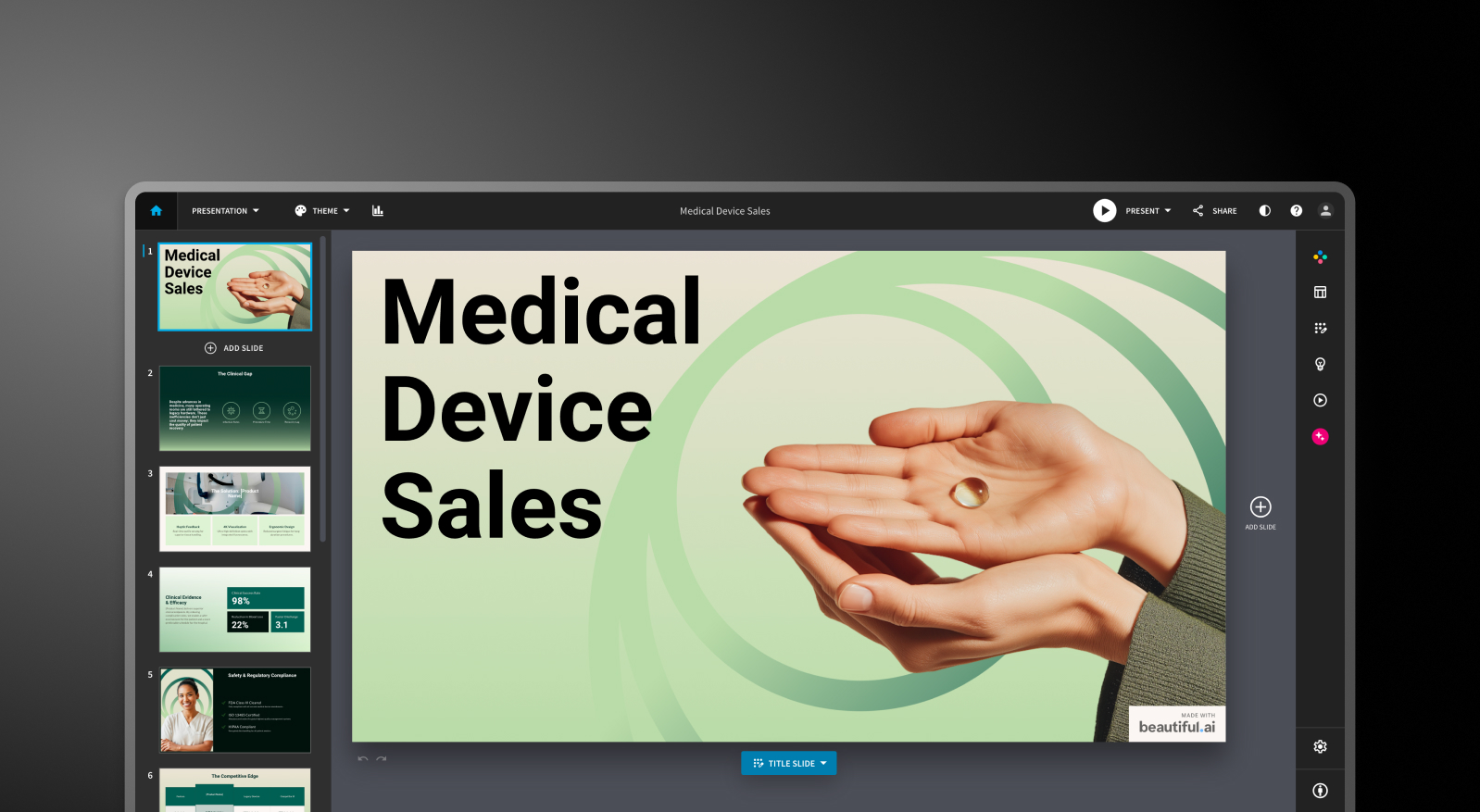
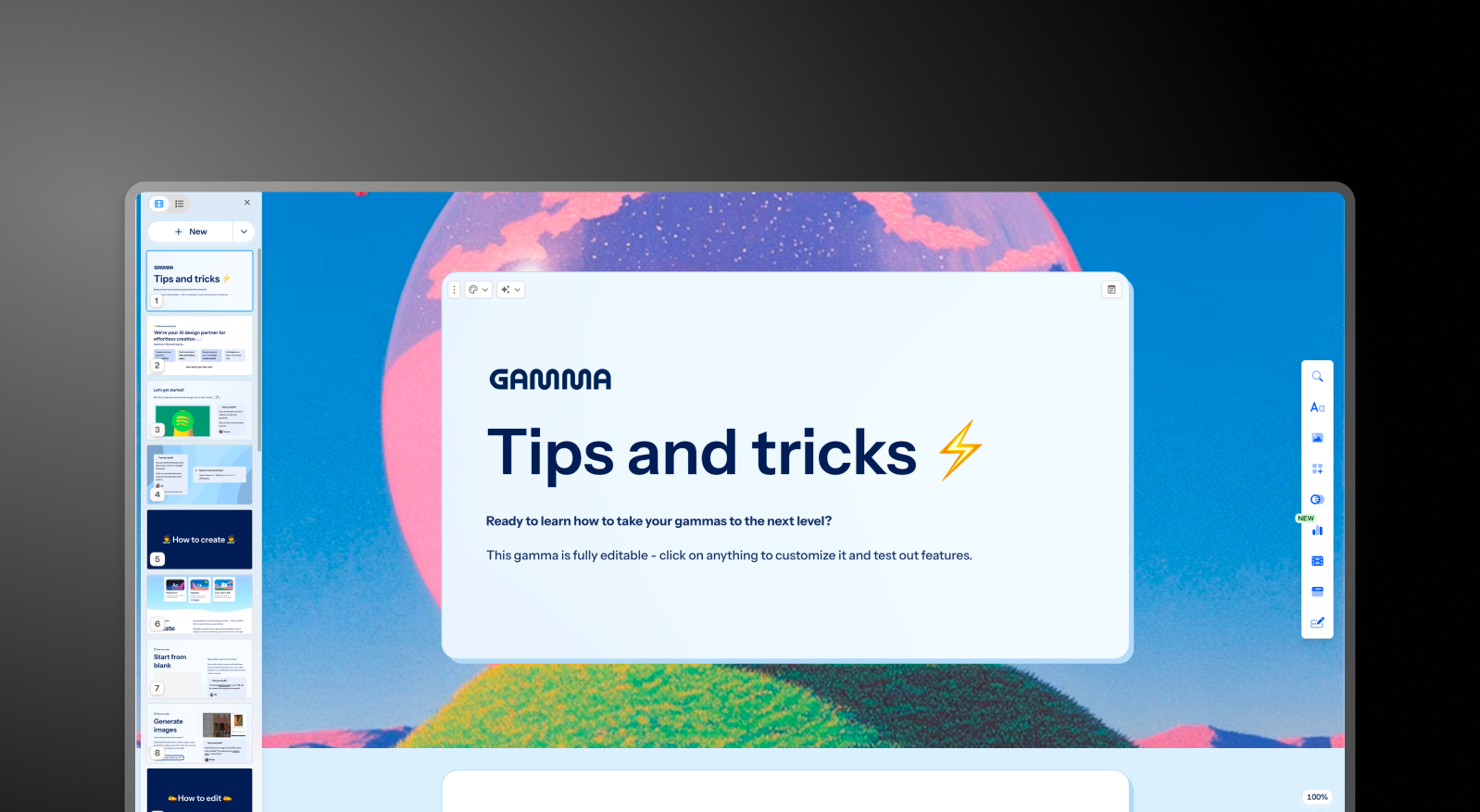


مقارنة تفصيلية بين Beautiful.ai وGamma وPresentations.AI
إنشاء الشرائح المدعوم بالذكاء الاصطناعي
Beautiful.ai: يقوم DesignerBot بإنشاء عرض تقديمي من نص مدخل ويملأ الشرائح بمحتوى منظم حسب المخطط التفصيلي. عادةً ما تكون المسودة الأولى جاهزة للاستخدام بنسبة 70-80% لأنواع العروض التقديمية القياسية. بعد الإنشاء الأولي، تتطلب إضافة شرائح جديدة تم إنتاجها بواسطة الذكاء الاصطناعي حلولاً يدوية. الذكاء الاصطناعي هنا بمثابة نقطة انطلاق وليس شريكاً في العمل.
Gamma: يقوم Gamma بإنشاء عرض تقديمي كامل من نص مدخل ويستمر في التكرار من خلال وكيل الذكاء الاصطناعي الخاص به. يمكن للمستخدمين طلب مراجعة أقسام معينة، أو البحث في مواضيع، أو إضافة محتوى جديد بعد المسودة الأولية. تختلف حدود البطاقات حسب الخطة، بدءاً من 10 بطاقات لكل طلب في الخطة المجانية وصولاً إلى 75 بطاقة في خطة Ultra.
Presentations.AI: يتولى Clip-E عملية إنشاء العرض التقديمي من البداية إلى النهاية ويظل مشاركاً طوال العملية. يمكنك الإنشاء من نص مدخل، أو استيراد ملف PDF، أو لصق رابط URL، أو تحميل مستند Word، وسيقوم الذكاء الاصطناعي ببناء عرض تقديمي منظم ومتوافق مع علامتك التجارية. يمكنك تحسين المحتوى وإضافة شرائح وتعديل النصوص من خلال محادثة طبيعية دون مغادرة المنصة.

جودة التصميم والتخصيص
Beautiful.ai: ينتج نظام الشرائح الذكية (Smart Slides) مخرجات نظيفة واحترافية باستمرار. المقايضة هنا هي في مستوى التحكم؛ إذ لا يمكنك وضع العناصر بحرية أو تجاوز منطق التخطيط عندما يتخذ قراراً لا توافق عليه. بالنسبة للغالبية العظمى من عروض الأعمال التقديمية، يعد هذا القيد ميزة في الواقع، أما بالنسبة للمستخدمين الذين يحتاجون إلى تخطيطات مخصصة أو غير تقليدية، فهو يمثل عائقاً كبيراً.
Gamma: مخرجات Gamma عصرية بصرياً ومناسبة تماماً لتنسيق البطاقات الخاص بها. خيارات التخصيص في الخطط المدفوعة أوسع من تلك الموجودة في Beautiful.ai، وتشمل خطوطاً وسمات مخصصة. تتألق الجودة البصرية عند المشاركة عبر المتصفح، لكنها قد تبدو أقل دقة عند تصديرها بتنسيق PowerPoint.
Presentations AI: تتكيف القوالب المرنة بذكاء مع تغير المحتوى دون الإخلال بهيكل التصميم. تقوم ميزة Brand Sync بتطبيق الهوية البصرية لشركتك تلقائياً من خلال رابط موقعك الإلكتروني، بحيث يكون كل عرض تقديمي متوافقاً مع علامتك التجارية منذ الشريحة الأولى دون الحاجة إلى إعداد يدوي للسمات.
ميزات التعاون والفريق
Beautiful.ai: تتوفر ميزات التحرير المشترك في الوقت الفعلي، والتعليقات، وسجل الإصدارات، والأذونات القائمة على الأدوار، ومكتبات الأصول المشتركة ضمن خطة الفريق بسعر 40 دولاراً للمستخدم شهرياً. هذه الميزات ناضجة وعملية، لكن العيب الوحيد هو أنها مقيدة بالكامل ضمن خطة ترفع التكلفة لكل مستخدم إلى أكثر من ثلاثة أضعاف تكلفة فئة Pro.
Gamma: يتوفر التعاون في الوقت الفعلي في جميع الخطط. أما ميزات مستوى الفريق، بما في ذلك سمات الشركة المخصصة، والمجلدات المشتركة، وعناصر تحكم المسؤول، والفواتير المركزية، فتبلغ تكلفتها 20 دولاراً للمقعد شهرياً بحد أدنى مقعدين. بالنسبة للفرق الصغيرة، يعد هذا الخيار الأكثر عملية للدخول إلى سوق أدوات التعاون بين الأدوات الثلاث.
Presentations.AI: يتم تضمين ميزات تعاون الفريق، والمزامنة في الوقت الفعلي، وعناصر التحكم في الوصول في مستوى Starter. يتمتع كل عضو في الفريق بإمكانية الوصول إلى مساعد Clip-E الذكي، مما يعني أن أي مستخدم يمكنه إنتاج مخرجات بجودة احترافية بشكل مستقل. وتضيف فئة Enterprise إمكانات إدارية، وقوالب على مستوى الشركة، وأماناً على مستوى المؤسسات.
خيارات التصدير والتكامل
Beautiful.ai: يتوفر التصدير إلى PowerPoint وPDF في جميع الخطط المدفوعة. يُعد تصدير PowerPoint نقطة ضعف ملحوظة في مراجعات المستخدمين؛ حيث يمكن أن ينقسم النص الذي يظهر ككتلة واحدة في Beautiful.ai إلى مربعات نص فردية في الملف المُصدّر، وقد يتغير المحاذاة. اختبر جودة التصدير قبل الالتزام إذا كان تسليم ملفات .pptx جزءاً أساسياً من سير عملك.
Gamma: يتوفر التصدير إلى PowerPoint وPDF في جميع الخطط. لا يتحول التنسيق القائم على البطاقات دائماً بشكل مثالي إلى شرائح بنسبة 16:9، لذا خصص وقتاً للتنقيح عند تسليم ملفات .pptx خارجياً. تدعم Gamma أيضاً المشاركة عبر الويب، ومخرجات المستندات، وتنسيقات محتوى الوسائط الاجتماعية التي لا تغطيها الأداتان الأخريان.
Presentations.AI: تصدير نظيف إلى PowerPoint في خطة Pro، مع مخرجات مصممة من الأساس لتتوافق بشكل صحيح مع تنسيق .pptx. يتوفر تصدير PDF أيضاً في خطة Pro وما فوق. توفر خيارات الاستيراد المتعددة، بما في ذلك PDF وWord وURL، أكثر مرونة في الإدخال بين الأدوات الثلاث.
سهولة الاستخدام ومنحنى التعلم
Beautiful.ai: منحنى تعلم بسيط. يعني نظام الشرائح الذكية (Smart Slides) أنك لن تبدأ أبداً من صفحة فارغة، حيث يتم التعامل مع قرارات التصميم تلقائياً إلى حد كبير. أفاد العديد من المستخدمين عبر منصات المراجعة بأنهم تمكنوا من الانتقال من الفكرة إلى عرض تقديمي جاهز في أقل من ساعة. بالنسبة لغير المصممين، تعد هذه الأداة الأكثر سهولة في الاستخدام من بين الأدوات الثلاث.
Gamma: عملية إعداد مباشرة مع باقة مجانية سخية تتيح لك إنشاء عروض تقديمية حقيقية قبل الالتزام بأي شيء. يتطلب التنسيق القائم على البطاقات بضع محاولات لتعتاد عليه، خاصة إذا كنت معتاداً على تخطيطات الشرائح التقليدية. يضيف وكيل الذكاء الاصطناعي قدرات إضافية بمجرد أن تتعلم كيفية توجيهه.
Presentations.AI: تعمل الواجهة الحوارية مع Clip-E على تقليل منحنى التعلم بشكل كبير. ولأنك تستطيع وصف ما تريده بلغة بسيطة، يمكن للمستخدمين الذين ليس لديهم خبرة في التصميم إنتاج مخرجات احترافية بسرعة. كما تقضي ميزة Brand Sync على صعوبات الإعداد التي عادة ما تبطئ فرق العمل عند اعتماد أداة جديدة.
| الإمكانية | Beautiful.ai | Gamma | Presentations AI |
|---|---|---|---|
| النهج الأساسي | أتمتة القوالب: تخطيطات ذكية تتكيّف تلقائيًا | توليد بالذكاء الاصطناعي بصيغ متعددة (عروض، مستندات، صفحات ويب) | هيكلة المحتوى وتوليده بالاعتماد على الذكاء الاصطناعي |
| حالات الاستخدام المعتادة | عروض المبيعات، عروض العملاء، التحديثات الداخلية | المشاريع الشخصية، وسائل التواصل الاجتماعي، المحتوى متعدد الصيغ | عروض مجلس الإدارة، عروض المستثمرين، مبيعات المؤسسات |
| استيراد المستندات | إدخال نصي أساسي | إدخال نصي / موجّه أساسي | تحويل ملفات PDF وWord وعناوين URL |
| إدارة العلامة التجارية | إعداد يدوي لكل عرض | يدوي لكل عرض | تلقائي من عنوان موقع الشركة |
| التصدير إلى PowerPoint | متاح — يُبلغ المستخدمون عن مشكلات في التنسيق | ❌ مربعات متداخلة وخطوط مفقودة | ✅ تصدير عالي الدقة |
| مكتبة القوالب | احترافية لكن الخيارات محدودة | مكتبة متوسطة | أكثر من 10,000 قالب |
| ميزات الذكاء الاصطناعي | DesignerBot لتوليد الشرائح | وكيل ذكاء اصطناعي للبحث والتحرير المتكرر | توليد وهيكلة كاملة للمحتوى (Clip-E) |
| الحركات / الانتقالات | إعداد يدوي | تنسيق قائم على البطاقات — حركات تقليدية محدودة | حركات احترافية تلقائية |
| التعاون | مشاركة أساسية — التحرير المشترك الكامل في خطة Team فقط | في الوقت الفعلي في جميع الخطط | سير عمل جماعي في الوقت الفعلي (Starter فما فوق) |
| أمان المؤسسات | أمان قياسي | ❌ لا يوجد SOC 2 — كثيرًا ما يفشل في مراجعة قسم تقنية المعلومات | ✅ حاصل على شهادة SOC 2 Type II |
| ملكية البيانات / المحتوى | شروط قياسية | ❌ يمنح Gamma حقوقًا دائمة وغير قابلة للإلغاء وعالمية | ✅ يحتفظ المستخدمون بالملكية الكاملة |
| الامتثال للائحة GDPR / الخصوصية | قياسي | ❌ تتبّع المشاهدين يثير مخاوف تتعلق بلائحة GDPR | ✅ الخصوصية منذ التصميم |
| سجل التدقيق | محدود | ❌ غير متوفر | ✅ تسجيل تدقيق كامل |
| الاعتماد لدى شركات Fortune 500 | متوسط | ضئيل | واسع |
| احتمالية موافقة قسم تقنية المعلومات | متوسطة | منخفضة — مخاوف تتعلق بالأمان والبيانات | مرتفعة — يلبي معايير المؤسسات |
| التجربة المجانية | تجربة 14 يومًا (بطاقة ائتمان مطلوبة) | خطة مجانية — بدون بطاقة | 5 عروض تقديمية — بدون بطاقة |
| التكاليف الخفية | تنقيح الملفات المصدَّرة، وعمق محدود للذكاء الاصطناعي عند التوسع | إصلاحات التصدير، ومخالفات العلامة التجارية، ومخاطر قانونية محتملة | لا توجد |
| التدريب المطلوب | ضئيل لمهام التصميم | تعدد الصيغ يسبب الارتباك | سير عمل مركّز — تعلّم سريع |
| مخاطر المورّد | متوسطة | مرتفعة — المنصة تتجه بعيدًا عن العروض التقديمية | منخفضة — تركيز متزايد على العروض التقديمية |
| مستوى الدعم | دعم قياسي | مركز مساعدة عام | دعم مؤسسي مخصص |
| الأنسب لـ | الفرق التي تحتاج إلى اتساق في التصميم دون مهارات تصميم | إنشاء محتوى متعدد الصيغ، والمبدعون الأفراد | الفرق التي تحوّل المستندات إلى عروض تقديمية متقنة |
مقارنة الأسعار: Beautiful.ai مقابل Gamma مقابل Presentations.AI
لا تتعلق الأسعار في هذه الفئة بالسعر المعلن فحسب. فما يهم حقاً هو ما ستدفعه عندما تحتاج إلى ميزات التعاون، أو التحكم في العلامة التجارية، أو التصدير بجودة عالية. تتعامل الأدوات الثلاث مع هذه الجوانب بطرق مختلفة.
أسعار Beautiful.ai
لدى Beautiful.ai ثلاث باقات: Pro وTeam وEnterprise. لا توجد باقة مجانية. تتوفر فترة تجريبية لمدة 14 يوماً لباقاتي Pro وTeam، ولكنها تتطلب بطاقة ائتمان وستتحول تلقائياً إلى اشتراك سنوي إذا لم يتم إلغاؤها. وقد أدى ذلك إلى شكاوى متكررة عبر منصتي Trustpilot وProduct Hunt.
- باقة Pro: بسعر 12 دولاراً شهرياً (تدفع سنوياً) أو 45 دولاراً شهرياً (تدفع شهرياً). تشمل شرائح غير محدودة، وشرائح ذكية، وتوليداً بالذكاء الاصطناعي، وخطوطاً مخصصة، وتصدير ملفات PowerPoint وPDF، وتحليلات المشاهدة. مخصصة لمستخدم واحد فقط.
- باقة Team: بسعر 40 دولاراً لكل مستخدم شهرياً (تدفع سنوياً) أو 50 دولاراً لكل مستخدم شهرياً (تدفع شهرياً). تضيف ميزات التعاون في الوقت الفعلي، ومجموعة أدوات العلامة التجارية (Brand Kit)، والمكتبات المشتركة، وأدوات التحكم الإدارية، وتحليلات التفاعل؛ حيث تزيد تكلفة المستخدم الواحد في هذه الباقة عن ثلاثة أضعاف تكلفته في باقة Pro.
- باقة Enterprise: أسعار مخصصة. تشمل الدخول الموحد (SSO)، وSCIM، وإدارة مخصصة للحسابات، ودعماً ذا أولوية، وأماناً متقدماً.
أمور يجب الانتباه إليها: تكلف باقة Team لفريق مكون من خمسة أفراد 2,400 دولار سنوياً. وهذا التزام مالي كبير لأداة تعتبر قدرات الذكاء الاصطناعي فيها محدودة أكثر مقارنة بمنافسيها الأحدث.
أسعار Gamma
لدى Gamma أربع باقات للأفراد وباقيتان للفرق. يتوفر خيار الدفع الشهري في معظم الباقات، مما يجعلها الأكثر مرونة بين الأدوات الثلاث للمشترين الذين ليسوا مستعدين للالتزام السنوي.
- مجانية: 400 رصيد ذكاء اصطناعي لمرة واحدة (لا يتم تجديده)، حتى 10 بطاقات لكل مطالبة، مع وجود علامة Gamma التجارية على جميع المخرجات.
- Plus: 12 دولاراً شهرياً (أو حوالي 9 دولارات شهرياً عند الدفع سنوياً). إزالة العلامة التجارية، 1,000 رصيد شهري متجدد، حتى 20 بطاقة لكل مطالبة.
- Pro: 25 دولاراً شهرياً (أو حوالي 18 دولاراً شهرياً عند الدفع سنوياً). نماذج ذكاء اصطناعي متقدمة، وصول إلى واجهة برمجة التطبيقات (API)، خطوط مخصصة، حتى 10 نطاقات مخصصة، تحليلات مفصلة، 4,000 رصيد شهري، حتى 50 بطاقة لكل مطالبة.
- Ultra: 100 دولار شهرياً (دفع شهري فقط). 20,000 رصيد شهري، حتى 75 بطاقة لكل مطالبة، وضع الاستوديو (Studio Mode)، وأكثر نماذج صور الذكاء الاصطناعي تطوراً.
- Team: 20 دولاراً لكل مستخدم شهرياً، بحد أدنى مقعدين. سمة مخصصة للشركة، مجلدات مشتركة، عناصر تحكم إدارية، فوترة مركزية، 6,000 رصيد لكل مقعد.
- Business: 40 دولاراً لكل مستخدم شهرياً، بحد أدنى 10 مقاعد. تسجيل دخول موحد (SSO)، وثائق SOC 2، عناصر تحكم متقدمة في البيانات، 10,000 رصيد لكل مقعد.
أمور يجب الانتباه إليها: أرصدة الخطة المجانية تُمنح لمرة واحدة وليست شهرية. الاستخدام المكثف لنماذج الصور المتميزة في الخطط المدفوعة يستهلك رصيد الأرصدة الشهرية بشكل أسرع من المتوقع.
| الخطة/الميزة | Beautiful.ai | Gamma | Presentations.AI |
|---|---|---|---|
| خطة مجانية | ✗ (تجربة 14 يومًا فقط) | ✓ (400 رصيد لمرة واحدة) | ✓ (عدد مستخدمين غير محدود) |
| الخطة المدفوعة المبتدئة | 12 دولارًا/شهر (Pro، سنويًا) | 12 دولارًا/شهر (Plus) | 240 دولارًا/سنة (20 دولارًا/شهر) |
| الخطة المدفوعة المتوسطة | غير متاحة | 25 دولارًا/شهر (Pro) | غير متاحة |
| خطة الفريق | 40 دولارًا/مستخدم/شهر | 20 دولارًا/مقعد/شهر (بحد أدنى 2) | مخصصة |
| خطة المؤسسات | مخصصة | 40 دولارًا/مقعد/شهر (بحد أدنى 10) | مخصصة |
| خصم الاشتراك السنوي | ✓ | ✓ | سنوي فقط (لا يوجد شهري) |
| الفوترة الشهرية | ✓ (تسعير مرتفع) | ✓ | ✗ |
| أرصدة الذكاء الاصطناعي المضمَّنة | غير محدودة في الخطط المدفوعة | 1,000–20,000/شهر (حسب الخطة) | محدودة في Starter؛ أكبر في Pro؛ والأعلى في Gold، مع نماذج ذكاء اصطناعي متطورة وتوليد ذي أولوية. |
| إزالة العلامة التجارية | جميع الخطط المدفوعة | Plus وما فوق | الخطط المدفوعة |
| بطاقة ائتمان للتجربة | ✓ (مطلوبة) | ✗ | ✗ |
أسعار Presentations.AI
تعتمد Presentations AI هيكلاً بسيطاً يتكون من ثلاث فئات. لا يوجد خيار للفوترة الشهرية؛ حيث تتوفر الخطط على أساس سنوي أو ربع سنوي فقط.
- Starter: مجانية. مستخدمون غير محدودين، أرصدة ذكاء اصطناعي محدودة، سمات العلامة التجارية، تعاون الفريق، ووظائف أساسية.
- Pro: 240 دولاراً سنوياً (مستخدم واحد). ما يعادل 20 دولاراً شهرياً. يتضمن رصيد ذكاء اصطناعي إضافي، وقوالب احترافية، وخطوطاً وألواناً مخصصة، وتحليلات، وتصدير ملفات PDF، وميزات متقدمة.
- الذهبية: 1,200 دولار سنوياً (مستخدم واحد). ما يعادل 100 دولاراً شهرياً. يضيف نماذج ذكاء اصطناعي متطورة، وتحكماً متقدماً في العلامة التجارية، ومشاركة معرفة المشروع، وأولوية في التوليد، بالإضافة إلى كل ميزات الخطة الاحترافية. مصمم للأعمال عالية المستوى وذات الحجم الكبير.
خطة المبتدئين (Starter) تدعم تعدد المستخدمين فعلياً، مما يجعلها وسيلة عملية للفريق بأكمله لتقييم المنصة قبل الالتزام. الخطة الاحترافية بسعر 240 دولاراً سنوياً تقل عن تكلفة خطة Gamma الاحترافية المماثلة (25 دولاراً شهرياً) بنحو الثلث على أساس سنوي.
ما هي الأداة الأنسب لحالة استخدامك؟
الأفضل للشركات الناشئة وعروض تقديم الأفكار الاستثمارية
تعد السرعة والاحترافية أهم العوامل عند إعداد عرض تقديمي للمستثمرين ضمن موعد نهائي. تتفوق Presentations AI هنا؛ حيث يقوم Clip-E بإنشاء عرض تقديمي منظم ومتوافق مع العلامة التجارية انطلاقاً من نص أو مستند مرفوع، ويمكنك إجراء التعديلات بلغة طبيعية دون الحاجة للتنقل يدوياً بين الشرائح.
تعتبر الخطة الاحترافية بسعر 240 دولاراً سنوياً ميسورة التكلفة للمؤسسين في المراحل المبكرة، وتبدو النتائج مصممة باحترافية. تعد Beautiful.ai خياراً ثانياً معقولاً إذا كنت تعرف مسبقاً ما تريد قوله وتحتاج فقط إلى مظهر جذاب بسرعة.
الأفضل لفرق المبيعات
تحتاج فرق المبيعات إلى عروض تقديمية سريعة الإنتاج، وسهلة التخصيص، وقابلة للتتبع بعد المشاركة. تحقق Presentations AI هذه المتطلبات الثلاثة: إنشاء مدعوم بالذكاء الاصطناعي، ومزامنة العلامة التجارية (Brand Sync) لضمان اتساق المخرجات بين الممثلين، وتحليلات المشاهدة في الخطط المدفوعة.
تعد Beautiful.ai أيضاً خياراً موثوقاً لفرق المبيعات التي تقدر اتساق "الشرائح الذكية" (Smart Slides) وتتبع التفاعل المدمج في الخطة الاحترافية. بينما Gamma أقل تخصصاً في سير عمل عروض المبيعات.
الأفضل لفرق التسويق
تعمل فرق التسويق ضمن إرشادات علامتها التجارية، وهنا تمنح ميزة "مزامنة العلامة التجارية" في Presentations AI ميزة تشغيلية حقيقية. يتم ضبط كل عرض تقديمي تلقائياً ليتماشى مع العلامة التجارية دون الحاجة لاختيار سمة أو مراجعة مجموعة أدوات العلامة التجارية.
بالنسبة للفرق التي تنتج مقترحات الحملات، وعروض الإطلاق، والموجزات الإبداعية بكثافة، فإن هذا الأتمتة توفر الكثير من الوقت. تعد مجموعة أدوات العلامة التجارية في Beautiful.ai بديلاً يدوياً جيداً. وتعمل Gamma بشكل جيد لفرق التسويق التي تحتاج إلى مخرجات متعددة التنسيقات تتجاوز مجرد الشرائح.
الأفضل للمؤسسات والفرق الكبيرة
توفر Presentations AI في فئة المؤسسات رصيد ذكاء اصطناعي غير محدود، وقوالب على مستوى الشركة، وتحكم إداري، وأماناً كاملاً للمؤسسات. وتعد شهادة SOC 2 Type II عاملاً فارقاً مهماً لعمليات المشتريات والمراجعة الأمنية.
تغطي خطة المؤسسات في Beautiful.ai ميزات SSO وSCIM وإدارة حسابات مخصصة. وتضيف خطة Gamma Business بسعر 40 دولاراً للمقعد ميزات SSO ووثائق SOC 2 للمؤسسات التي ترغب في ضوابط مؤسسية دون مغادرة نظام Gamma البيئي.
الأفضل للأفراد والمستقلين
بالنسبة للمستخدمين الأفراد، يعتمد القرار على جودة وقيمة الخطة المجانية وأول خطة مدفوعة. خطة Gamma المجانية هي الأكثر فائدة فعلياً: 400 رصيد، لا تتطلب بطاقة ائتمان، وتتضمن ميزة التصدير إلى PowerPoint. خطة المبتدئين المجانية من Presentations AI قوية لاستكشاف المنصة قبل الالتزام. لا توفر Beautiful.ai خطة مجانية، وتتطلب الفترة التجريبية بطاقة ائتمان مع تجديد تلقائي لاشتراك سنوي. بالنسبة للمحترفين الأفراد الذين ينشئون عروضاً تقديمية بانتظام، توفر Presentations AI Pro بسعر 20 دولاراً شهرياً أفضل قيمة مقابل مجموعة الميزات التي تقدمها.
5 أسباب تجعل فرق العمل تفضل Presentations.AI على Beautiful.ai وGamma
تتفوق كل من Beautiful.ai وGamma في سيناريوهات محددة. فبرنامج Beautiful.ai أسرع لغير المصممين الذين يرغبون في بناء عروض تقديمية مباشرة، بينما يوفر Gamma مرونة أكبر إذا كنت بحاجة إلى مخرجات بتنسيقات متعددة وحرية في الدفع الشهري. كلاهما أداتان قويتان في مجالاتهما المحددة.
لكن Presentations.AI صُمم خصيصاً لحالة الاستخدام الأكثر أهمية: إنتاج عروض تقديمية حيوية للأعمال تتطلب مظهراً احترافياً، والتزاماً تاماً بالهوية البصرية، وسرعة في التنفيذ دون الحاجة إلى مهارات تصميم قد لا تمتلكها.
إليك ما يجعله الخيار الأفضل والأكثر شمولاً:
- مزامنة الهوية البصرية يتجاوز أي مجموعة أدوات هوية بصرية (Brand Kit) تقليدية. فهو لا يطلب منك إعداد قواعد العلامة التجارية يدوياً، بل يقرأ رابط موقع شركتك ويطبق هويتك البصرية تلقائياً. كل عرض تقديمي يكون متوافقاً مع علامتك التجارية منذ الشريحة الأولى، دون الحاجة لأي إعداد مسبق لكل عرض.
- Clip-E هو مساعد ذكاء اصطناعي حقيقي، وليس مجرد محرك للمسودات الأولية. يمكنك بناء وتطوير وتعديل العرض التقديمي من خلال المحادثة. يتوقف ذكاء Beautiful.ai الاصطناعي عند المسودة الأولى، بينما وكيل Gamma الذكي قادر ولكنه أقل تركيزاً على مخرجات الشرائح بشكل خاص.
- تعدد مصادر الإدخال يمثل ميزة حقيقية لسير العمل. يمكنك تحويل ملف PDF، أو مستند Word، أو رابط موقع، أو نص بسيط إلى عرض تقديمي مصقول. لا يدعم أي من المنافسين الإدخال من هذه المصادر الأربعة جميعها.
- تسعير باقة Pro أكثر تنافسية مما يبدو عليه في البداية. بسعر 240 دولاراً سنوياً (20 دولاراً شهرياً)، تتفوق باقة Presentations.AI Pro على باقة Gamma Pro (25 دولاراً شهرياً) بثلث السعر، وتتقارب كثيراً مع باقة Beautiful.ai Pro (12 دولاراً شهرياً) أكثر مما توحي به الأرقام الأولية، خاصة عند الأخذ في الاعتبار ما تقدمه كل باقة فعلياً.
- باقة Starter المجانية تتيح الاستخدام لعدة مستخدمين فعلياً. يمكن لفريقك بالكامل استكشاف المنصة قبل الالتزام بأي ميزانية. تتطلب الفترة التجريبية في Beautiful.ai بطاقة ائتمان، بينما تقتصر الباقة المجانية في Gamma على رصيد لمرة واحدة.
الخلاصة: أي صانع عروض تقديمية بالذكاء الاصطناعي يجب أن تختار؟
اختر Beautiful.ai إذا كنت:
- تنشئ العروض التقديمية بمفردك وترغب في الحصول على نتيجة متسقة ومصقولة في كل مرة بأقل جهد ممكن
- تحتاج إلى تحليلات تفاعل المشاهدين لسير عمل متابعة المبيعات
- متطلبات العلامة التجارية واضحة ومباشرة: الألوان، والخطوط، والشعارات
- لا تمانع في تجربة لمدة 14 يوماً تتطلب بطاقة ائتمان
اختر Gamma إذا كنت:
- تحتاج إلى خطة مجانية لا تتطلب بطاقة ائتمان
- ترغب في إنشاء محتوى بتنسيقات متعددة: عروض تقديمية، ومستندات، وصفحات ويب، ومحتوى لوسائل التواصل الاجتماعي
- تريد مرونة في الدفع شهرياً قبل الالتزام بخطة سنوية
- فريق صغير يبحث عن ميزات تعاونية بسعر معقول لكل مستخدم
اختر Presentations AI إذا كنت:
- تريد ذكاءً اصطناعياً يبني عرضك التقديمي ويطوره ويعدله من خلال المحادثة
- تحتاج إلى أن يكون اتساق العلامة التجارية تلقائياً، وليس معتمداً على اختيار السمات يدوياً
- تقوم بانتظام بتحويل ملفات PDF أو مستندات Word أو روابط المواقع إلى تنسيق عرض تقديمي
- تعمل على إعداد عروض تقديمية حيوية للأعمال: عروض ترويجية، وعروض مبيعات، وتحديثات لمجلس الإدارة
- يحتاج فريقك إلى أن يتمكن كل عضو من إنتاج محتوى احترافي، بغض النظر عن مهاراته في التصميم


