

SlideSpeak vs Presentations.AI: 2026年版徹底比較

SlideSpeakとは?

SlideSpeakとは?

プロンプトを基に、スピーカーノート付きの基本的なスライドアウトラインを作成するAIプレゼンテーションツールです。最終的な完成度の高い資料というよりは、構想段階のアウトライン作成に主に利用されます。コンテンツ作成を加速させますが、デザインやブランディングはユーザー自身が行う必要があります。

Presentations AIとは?

Presentations AIとは?

プロンプト、ドキュメント、またはアウトラインを入力として受け取り、完全にデザインされ、ブランドが適用され、エクスポート可能な資料を生成する専用のAIプレゼンテーションプラットフォームです。外部ツールや手作業での修正は一切不要です。

SlideSpeak vs Presentations.AI: 機能比較

SlideSpeakは、アイデアのアウトライン作成のためにテキストベースのスライドとスピーカーノートを素早く生成する必要がある学生、教育者、個人向けに設計されています。Presentations AIは、数分で完全にデザインされ、ブランドに準拠したPowerPointプレゼンテーションを作成する必要があるビジネスプロフェッショナル、コンサルタント、チーム向けに作られています。SlideSpeakはコンテンツの下書き作成を支援し、Presentations AIはプレゼンテーション準備が整った資料の提供を支援します。
Capability Slidespeak Presentations.AI
AI Function Primarily text-based slides with speaker notes Comprehensive AI for content, layout, and design
Brand Consistency Manual or not supported Automatic brand sync across all slides
Export Google Slides or basic PowerPoint export High-fidelity PowerPoint (.pptx) export
Animations & Transitions Limited or requires manual setup Built-in animations and transitions
Best Use Case Drafting content and speaker scripts Full-scale professional presentations

AIによるプレゼンテーション作成を、もっと手軽に体験しませんか?

Presentations AIが、アウトラインやドキュメントを数分で見事なブランド準拠のプレゼンテーションに変換する様子をぜひご覧ください!

無料で始める

SlideSpeakとPresentations.AIの概要

SlideSpeakは、プロンプトやアウトラインからテキストベースのスライドコンテンツとスピーカーノートを生成することに特化したAIツールであり、プレゼンテーション作成の執筆段階を加速させます。Presentations AIはさらに進んで、同じ入力からレイアウト、ビジュアル、アニメーション、企業アイデンティティが自動的に適用された、ブランド化された完全なスライド資料を生成します。

SlideSpeakの主な限界は、コンテンツ作成で止まる点です。出力はスライドに整理された構造化テキストですが、デザイン、ブランディング、視覚的な洗練は、別のツールでユーザー自身がすべて行う必要があります。これは、資料がプレゼンテーション可能になるまでに、PowerPointやGoogleスライドへのエクスポート、ブランドカラーやフォントの適用、画像の調達、トランジションの追加といった追加の手順が必要になることを意味します。Presentations AIはこれらの手順を完全に排除し、デザインとコンテンツを単一の自動化されたワークフローに統合します。

ブランドコンプライアンスが重要となるプロフェッショナルなユースケースにおいて、Presentations AIの自動ブランド同期と高精度な.pptxエクスポート機能により、AIから出力された資料はそのままプレゼンテーションに使用できます。リアルタイムのチームコラボレーション機能も組み込まれているため、下書きを何度もエクスポートし合う必要はありません。

SlideSpeakの仕組み

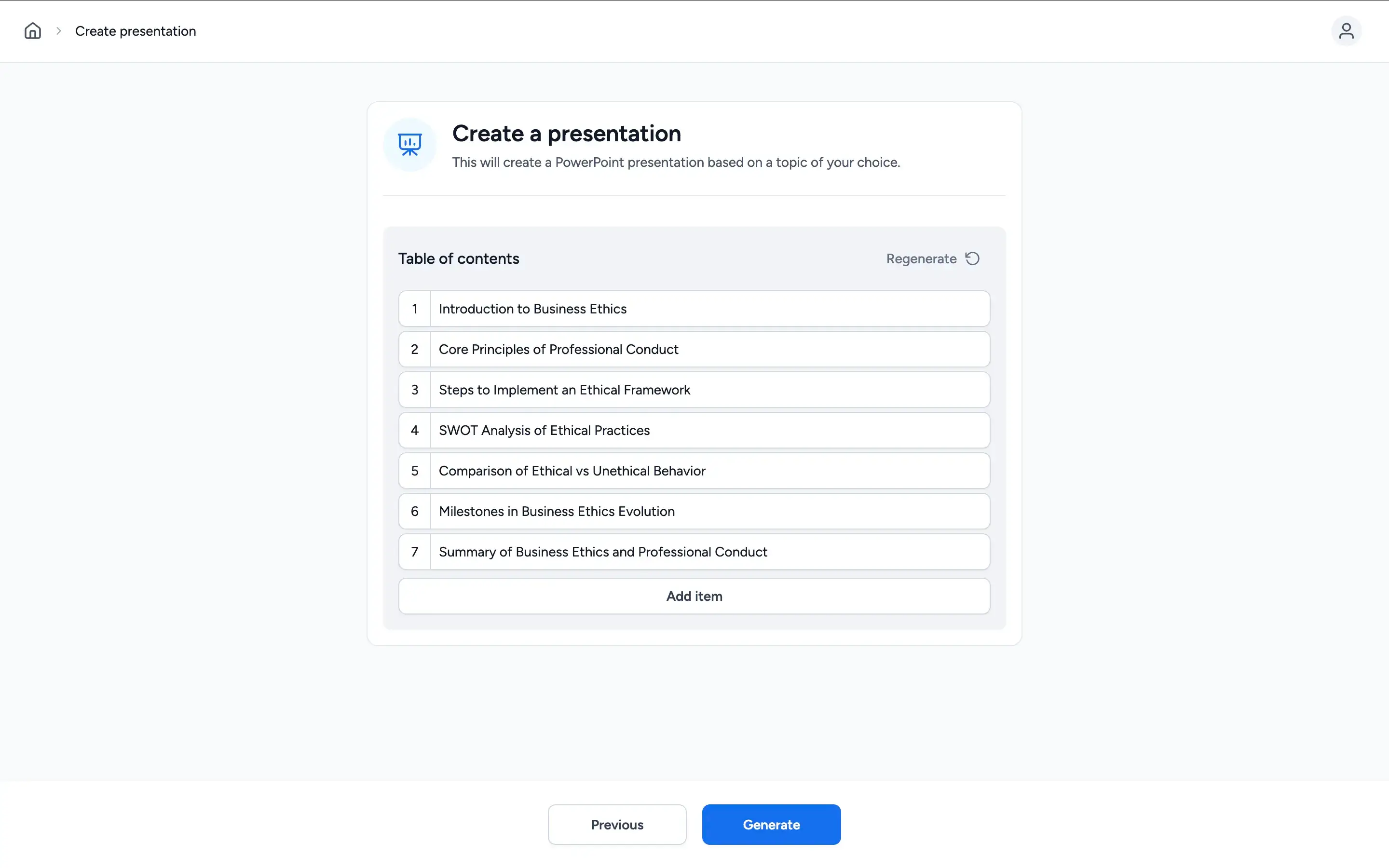
ステップ1: プロンプトを入力する – プレゼンテーションのトピックを記述します。SlideSpeakはこれを基に、スライドコンテンツとスピーカーノートを生成します。

SlideSpeak Step 1: Enter a prompt

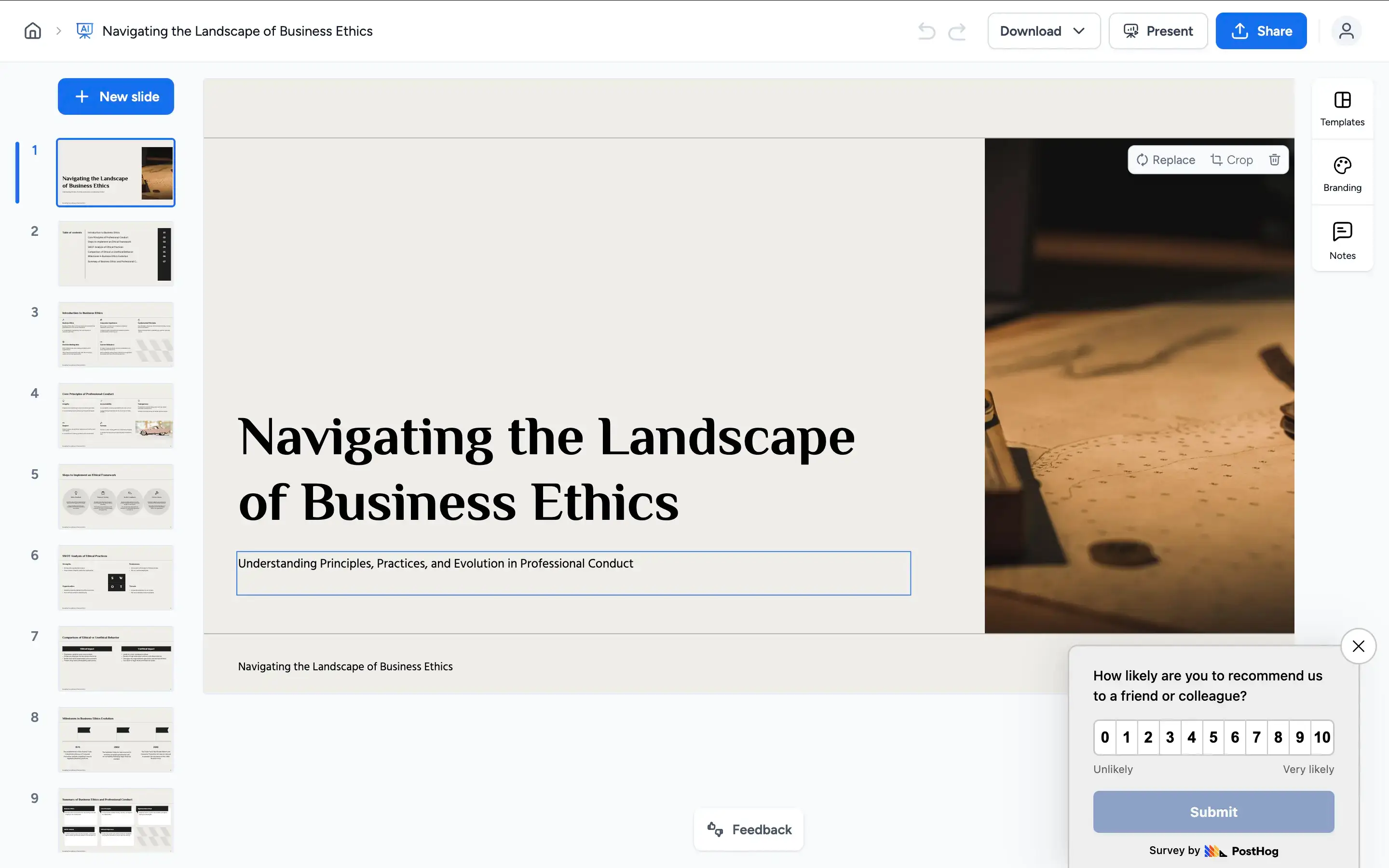
ステップ2: AIがテキストベースのスライドを生成する – AIは各スライドの箇条書きとスピーカーノートを生成します。視覚的なデザインは最小限に抑えられた、コンテンツ重視の出力です。

SlideSpeak Step 2: AI generation

ステップ3: 外部ツールで作業する – コンテンツの下書き以上のもの、つまりブランドカラー、フォント、ロゴ、適切なレイアウトなどが必要な場合は、PowerPointまたはGoogleスライドで出力を開き、手動で処理します。

SlideSpeak Step 3: Refine in editor

ステップ4: 基本形式でエクスポート – 利用可能な形式で保存またはエクスポートします。得られるのはコンテンツの骨組みであり、完成されたプレゼンテーションではありません。

SlideSpeak Step 4: Presentation delivery


Presentations AIの仕組み

ステップ1: 登録 – 無料プランをご利用いただけます。クレジットカードは不要です。1分以内に利用開始できます。

ステップ2: 資料をアップロード – Word文書、PDFをドロップするか、アウトラインを入力してください。Presentations AIはコンテンツを読み込み、文脈を理解します。

ステップ3: AIが完全なデッキを作成 – デザイン、ブランドテーマ、アニメーション、トランジションが自動的に適用されます。整理されたテキストだけでなく、完全に完成したプレゼンテーションが得られます。

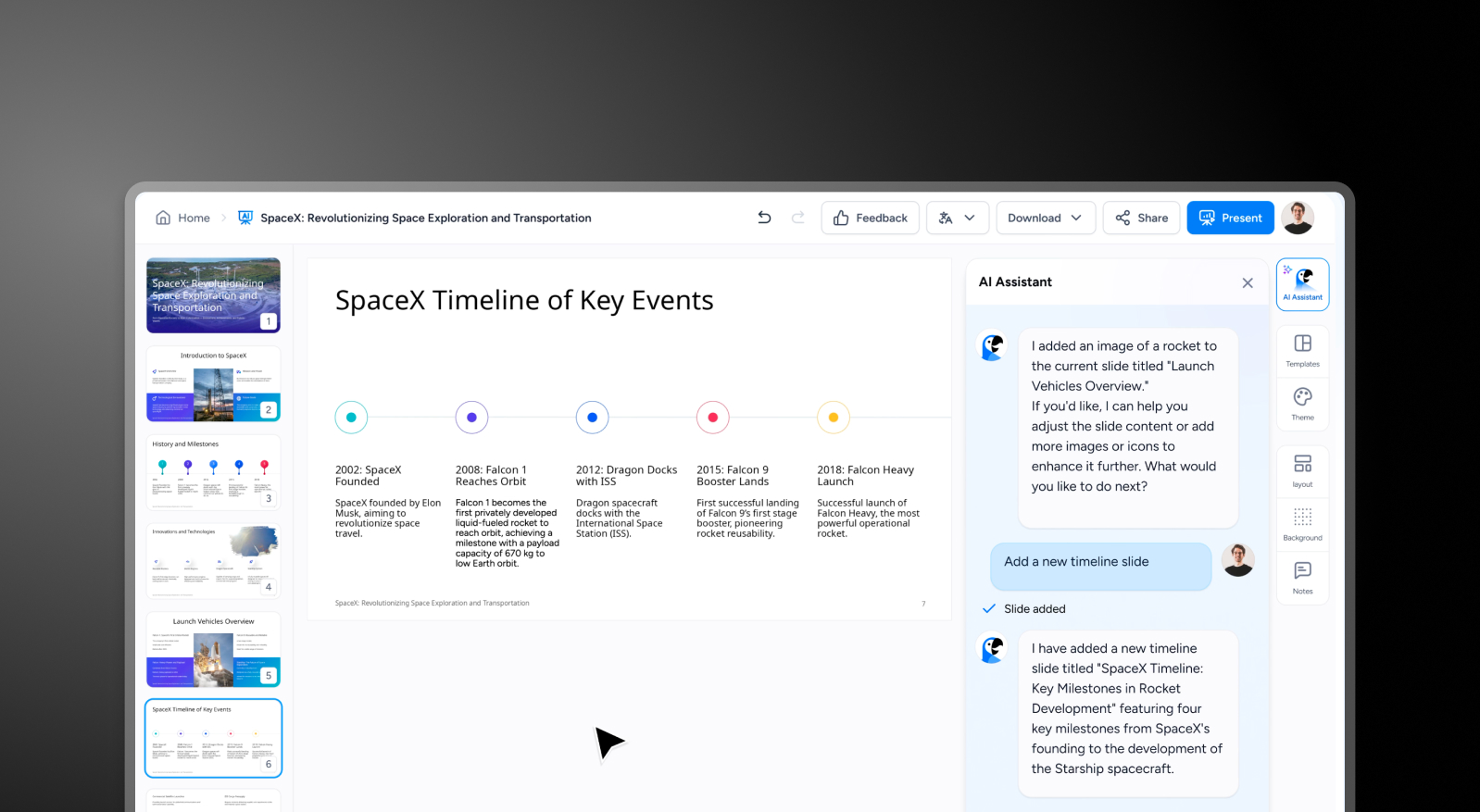
ステップ4: 共同作業とエクスポート – チームとリアルタイムで共同編集し、その後、PowerPointで問題なく開ける高精度の.pptxファイルをエクスポートできます。再フォーマットや追加の手順は不要です。

Presentations.AI Step 4: Collaborate and export


チームがSlideSpeakではなくPresentations.AIを選ぶ5つの理由

コンテンツ デザイン、コンテンツではなく その代わりに デザイン性: SlideSpeakはテキストとスピーカーノートを生成します。一方、Presentations AIは、レイアウト、ビジュアル、アニメーション、ブランドまで含んだ完全な資料を作成するため、別のツールは一切必要ありません。

フォーマット調整不要: SlideSpeakの出力は、発表前に再デザインが必要です。Presentations AIなら、会社のURLを一度入力するだけで、すべての資料が瞬時にブランドに準拠します。

ノートだけではない、物語性のある構成: SlideSpeakはコンテンツを箇条書きに整理するだけですが、Presentations AIはストーリー展開と説得力のある流れを持つ資料を作成します。AIは単に箇条書きを生成するだけでなく、視覚的な資料全体を完成させます。

変化に強いデザイン: SlideSpeakのテキストベースのレイアウトは、コンテンツの量が変わると崩れてしまいます。Presentations AIは、自動的に再調整するレスポンシブエンジンを採用しているため、どのような状況でもプロフェッショナルなデザインを維持します。

チーム向け: SlideSpeakにはコラボレーション機能がありません。Presentations AIは、バージョン管理機能を備えたリアルタイムのマルチプレイヤーワークスペースなので、編集、レビュー、最終化をすべて一箇所で行えます。

コンテンツの下書きが終わり、完成された資料が始まる場所

SlideSpeakは、スピーカーノートと大まかなコンテンツ構造を素早く作成する必要がある場合には、優れた下書き作成ツールです。 しかし、コンテンツの下書きは完成したプレゼンテーションではありません — そして、SlideSpeakの出力と、実際に送信または発表できる資料との間には、かなりの作業が必要です。

Presentations AIは、そのプロセス全体を担います。生のプロンプト、PDF、Word文書から、洗練されたブランドに準拠した、エクスポート可能なPowerPointまでを数分で作成します。 クライアント、役員会、投資家の前で発表するプレゼンテーションを作成するチームにとって、これは作業を開始するツールと、それを完了させるツールの決定的な違いとなります。

Divider Lines

よくある質問

What is the main difference between SlideSpeak and Presentations.AI?

Down IconUp Icon

The main difference is design depth. SlideSpeak focuses on ingesting source material like PDFs, Word docs, spreadsheets, and websites and converting them into editable slide content with speaker notes. Presentations.AI builds complete decks with brand styling, animations, transitions, and visual design applied automatically from the same input. SlideSpeak gives you structured content fast. Presentations.AI delivers a finished presentation.

Is SlideSpeak free?

Down IconUp Icon

Yes, SlideSpeak has a free plan with three credits at sign-up, access to the Charles AI assistant and Document Chat Bot, 150+ language support, and online sharing, with no credit card required. Premium and Premium Plus add monthly credit pools, brand kits, and unlimited generation. Presentations.AI offers a free plan with five complete AI-generated presentations, no credit card required, and full PowerPoint export included.

Can you export from SlideSpeak to PowerPoint?

Down IconUp Icon

Yes, SlideSpeak exports to PowerPoint on all paid plans, and the free plan allows basic PPTX export. The catch is that brand kits, custom templates, and unlimited credits sit behind Premium Plus and higher tiers. Presentations.AI exports a high-fidelity PowerPoint file with layouts, fonts, animations, and brand styling preserved exactly as designed in the editor, on every plan including the free tier.

Does SlideSpeak support brand customization?

Down IconUp Icon

Yes, but brand customization in SlideSpeak is locked to the Premium Plus plan and above, with a separate $129 add-on per custom template if you want to upload your own PowerPoint master. Presentations.AI applies brand colors, fonts, and logos automatically by syncing from your company URL once, with no per-template fees and no plan gating.

What is the best alternative to SlideSpeak for business presentations?

Down IconUp Icon

Presentations.AI is the strongest alternative for teams that need finished decks rather than content drafts. It generates complete presentations from documents, outlines, or prompts, applies brand styling automatically through company URL sync, and exports a clean PowerPoint file with no per-template fees.