Resumo
- O Presentations.AI é ideal para equipes que precisam transformar dados brutos em apresentações .pptx editáveis e alinhadas à marca. Ele elimina a necessidade de ajustes manuais e substitui o designer.
- A escolha da ferramenta certa depende de três perguntas. Comece pelo formato de saída e pelo tamanho da equipe. Depois, avalie o nível de rigor necessário para a consistência da sua marca.
- Para uma equipe de cinco pessoas, os preços anuais variam de gratuito a mais de US$ 1.800. O valor depende da ferramenta e do plano escolhidos.
- Os planos gratuitos variam muito. Alguns oferecem um fluxo de trabalho completo, enquanto outros restringem exportações e colaboração aos planos pagos.
- A fidelidade na exportação para PowerPoint é o que diferencia as ferramentas profissionais das demais. Muitos geradores de IA populares desconfiguram o layout assim que você exporta o arquivo.
Veredito Rápido: Os Melhores Geradores de Apresentação com IA em 2026
O melhor gerador de apresentações com IA em 2026 é o Presentations.AI para equipes que precisam de slides em PowerPoint prontos para uso e alinhados à marca. O Gamma é o melhor para compartilhamento via web. O Canva é ideal para fluxos de trabalho baseados em modelos, o Beautiful.ai atende equipes que não têm familiaridade com design, e o Prezent.ai é voltado para a governança de marca em grandes empresas.
Você tem anotações espalhadas e um prazo apertado. O gerador de apresentações com IA ideal deve transformar essa bagunça em uma apresentação polida e pronta para uso. O objetivo é ter um arquivo finalizado, e não outro rascunho que você precisará refazer. Este é o problema que a maioria das equipes enfrenta: o slide gerado pela IA parece ótimo no navegador, mas, assim que alguém pede o arquivo em PowerPoint, o trabalho de correção começa. O texto sai do lugar, as fontes somem, os layouts quebram. E, de repente, o "atalho da IA" vira mais uma tarefa manual de reconstrução de slides.
O verdadeiro teste vai além de saber se a ferramenta consegue gerar slides. A maioria consegue. O teste é verificar se ela acompanha você durante todo o fluxo de trabalho. Uma ferramenta robusta lê seu material de base e estrutura a narrativa. Em seguida, ela aplica sua identidade visual e exporta um arquivo que sua equipe realmente pode usar. Avaliamos 12 ferramentas em seis dimensões, desde a qualidade da geração por IA até o custo total de propriedade.
O que é um gerador de apresentações com IA?
Um gerador de apresentações com IA é um software que transforma automaticamente comandos em linguagem simples ou conteúdos existentes em slides estruturados e com design profissional. Em vez de abrir um slide em branco e criar cada um manualmente, você descreve o que precisa ou fornece um documento à ferramenta. Ela gera um primeiro rascunho completo, com layout e elementos visuais.
Essas ferramentas diferem dos softwares de apresentação tradicionais, como PowerPoint ou Google Slides, em um ponto fundamental: o software toma as decisões de design e estrutura para você. Um editor tradicional oferece controle manual total sobre cada elemento. Um gerador de apresentações com IA cuida da formatação e do trabalho visual, permitindo que você foque na mensagem, e não na parte técnica.
A maioria dos geradores de apresentações com IA aceita vários tipos de entrada:
- Comandos de texto: Uma descrição curta da apresentação que você precisa.
- Documentos: Um arquivo Word, PDF ou relatório que a ferramenta converte em slides.
- Esboços: Tópicos ou uma estrutura básica que a IA expande.
- URLs: Uma página da web que a ferramenta lê e transforma em uma apresentação.
- Slides existentes: Uma apresentação inicial que a IA reestiliza ou reestrutura.
O valor prático está na velocidade e na consistência. Um profissional que começa com dados dispersos, como notas de CRM e dados de campanha, pode chegar a uma narrativa polida em minutos, em vez de horas. Sem precisar de uma equipe de design.
Por que usar um criador de apresentações com IA?
Economize tempo nos primeiros rascunhos
O slide em branco é a parte mais lenta de qualquer apresentação. A geração por IA substitui isso por um rascunho utilizável em minutos. Assim, você dedica seu tempo a refinar a mensagem em vez de criar a estrutura do zero.
Melhore a qualidade do design
Ferramentas especializadas aplicam layouts e tipografia profissionais automaticamente. Quem não é designer obtém um resultado que parece intencional, e não apenas montado. Isso faz diferença quando a apresentação é exibida para um cliente ou conselho.
Mantenha a consistência da marca
Os controles de marca aplicam sua identidade visual em todos os slides. Para equipes que produzem apresentações para clientes em grande volume, a aplicação automática das diretrizes da marca elimina as variações que surgem quando cada um cria slides à sua própria maneira.
Transforme conteúdo existente em slides
A importação de documentos e URLs significa que um relatório ou página da web se torna uma apresentação inicial, em vez de algo que você precisa reescrever como um prompt. É aqui que os criadores de apresentações com IA mais economizam tempo para equipes de negócios.
Colabore com mais rapidez
A edição em tempo real e os espaços de trabalho compartilhados permitem que as equipes criem e revisem apresentações juntas. Isso acaba com o caos de versões em arquivos enviados por e-mail.
Reduza o trabalho manual de limpeza na exportação
As melhores ferramentas exportam arquivos .pptx limpos que mantêm a formatação. Essa funcionalidade separa uma ferramenta que realmente economiza tempo daquela que, silenciosamente, adiciona uma etapa extra de retrabalho no final.
O que torna um criador de apresentações com IA o melhor?
Antes de comparar ferramentas individuais, é útil saber o que realmente importa. Use esta lista de verificação para avaliar qualquer criador de apresentações com IA em relação ao seu fluxo de trabalho:
- Qualidade da geração por IA: o primeiro rascunho é realmente utilizável ou apenas uma estrutura que você precisa reconstruir?
- Estrutura narrativa: a ferramenta organiza um argumento coerente além de apenas preencher slides?
- Automação de design: os layouts são profissionais por padrão e livres de formatação manual?
- Controles de marca: você consegue aplicar cores, fontes e logotipos automaticamente em todas as apresentações?
- Saída editável: você consegue alterar qualquer coisa com facilidade após a geração?
- Fidelidade de exportação: o arquivo .pptx mantém a formatação ao ser aberto no PowerPoint para desktop?
- Colaboração: edição em tempo real, comentários e controles de acesso para equipes.
- Análise: é possível rastrear o desempenho de uma apresentação após o compartilhamento?
- Segurança e conformidade: SOC 2, GDPR e termos claros de propriedade de dados.
- Transparência de preços: planos claros e níveis gratuitos honestos para equipes reais.
- Suporte a arquivos existentes: é possível importar PDFs, documentos do Word e URLs?
Visão geral dos melhores criadores de apresentações com IA
Veja como as 12 ferramentas se comparam nos critérios que mais importam no momento da compra.
Como testamos e avaliamos os melhores criadores de apresentações com IA
Comparamos 12 ferramentas de apresentação com IA ao longo de 5 semanas no início de 2026, utilizando cada uma no plano mais adequado para uma equipe de pequeno a médio porte. Os preços foram verificados nas páginas oficiais de cada ferramenta. Para tornar os resultados comparáveis, utilizamos os mesmos dados de entrada em todas as ferramentas, incluindo notas brutas e um documento de estratégia. Também adicionamos um relatório em PDF e uma URL da empresa. Este é o material de origem com o qual as equipes de negócios costumam trabalhar.
As seis dimensões foram:
- Qualidade da geração por IA: quão bom é o primeiro rascunho a partir de um prompt em linguagem simples
- Controle de edição: o quanto você pode alterar após a conclusão da IA
- Fidelidade de exportação: se o arquivo .pptx mantém a formatação ao ser aberto no PowerPoint
- Automação de marca: quanto trabalho manual é necessário para corresponder à sua identidade visual
- Colaboração: edição em tempo real, compartilhamento e controles de acesso
- Custo total de propriedade: preço por usuário escalado para uma equipe de 5 pessoas ao longo de 12 meses
O Presentations.AI é o nosso produto, e nós o classificamos em primeiro lugar porque acreditamos que ele merece essa posição com base nos critérios acima. Também fomos específicos sobre onde ele deixa a desejar, porque uma lista que ignora fraquezas não ajuda ninguém a tomar uma decisão de compra real.
Teste com o mesmo prompt: como comparamos a qualidade da saída
Para manter a comparação honesta, demos a cada ferramenta o mesmo prompt de referência e avaliamos o resultado com base nos mesmos critérios. O prompt:
Crie uma apresentação para investidores de 10 slides para uma startup SaaS B2B, abordando o problema, a solução, o tamanho do mercado, a tração, o modelo de negócios e as finanças. Siga a identidade visual da nossa marca a partir da URL da nossa empresa.
Avaliamos cada resultado com base na usabilidade do primeiro rascunho e na qualidade da exportação para PowerPoint. Também medimos o esforço de ajuste manual necessário para que a apresentação ficasse pronta para o cliente.
As 12 melhores ferramentas de IA para apresentações avaliadas
Analisamos os pontos fortes e fracos de cada ferramenta e indicamos para quem cada uma é mais adequada.
1. Presentations.AI: A melhor para transformar rascunhos em apresentações prontas para a marca
O Presentations.AI foi criado para todo o fluxo de trabalho de uma apresentação: transformar entradas brutas em um deck estruturado e com a identidade da marca. O Clip-E, seu agente de IA conversacional, faz muito mais do que gerar um primeiro rascunho. Ele estrutura a narrativa e monta os slides. Em seguida, aplica o design e revisa a apresentação dentro do contexto. Você descreve o que precisa. O Clip-E gera toda a estrutura dos slides e preenche o conteúdo, aplicando o design simultaneamente. Depois, você continua interagindo com ele. Mova o slide de receita para cima. Adicione uma tabela comparativa. Deixe isso mais visual. Ele faz iterações contextuais. Você evita o trabalho manual de arrastar elementos e navegar por menus que outras ferramentas exigem após a criação de um rascunho.
O Brand Sync é o outro recurso de destaque. Basta indicar a URL da sua empresa. Ele extrai as cores e o logotipo da sua marca e os aplica a todos os slides.
Você pula a etapa de upload do kit de marca. Esqueça os códigos hexadecimais. O logotipo aparece corretamente no slide 14 automaticamente. Para equipes enxutas que produzem apresentações para clientes, isso economiza um tempo precioso em cada projeto.
A ferramenta também aceita vários formatos de entrada. Ela lê prompts, PDFs e documentos do Word. Também aceita URLs e textos colados. Seu conteúdo existente torna-se um ponto de partida, em vez de algo que você precisa reescrever como um prompt.
Avaliação no G2: Plataforma mais recente, com poucas avaliações no momento.
Prós do Presentations.AI:
- Fluxo de trabalho de prompt para apresentação que produz um resultado realmente utilizável, em vez de um rascunho que você precisa refazer do zero
- O Brand Sync aplica sua identidade visual a cada apresentação sem necessidade de configuração manual
- Modelos robustos que mantêm a integridade do design mesmo quando o conteúdo é alterado
- Exportação limpa para PowerPoint que preserva a formatação original
- Aceita vários formatos de entrada: prompt, PDF, documento do Word e URL
- Compartilhamento em tempo real com controles de acesso e análise de dados integrada
Contras do Presentations.AI:
- A biblioteca de modelos ainda está em crescimento em comparação com ferramentas mais estabelecidas
Preços do Presentations.AI:
Plano inicial gratuito. Pro por US$ 198/ano. Planos Team e Enterprise disponíveis.
O Presentations.AI é ideal para:
Equipes B2B, consultores, líderes de vendas, profissionais de marketing e fundadores. Qualquer pessoa que precise transformar notas, relatórios, dados de CRM ou documentos estratégicos em apresentações consistentes com a marca e prontas para exportação, de forma rápida.
Visite o Presentations.AI ou explore o criador de apresentações com IA e as ferramentas.
Precisa de uma apresentação pronta para o cliente a partir de notas ou documentos desorganizados?
Experimente o Presentations.AI e veja com que rapidez você pode transformar material bruto em uma apresentação editável e com a identidade da sua marca.
(Não requer cartão de crédito)
2. Gamma: O melhor para compartilhamento interno nativo da web
Use quando: Você precisar de um link web rápido e polido para atualizações internas e briefings assíncronos.
Evite quando: Alguém no seu fluxo de trabalho precisar de um arquivo PowerPoint limpo e editável.
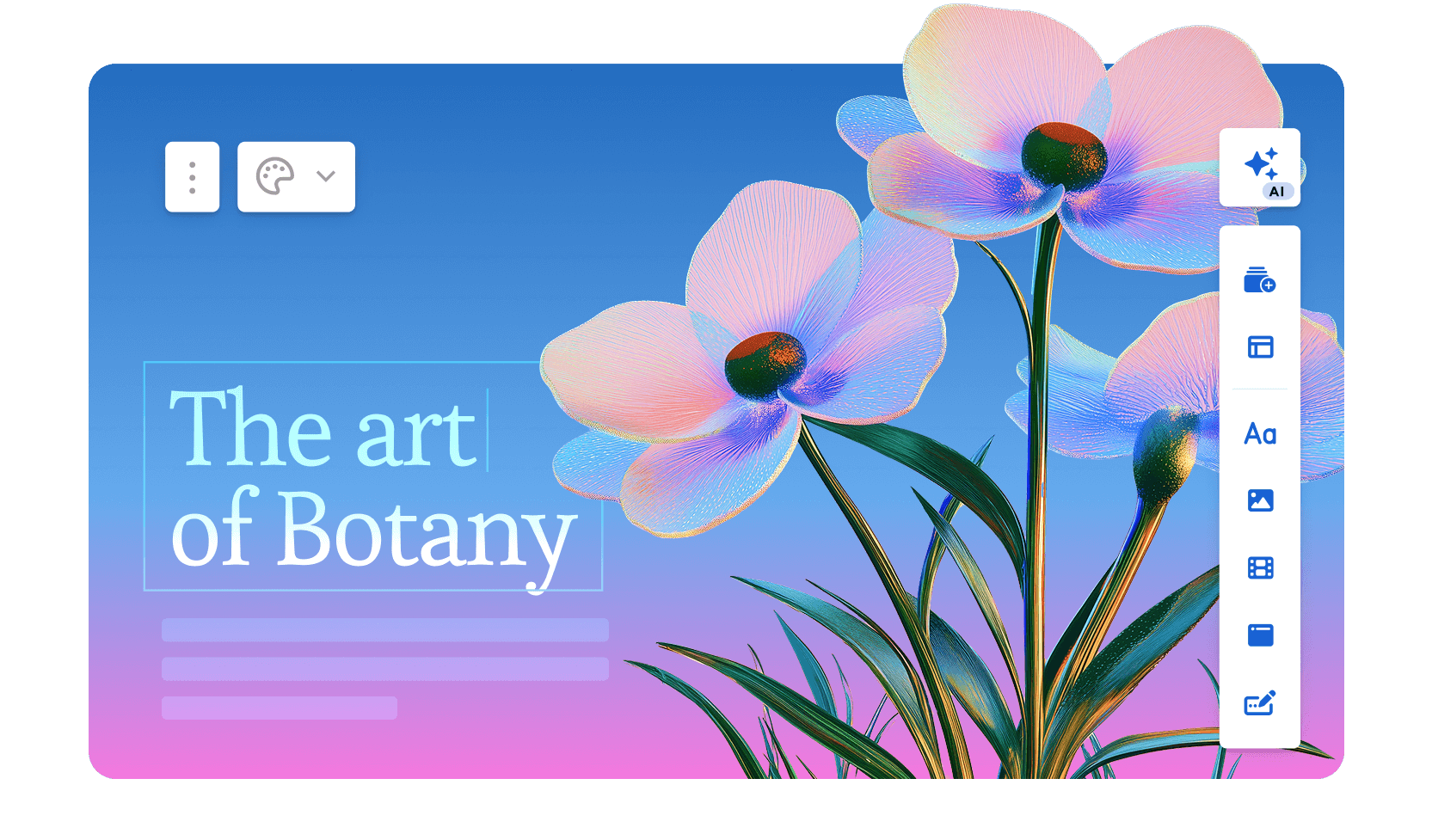
O Gamma é rápido quando o resultado final é um link web. O problema começa quando o fluxo de trabalho precisa retornar ao PowerPoint. A plataforma atende a mais de 70 milhões de usuários e gera cerca de 700.000 conteúdos por dia. O ChatGPT foi integrado no início de 2023, e o uso cresceu drasticamente desde então. O lançamento do Gamma 3.0 em 2026 introduziu o Gamma Agent. Este assistente de IA pesquisa na web e reestiliza apresentações inteiras. Ele também incorpora links ou capturas de tela que você insere na conversa.
O Gamma gera apresentações em formato de cartões roláveis e nativos da web, em vez de slides tradicionais. A qualidade do primeiro rascunho é alta, e a IA cuida da seleção de imagens automaticamente. Você pode ir do prompt ao link compartilhável em menos de um minuto.
O plano gratuito não exige cartão de crédito e atende bem a usuários ocasionais. O Gamma obteve a certificação SOC 2 Tipo II em outubro de 2025 e oferece conformidade com GDPR e CCPA nos planos Team e Business.
O limite rígido continua sendo o formato de saída. As apresentações do Gamma são páginas da web, não slides. Ao exportar para .pptx, os layouts são corrompidos e a estrutura dos cartões não se adapta às dimensões fixas dos slides.
Se alguém no seu fluxo de trabalho abrir o arquivo no PowerPoint, o Gamma gera mais retrabalho do que economiza.
Avaliação no G2: 4,1/5
Prós do Gamma:
- Geração rápida de apresentações a partir de prompts; a maioria dos decks padrão fica pronta em menos de um minuto
- Plano gratuito real que não exige cartão de crédito
- A saída nativa para web tem um visual refinado por padrão
- Análise de visualizações nos planos pagos
Contras do Gamma:
- As exportações para PowerPoint frequentemente quebram a formatação, com caixas de texto sobrepostas e fontes ausentes
- Os limites de créditos de IA criam atrito para usuários frequentes; usuários do plano Plus atingem o teto rapidamente na prática
- A aplicação da marca permanece manual no nível do espaço de trabalho
- A IA recua após o primeiro rascunho; a iteração conversacional e a importação de documentos não estão disponíveis
Preços do Gamma:
Nível gratuito disponível. Plano Plus por US$ 9/mês. Plano Pro por US$ 18/mês (cobrança anual).
O Gamma é ideal para:
Equipes internas que compartilham atualizações e briefings via links, onde o arquivo não precisa ser aberto no PowerPoint.
Se você quiser uma análise detalhada, visite nossa página que compara o Gamma e o Presentations.AI a fundo.
3. Canva: Para modelos e designs rápidos

Use quando: Sua equipe já utiliza o Canva e o resultado final será um PDF ou um link de compartilhamento do Canva.
Evite quando: Você precisar de uma IA que estruture uma narrativa ou de um arquivo .pptx limpo e editável para layouts complexos.
O Canva está entre as maiores plataformas de design do mundo, encerrando 2025 com mais de 265 milhões de usuários ativos mensais. A plataforma também registra 31 milhões de assinantes pagantes e US$ 4 bilhões em receita recorrente anual. Especificamente para apresentações, os recursos de IA do Canva, incluindo o Magic Design para geração de layout e o Magic Write para textos assistidos por IA, complementam uma enorme biblioteca de modelos com mais de 4,5 milhões de designs.
Os recursos de colaboração são realmente maduros, e o Kit de Marca nos planos pagos mantém a consistência das criações entre as equipes. Se o seu time já usa o Canva para outros conteúdos, adicionar apresentações ao mesmo espaço de trabalho é simples e fluido.
A camada de IA é mais superficial do que a de ferramentas criadas especificamente para apresentações. Ela gera layouts e preenche textos, mas não chega a reestruturar sua narrativa ou iterar de forma conversacional.
Além disso, a exportação para .pptx exige ajustes manuais em layouts complexos. O Canva funciona melhor quando o seu resultado final é um PDF ou um link de compartilhamento do Canva, em vez de um arquivo PowerPoint editável.
Avaliação no G2: 4,7/5
Prós do Canva:
- Biblioteca imensa de modelos e recursos que atende a quase todos os casos de uso
- Plano gratuito robusto com recursos realmente úteis
- Compartilhamento e colaboração fáceis entre equipes
- Kit de Marca nos planos pagos mantém a consistência visual
Contras do Canva:
- A geração por IA é menos sofisticada do que a de ferramentas dedicadas a apresentações
- O excesso de flexibilidade pode gerar mais decisões em vez de menos; a ferramenta deixa você responsável por finalizar a apresentação por conta própria
- Criado para design geral, não para fluxos de trabalho de apresentações
Preços do Canva:
Plano gratuito disponível. Pro por US$ 144/ano por usuário.
O Canva é ideal para:
Equipes que já utilizam o Canva e cujo resultado final é um PDF ou um link de compartilhamento do Canva, em vez de um arquivo .pptx.
Se você quiser se aprofundar no assunto, acesse nossa página que compara o Canva e o Presentations.AI detalhadamente.
4. Beautiful.ai: Ideal para equipes sem designers
Use quando: você deseja que a consistência do design seja aplicada automaticamente e não se importa em seguir a grade dos modelos.
Evite quando: você precisar substituir layouts ou depender de uma geração de conteúdo profunda por IA.
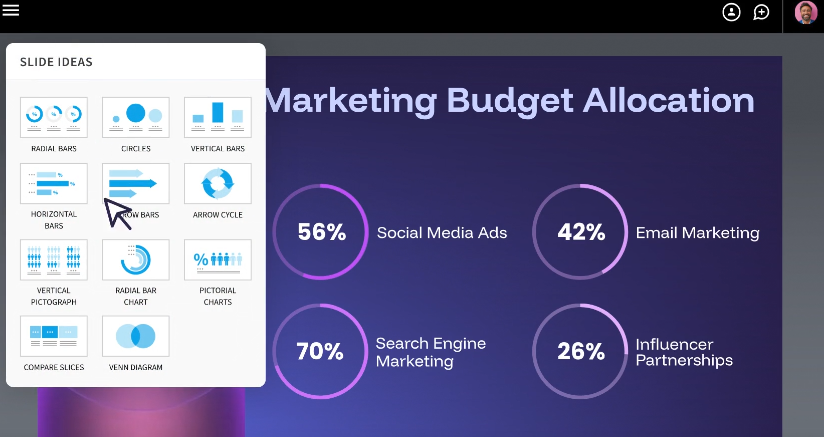
O Beautiful.ai foi criado com base em uma premissa simples: a maioria das pessoas que cria apresentações não tem formação em design, e a ferramenta as poupa de ter que pensar como um designer. O sistema Smart Slides ajusta o layout e o espaçamento conforme você adiciona ou remove conteúdo. Isso elimina as decisões de formatação que consomem tempo no PowerPoint.
O resultado é que o trabalho final sempre parece profissional, independentemente de quem o criou. Mais de 50.000 equipes usam a plataforma. Os avaliadores do G2 dão uma nota de 4,7 de 5, com base em quase 200 avaliações. Eles citam a facilidade de uso e a qualidade do design como os pontos mais frequentes.
A IA funciona como um assistente de layout e rascunho, e não como um motor de criação de conteúdo. Ela gera uma apresentação a partir de um comando e ajuda a refinar o texto. Ela não chega a pesquisar tópicos ou extrair dados externos. Além disso, não oferece interação conversacional após a conclusão do primeiro rascunho.
A adição do DesignerBot em 2026 melhorou a qualidade da geração inicial. A plataforma ainda se concentra em manter a consistência do design, em vez de gerar conteúdo profundamente contextual.
O preço a pagar é a rigidez. As mesmas diretrizes que mantêm os slides com uma boa aparência também limitam a personalização. Fontes personalizadas exigem o plano Pro, e os controles de marca estão disponíveis apenas nos planos Team e Enterprise. A lógica de layout do Smart Slide permanece fixa, mesmo quando você discorda de suas decisões.
Avaliação no G2: 4,7/5
Prós do Beautiful.ai:
- Layouts Smart Slide que se reajustam automaticamente conforme você adiciona ou remove conteúdo
- Design padrão de alta qualidade e consistente
- Curva de aprendizado relativamente fácil; a maioria dos usuários se torna produtiva rapidamente
Contras do Beautiful.ai:
- Personalização da marca disponível apenas nos planos Team e Enterprise
- Menos focado em IA do que os concorrentes; funciona mais como um assistente de design do que como um gerador de conteúdo
- As exportações para PowerPoint às vezes perdem o comportamento de layout inteligente
Preços do Beautiful.ai:
Teste de 14 dias, seguido pelo plano Pro a US$ 12/mês (cobrado anualmente). Plano Team a US$ 40/usuário/mês.
O Beautiful.ai é ideal para:
Equipes que desejam consistência de design aplicada automaticamente e que se sentem confortáveis em manter a grade de modelos.
Leia uma comparação detalhada entre Beautiful.ai e Presentations.AI.
5. Prezi: Ideal para narrativas interativas e não lineares
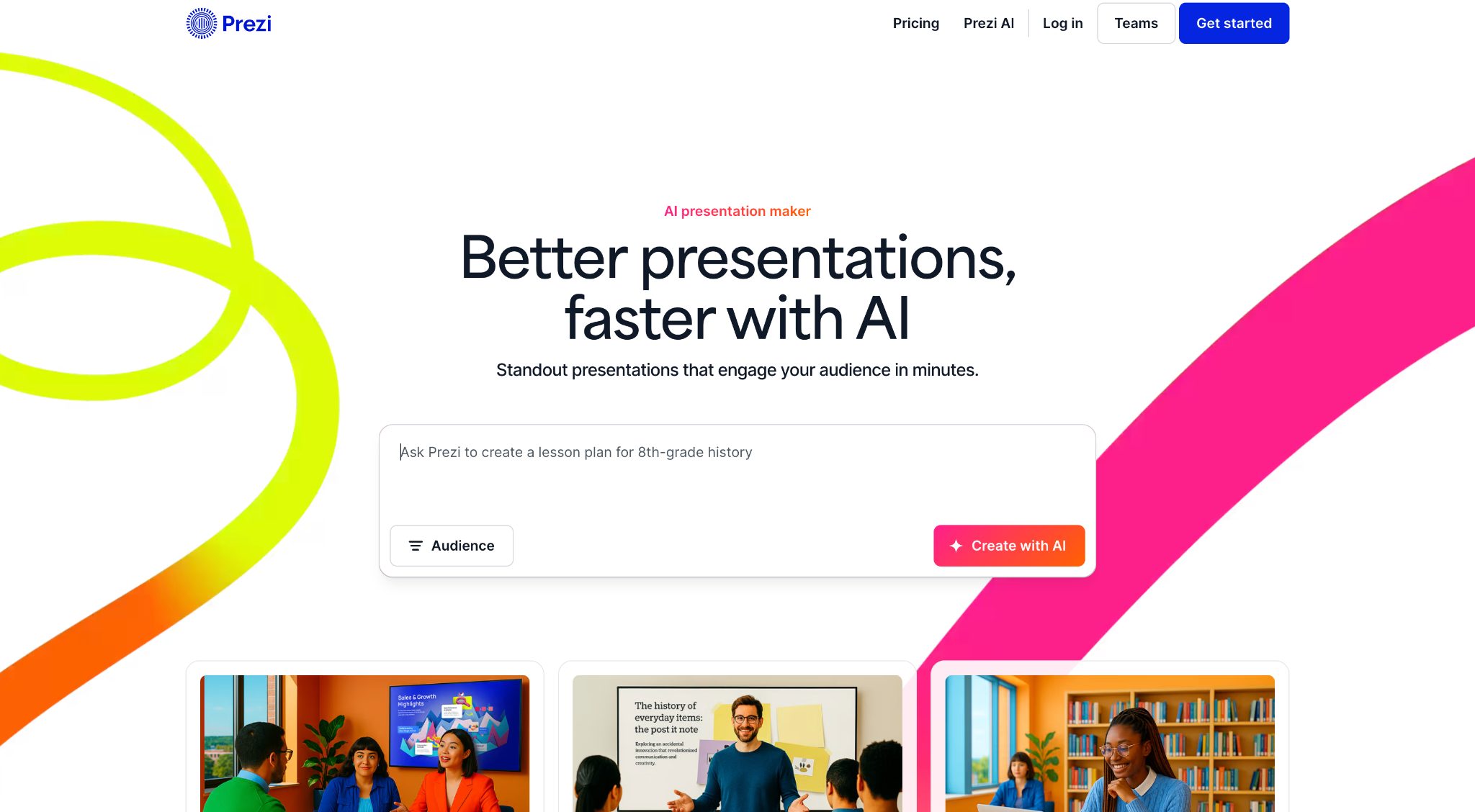
Use quando: Você faz apresentações ao vivo e deseja um formato distinto e com zoom que se destaque.
Evite quando: Você precisar exportar para um arquivo PowerPoint utilizável.
O Prezi foi fundado em Budapeste em 2009 e cresceu para mais de 160 milhões de usuários globalmente, o que o torna uma das plataformas de apresentação mais adotadas no mundo. Apesar dessa escala, ele ocupa um nicho genuíno. Em vez de slides sequenciais, o Prezi usa uma interface de zoom construída em um plano espacial infinito onde todo o conteúdo reside.
Você navega entre tópicos e aplica zoom nos detalhes, depois recua para revelar o panorama geral. O formato cria um envolvimento real quando o conteúdo favorece essa abordagem.
As atualizações de 2025 e 2026 adicionaram recursos de IA, como geração baseada em prompts e edição de tópicos. Isso o aproxima dos concorrentes modernos, preservando sua identidade única.
O Prezi também oferece o Prezi Video, que sobrepõe o apresentador ao conteúdo para transmissões remotas, um recurso que ganhou força entre educadores e equipes de vendas remotas.
As limitações permanecem as mesmas. As apresentações do Prezi não permitem uma exportação .pptx utilizável. A curva de aprendizado é mais íngreme do que a de ferramentas de slides convencionais. O formato de zoom pode desorientar o público se não for usado com cuidado.
Os recursos de IA também são menos desenvolvidos do que os de criadores de apresentações focados em IA. O Prezi é uma excelente escolha para uma tarefa específica, mas uma má opção para todo o resto.
Avaliação no G2: 4,2/5
Prós do Prezi:
- Formato altamente distinto e memorável que se destaca das apresentações de slides convencionais
- Muito adequado para visualizar relações e estruturas complexas
- Excelente para apresentações em conferências e demonstrações ao vivo
Contras do Prezi:
- Curva de aprendizado íngreme em comparação com ferramentas baseadas em slides
- O formato de zoom não se adapta bem a alguns tipos de conteúdo e pode desorientar o público quando usado em excesso
- Recursos de IA limitados em comparação com ferramentas mais recentes
- A exportação para PowerPoint continua inviável
Preços do Prezi:
Plano Plus a US$ 15/mês. Plano Business a US$ 29/mês por usuário.
O Prezi é ideal para:
Palestrantes e educadores que fazem apresentações ao vivo e desejam um formato diferenciado, realizando toda a apresentação dentro do Prezi.
6. Visme: A melhor para apresentações com muitos dados

Use quando: Seus slides forem densos, com muitos gráficos e infográficos personalizados.
Evite quando: Você precisar de um fluxo de trabalho simples de slides com forte geração de conteúdo por IA.
O Visme é uma plataforma de conteúdo visual baseada na nuvem que atende a mais de 27 milhões de usuários em todo o mundo. Entre seus clientes estão a IBM e o Golden State Warriors. A ferramenta ajuda pessoas sem experiência em design a criar visuais profissionais para apresentações e relatórios. A biblioteca de modelos abrange mais de 50 tipos de conteúdo.
Para equipes cujas apresentações são repletas de gráficos e elementos visuais personalizados, o Visme oferece ferramentas mais especializadas do que a maioria das plataformas apresentadas aqui.
Os recursos de visualização de dados são o seu maior diferencial. Gráficos personalizáveis e modelos específicos para infográficos tornam a apresentação de dados complexos muito mais simples. A ferramenta exige um nível mínimo de habilidade em design.
A plataforma também inclui recursos de Kit de Marca e colaboração em tempo real. O rastreamento de métricas está disponível para conteúdos publicados.
Vale a pena considerar os pontos negativos. O Visme é uma plataforma de conteúdo visual abrangente, e seu editor é mais complexo do que a maioria dos usuários precisa para apresentações simples. A geração por IA permanece como um recurso secundário. Alguns usuários no Capterra relatam problemas de desempenho, como lentidão no carregamento e falhas durante a criação dos designs.
Para quem busca um criador de apresentações focado exclusivamente em IA, o Visme deixa a desejar. No entanto, equipes que dedicam muito tempo à visualização de dados e precisam de uma única ferramenta para diversos formatos de conteúdo verão que ele vale o investimento.
Avaliação no G2: 4,5/5
Prós do Visme:
- Excelentes recursos de infográficos e visualização de dados
- Recursos robustos de kit de marca para resultados consistentes
- Ampla variedade de tipos de conteúdo além de apresentações
Contras do Visme:
- Mais complexo do que o necessário para apresentações de slides padrão
- A geração por IA é um recurso secundário
- Preço elevado para usos mais simples de apresentações
Preços do Visme:
Plano gratuito disponível. Plano Starter a partir de US$ 12,25/mês. Plano Business a partir de US$ 24,75/mês por usuário.
O Visme é ideal para:
Analistas e equipes de dados que priorizam apresentações ricas em gráficos e infográficos em vez da geração de conteúdo por IA.
7. Slidesgo: Melhor biblioteca de modelos gratuitos

Use quando: Você quiser um modelo gratuito e bem acabado para personalizar manualmente no PowerPoint ou Google Slides.
Evite quando: Você precisar de geração por IA ou automação de marca.
O Slidesgo é um marketplace de modelos operado pela Freepik Company, a mesma organização por trás de uma das maiores bibliotecas de ativos de banco de imagens da web. A plataforma oferece milhares de modelos gratuitos, projetados profissionalmente para Google Slides e PowerPoint. Eles cobrem uma ampla gama de tópicos e estilos visuais.
Ele figura entre os primeiros resultados quando as pessoas pesquisam por modelos de apresentação gratuitos. A biblioteca é vasta e os designs são refinados. O download é simples e direto.
Recursos de IA foram adicionados nos últimos anos, permitindo que os usuários gerem estruturas básicas de slides a partir de um prompt de texto. O fluxo de trabalho prático é diferente. Você navega pela biblioteca e escolhe um design que se encaixe. Depois, você o personaliza no Google Slides ou PowerPoint. A camada de IA é superficial em comparação com criadores de apresentações dedicados e acaba sendo irrelevante para a maioria dos usuários.
A plataforma não oferece automação de marca nem um espaço de trabalho colaborativo. Análises de visualização e iteração por IA também estão ausentes. O Slidesgo funciona melhor como um recurso de ponto de partida do que como uma plataforma completa de apresentações.
Ele se encaixa em um fluxo de trabalho onde alguém já sabe qual ferramenta usará para criar e apresentar, e só precisa de uma base de design para começar.
Avaliação no G2: 4,7/5
Prós do Slidesgo:
- Biblioteca vasta e gratuita de modelos com ampla cobertura de tópicos
- Curva de aprendizado quase zero; funciona diretamente com PowerPoint e Google Slides
- Ponto de partida útil para apresentadores ocasionais
Contras do Slidesgo:
- A geração por IA e a assistência de conteúdo são mínimas
- Toda a personalização é feita inteiramente de forma manual
- Recursos de automação de marca e colaboração estão ausentes
Preços do Slidesgo:
Gratuito (com atribuição). Premium por US$ 35,99 cobrados anualmente.
O Slidesgo é ideal para:
Usuários individuais que desejam um ponto de partida gratuito e se sentem confortáveis em fazer toda a personalização manualmente no PowerPoint ou Google Slides.
8. Prezent.ai: A melhor para controle de marca corporativa

Use quando: Você precisa de governança de marca e controle centralizado em uma grande organização.
Evite quando: Você é um indivíduo ou uma pequena equipe que precisa de flexibilidade em vez de controles rígidos.
A Prezent.ai é uma plataforma de IA generativa criada especificamente para fluxos de trabalho de apresentações corporativas. Em 2026, ela atende a dezenas de milhares de profissionais em mais de 80 empresas da Fortune 2000. Sua liderança inclui ex-executivos da Cisco e da McKinsey.
O posicionamento da plataforma é restrito e deliberado. Ela tem como alvo grandes organizações que precisam de governança de marca em escala, deixando os criadores de apresentações individuais para outras ferramentas.
A oferta principal inclui uma biblioteca com mais de 35.000 slides e roteiros projetados por especialistas. Astrid, sua assistente de IA, impulsiona a geração de apresentações. Um recurso proprietário chamado Fingerprints adapta as apresentações às preferências do público com base no estilo de comunicação e na senioridade.
A camada de conformidade de marca é a mais madura desta lista. O gerenciamento centralizado de modelos e as bibliotecas de slides garantem a consistência em grandes equipes. Os controles dispensam a revisão manual de cada resultado.
A Prezent também oferece serviços especializados opcionais, incluindo a criação de apresentações durante a noite e coaching de comunicação personalizado, o que estende seu valor além do software para um modelo de serviço gerenciado. Os preços permanecem privados nos planos padrão e exigem uma conversa com a equipe de vendas. Isso reflete a abordagem focada em empresas.
Para usuários individuais ou pequenas equipes, esta ferramenta é excessiva. Organizações onde cada apresentação carrega riscos de marca e comunicação devem considerar esta opção.
Avaliação no G2: 4,5/5
Prós da Prezent:
- Bibliotecas de slides corporativos robustas e fluxos de trabalho de governança
- Útil para grandes equipes que precisam de controle centralizado sobre ativos de apresentação aprovados
- Serviços especializados opcionais podem ajudar equipes com necessidades de alto volume de apresentações
Contras da Prezent:
- Opções de personalização limitadas, reduzindo a flexibilidade para usuários que desejam mais controle sobre o design e o layout.
- Os resultados gerados por IA podem ser inconsistentes, especialmente quando os prompts não são claros ou são complexos.
- Oferece menos opções de design em comparação com algumas ferramentas de apresentação concorrentes.
- A personalização de modelos pode parecer restritiva, tornando mais difícil adaptar as apresentações a necessidades específicas.
- Pode apresentar problemas de desempenho com apresentações maiores, levando a fluxos de trabalho mais lentos.
Preços da Prezent:
Lite por US$ 399 ao ano. Preços para empresas: entre em contato para um orçamento.
A Prezent é ideal para:
Grandes organizações que precisam de governança de marca e controle centralizado para muitos usuários que criam apresentações em larga escala.
9. Pitch: Ideal para apresentações colaborativas em equipe
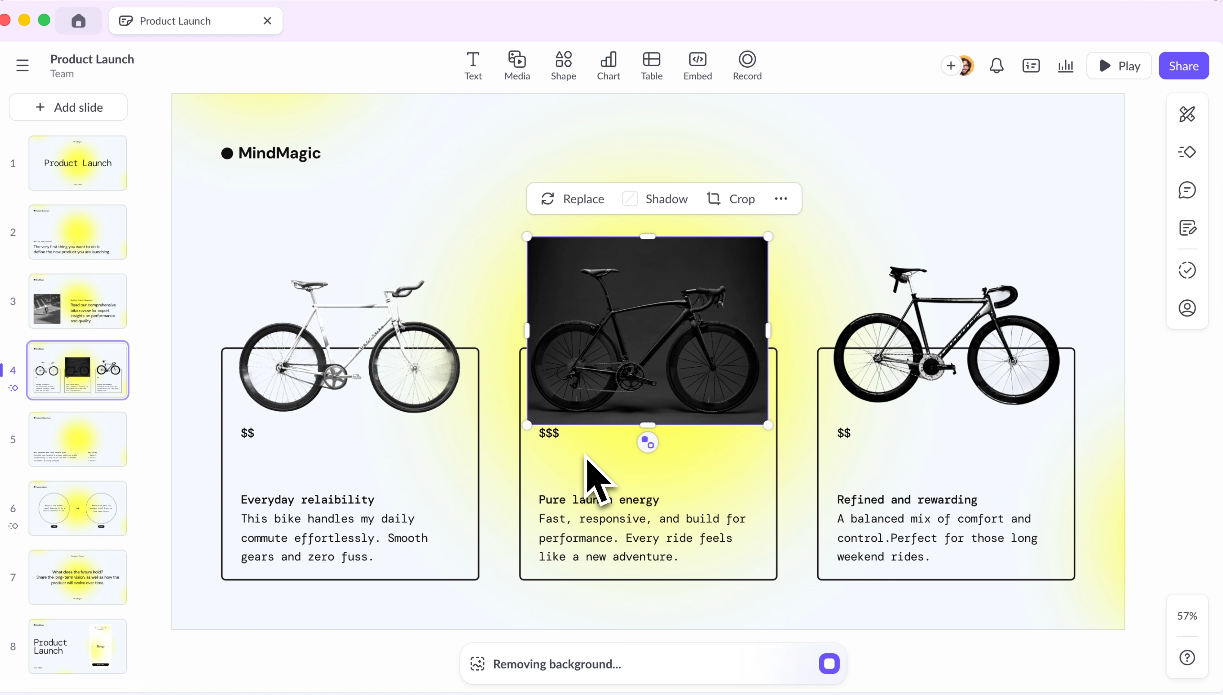
Use quando: Várias pessoas contribuem para as apresentações e você precisa de fluxos de trabalho de revisão e aprovação.
Evite quando: Você precisa de geração avançada focada em IA ou de preços acessíveis para equipes grandes.
O Pitch foi criado desde o início como uma ferramenta de apresentação para equipes, e essa intenção é evidente em todo o produto. Milhões de equipes o utilizam, incluindo a Pentagram e a Synthesia. A plataforma trata as apresentações como documentos vivos. Elas permanecem colaborativas por padrão e centralizadas em espaços de trabalho compartilhados e bibliotecas de modelos. O design suporta todo o ciclo de revisão e aprovação que apresentações de nível profissional exigem.
A coedição em tempo real e os comentários em tópicos são recursos de primeira linha. Os status das apresentações e o acesso baseado em funções recebem o mesmo tratamento.
O editor é amplamente considerado uma das experiências mais limpas da categoria. É responsivo, moderno e desenvolvido especificamente para apresentações, em vez de ser adaptado de uma plataforma de design geral.
Os modelos são organizados em torno de necessidades comerciais comuns, como apresentações de pitch e revisões de OKR. Os designs tendem a ser mais contemporâneos do que a maioria das apresentações do PowerPoint.
O Pitch expandiu seus recursos de IA nos últimos dois anos. Agora, ele suporta a geração de rascunhos e a criação de notas do orador, além de ajustes de tom. A IA funciona como uma camada de suporte, e não como o motivo principal para escolher a ferramenta.
O Pitch também se integra ao Slack, Google Analytics e ferramentas de CRM. Isso amplia sua utilidade para equipes de receita e marketing que acompanham o desempenho das apresentações após o compartilhamento.
Avaliação no G2: 4,4/5
Prós do Pitch:
- Desenvolvido especificamente para fluxos de trabalho em equipe com espaços de trabalho compartilhados e bibliotecas de modelos
- Recursos robustos de comentários, revisão e aprovação
- Boas análises sobre o engajamento com as apresentações
Contras do Pitch:
- A geração por IA é menos avançada do que em ferramentas dedicadas focadas em IA
- O preço aumenta consideravelmente para equipes maiores
- Curva de aprendizado para equipes que migram de ferramentas mais simples
Preços do Pitch:
Plano Starter gratuito. Plano Plus por US$ 10/mês por usuário (cobrado anualmente).
O Pitch é ideal para:
Equipes que colaboram intensamente em apresentações e desejam um espaço de trabalho moderno para decks onde várias pessoas contribuem.
10. Google Slides + Complementos de IA: A melhor opção econômica para equipes do Google Workspace
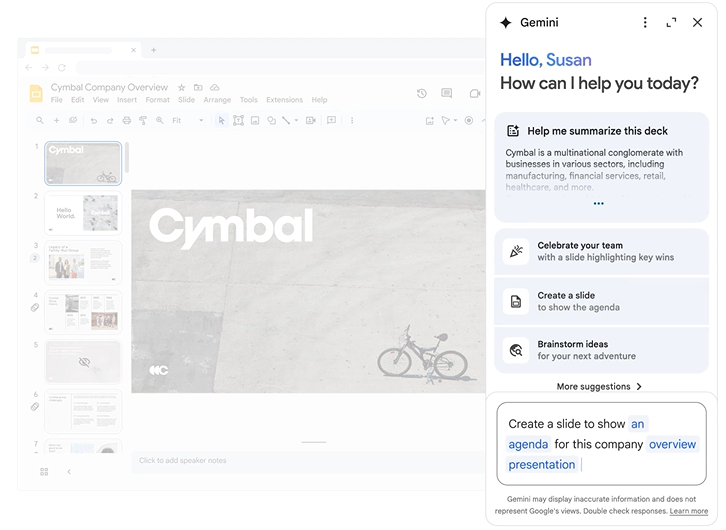
Use quando: Sua equipe já utiliza o Google Workspace e precisa de colaboração gratuita em tempo real.
Evite quando: A qualidade do design ou a consistência da marca forem prioridade.
O Google Slides foi lançado como parte do Google Docs em 2006. Tornou-se uma das ferramentas de apresentação mais utilizadas em volume absoluto. O motivo é simples: é gratuito e está integrado ao ambiente do Google Workspace, usado diariamente por centenas de milhões de pessoas.
A infraestrutura de colaboração é genuinamente a melhor da categoria. Várias pessoas editam o mesmo deck simultaneamente, e os comentários são organizados em tópicos e resolvidos diretamente no arquivo. O histórico de versões é automático e ilimitado.
A geração nativa por IA ainda não está presente no Google Slides, mas um ecossistema crescente de complementos traz essa funcionalidade. SlidesAI, Plus AI e MagicSlides estão entre os mais comuns. Cada um oferece uma abordagem diferente para a geração de slides baseada em prompts dentro da interface familiar.
A vantagem é que as equipes permanecem em uma ferramenta que já conhecem, com coedição em tempo real integrada, evitando o aprendizado de uma nova plataforma.
As limitações são reais. Cada complemento possui pontos fortes, níveis de qualidade e preços diferentes. Isso cria uma experiência fragmentada em comparação com ferramentas de apresentação com IA dedicadas.
Os recursos de design nativos permanecem básicos, e cada complemento fica atrás em termos de profundidade de geração e controle de marca em comparação com plataformas independentes. Para equipes onde o custo e a familiaridade são mais importantes que a qualidade do design, esta continua sendo uma opção prática.
Avaliação no G2: 4,6/5 (avaliado como parte do Google Workspace)
Prós do Google Slides:
- Colaboração em tempo real de primeira linha pronta para uso
- Gratuito com uma conta Google
- Integração perfeita com Google Docs, Sheets e Drive
Contras do Google Slides:
- As capacidades nativas de design são limitadas em comparação com ferramentas de apresentação dedicadas
- Os complementos de IA são de terceiros e variam significativamente em qualidade
- Uma má escolha quando a qualidade do design ou a consistência da marca são importantes
Preços do Google Slides:
Gratuito com uma conta Google. Google Workspace a partir de $6/usuário/mês.
O Google Slides é ideal para:
Equipes que usam Google Workspace, preocupadas com o orçamento, que desejam assistência básica de IA e permanecer na plataforma atual.
Saiba como o Presentations.AI se compara ao Google Slides.
11. Keynote: Ideal para apresentadores que usam Apple
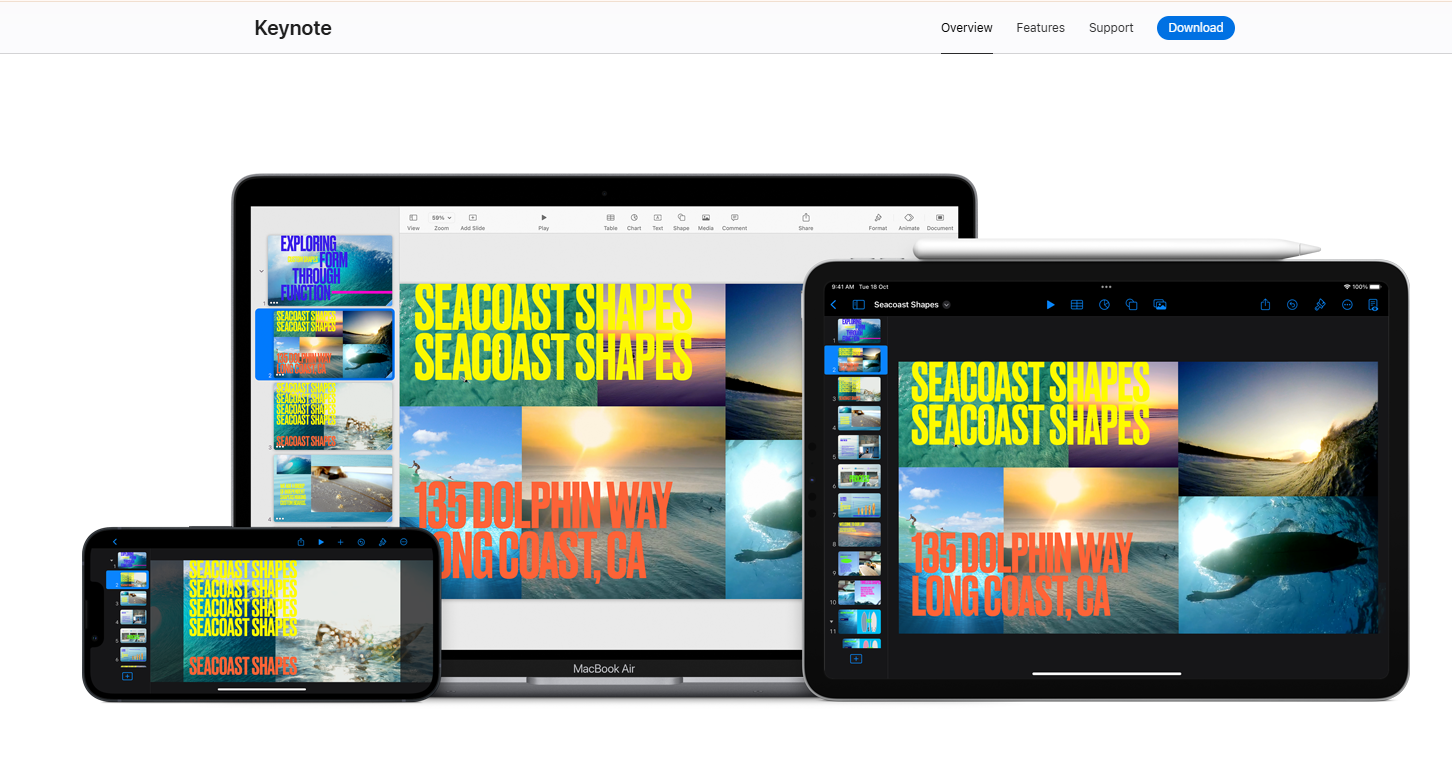
Use quando: Você faz apresentações ao vivo em dispositivos Apple e prioriza a qualidade das animações.
Evite quando: Você precisa de geração por IA ou de uma exportação confiável para PowerPoint.
O Keynote é o aplicativo de apresentação nativo da Apple, disponível gratuitamente para todos os usuários de dispositivos Apple desde 2013 e amplamente considerado como tendo o melhor motor de animação de todas as ferramentas desta lista. As transições Magic Move e a animação em nível de objeto superam todos os concorrentes em polimento visual para apresentações ao vivo.
Para apresentadores individuais ou equipes que usam apenas Apple, o Keynote produz o resultado ao vivo de maior qualidade disponível.
A história da IA, no entanto, é praticamente inexistente. Em 2026, o Keynote oferece uma geração por IA integrada mínima. Isso o torna uma ferramenta manual em um mercado que migrou para a automação.
Você constrói cada slide manualmente, o que significa que o tempo investido por apresentação é significativamente maior do que com qualquer alternativa assistida por IA nesta lista. Equipes que produzem apresentações em volume pagam um preço real aqui.
A outra restrição rígida é o confinamento ao ecossistema. O Keynote funciona perfeitamente dentro do ecossistema Apple e cria atrito no momento em que encontra o Windows. As animações e transições que tornam o Keynote memorável quebram ao exportar para .pptx. O resultado só impressiona quem o vê ao vivo.
O Keynote tem nota 4,3/5 no G2, com usuários elogiando consistentemente a qualidade do design e apontando falhas na colaboração limitada e na compatibilidade entre plataformas.
Avaliação no G2: 4,3/5
Prós do Keynote:
- Qualidade de design padrão impressionante e animações fluidas
- Gratuito para todos os usuários Apple
- A melhor experiência de apresentação ao vivo no Mac e iPad
Contras do Keynote:
- Recursos de geração por IA limitados
- A colaboração é limitada em comparação ao Google Slides ou Pitch
- A exportação para PowerPoint causa problemas de formatação; as animações quebram durante a conversão
Preço do Keynote:
Gratuito para usuários Apple.
O Keynote é ideal para:
Apresentadores individuais ou equipes que utilizam apenas Apple, que fazem apresentações ao vivo e priorizam a qualidade da animação em vez da velocidade de geração por IA.
12. Microsoft Copilot para PowerPoint: Ideal para organizações que utilizam Microsoft 365
Use quando: Permanecer no PowerPoint é inegociável e a qualidade do design é secundária.
Evite quando: Você precisa de um design de alto nível ou automação de marca baseada em URL.
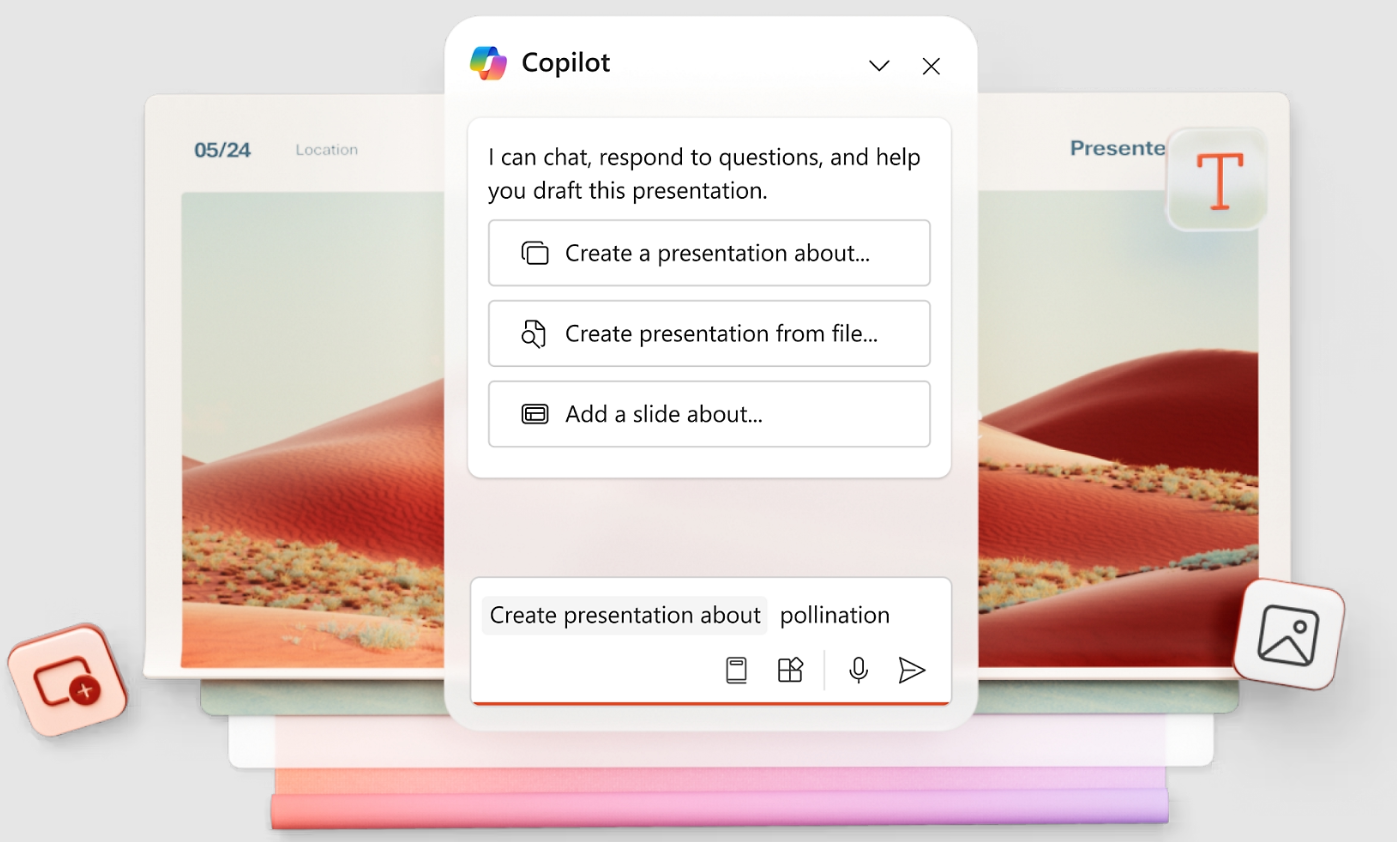
O Microsoft Copilot para PowerPoint adiciona a geração por IA diretamente na interface do PowerPoint, permitindo que os usuários descrevam o que precisam e recebam slides preenchidos pela IA dentro do seu fluxo de trabalho .pptx existente. Para organizações profundamente integradas ao Microsoft 365, a integração sem atritos é uma vantagem real. As equipes mantêm sua plataforma, evitam a conversão de arquivos e eliminam a etapa de exportação.
O Copilot também se conecta ao Microsoft Graph. Ele pode referenciar arquivos, e-mails e dados existentes da sua organização durante a geração. Nenhuma outra ferramenta independente nesta lista possui essa capacidade.
O PowerPoint continua sendo o padrão de apresentação dominante globalmente, com mais de um bilhão de usuários e décadas de adoção corporativa. O Copilot adiciona uma camada moderna de IA sobre essa base instalada, em vez de pedir que as equipes abandonem uma infraestrutura familiar. Organizações onde a governança de TI e a integração com o Microsoft 365 são inegociáveis encontram aqui o caminho de menor resistência.
As limitações merecem ser ditas claramente. O resultado de design do Copilot é o mais fraco desta lista. Os slides parecem formatados automaticamente, e não desenhados. É necessário um trabalho manual significativo de limpeza antes que uma apresentação esteja pronta para um cliente ou diretoria.
A licença acrescenta US$ 30/usuário/mês à assinatura existente do Microsoft 365, tornando-a uma das opções mais caras em escala. A automação de marca também é superficial, limitada a qualquer modelo de PowerPoint que já esteja em uso.
Avaliação no G2: 4,6/5
Prós do Copilot:
- Experiência nativa no PowerPoint que elimina o atrito de exportação e importação
- O Copilot entende seus arquivos existentes e os dados da empresa por meio do Microsoft Graph
- Curva de aprendizado quase nula para usuários atuais do PowerPoint
Contras do Copilot:
- Requer uma licença do Copilot além dos custos existentes do Microsoft 365
- A qualidade da saída da IA varia e geralmente precisa de ajustes significativos
- Um complemento para ferramentas pelas quais você já paga, vendido separadamente
- Fraco em automação de marca, sem extração baseada em URL
Preço do Copilot:
Incluído no Microsoft 365 (a partir de US$ 6,99/mês no plano pessoal). Complemento de IA do Copilot por aproximadamente US$ 30/usuário/mês.
O Copilot é ideal para:
Grandes organizações que utilizam o Microsoft 365, onde permanecer dentro do PowerPoint é inegociável e a qualidade do design é uma preocupação secundária.
Se você quiser se aprofundar no assunto, acesse nossa página que compara o PowerPoint e o Presentations.AI detalhadamente.
Melhores Criadores de Apresentações com IA Gratuitos
O título promete opções gratuitas e pagas, então aqui está uma comparação das versões gratuitas que realmente funcionam. O que importa é o que você pode fazer sem custo algum. Considere os limites de apresentações e as exportações restritas. Em seguida, avalie a presença de marcas d'água, recursos de colaboração e controles de marca.
Como escolher o melhor criador de apresentações com IA para o seu fluxo de trabalho
A maneira mais rápida de escolher é alinhar a ferramenta à finalidade da apresentação, indo além da lista de recursos. Analise estas cinco perguntas de diagnóstico: Qual é o formato final da sua apresentação? Qual é o nível de rigor exigido pelas diretrizes da sua marca? Quantas pessoas colaboram em cada apresentação? Qual é o seu orçamento considerando o tamanho real da sua equipe? E você precisa de IA para gerar conteúdo ou apenas para dar um toque final no design?
Antes de decidir, utilize este checklist de oito pontos durante qualquer período de teste gratuito: qualidade da entrada de dados, utilidade do primeiro rascunho, velocidade de edição, fidelidade à marca, colaboração, qualidade da exportação, segurança e custo anual para o tamanho real da sua equipe.
Quer testar uma apresentação real antes de decidir?
Insira suas notas, documentos ou a URL da sua empresa no Presentations.AI e veja você mesmo o resultado editável e personalizado com a sua marca.
(Não é necessário cartão de crédito)
Por que nossa principal escolha se destaca
Você viu todas as 12 ferramentas. Aqui está o que diferencia o Presentations.AI no momento da compra: automação de marca, iteração por IA, qualidade de exportação e estrutura narrativa.
1. A sincronização da marca não exige configuração manual
Você cola a URL da sua empresa e o sistema extrai automaticamente suas cores e logotipo. Cada slide e cada nova apresentação permanecem dentro da identidade visual por conta própria. Códigos hexadecimais e uploads de logotipos tornam-se desnecessários. O Presentations.AI é a única ferramenta desta lista que faz isso a partir de uma URL. O Brand Kit do Canva é robusto, mas exige configuração inicial. Todo o resto é manual.
2. O Clip-E mantém o fluxo da conversa
A maioria das ferramentas de IA entrega um primeiro rascunho e deixa você terminar o trabalho manualmente. O Clip-E itera com você. Reestruture seções, adicione tabelas comparativas e ajuste o peso visual de um slide. Você permanece em uma única conversa em vez de alternar entre a IA e um editor separado. Por trás do Clip-E, um criador de slides com IA reconstrói cada slide individualmente conforme você faz alterações. O layout se adapta à conversa em vez de ficar travado após o primeiro rascunho, como acontece na maioria das outras ferramentas. Na prática, a diferença é passar 10 minutos conversando para obter uma apresentação 90% pronta, em vez de gerar um rascunho e gastar 45 minutos corrigindo-o manualmente.
3. A exportação em .pptx funciona de verdade
Se o seu arquivo final precisa ser um PowerPoint, a exportação deve funcionar perfeitamente. O Gamma falha nesse ponto. O Canva exige ajustes. O Copilot é nativo do PowerPoint, mas produz designs mais fracos. O Presentations.AI oferece slides projetados por IA que permanecem intactos após a exportação.
4. Ele transforma material de origem em uma narrativa
A parte difícil raramente é criar um slide. É transformar informações dispersas em uma história que as pessoas consigam acompanhar. Pense em notas, relatórios, PDFs e documentos estratégicos. O Presentations.AI estrutura a narrativa antes de projetar a apresentação, então você recebe mais do que apenas slides bonitos. Você recebe um argumento mais claro.
5. Você pode começar de graça
O plano gratuito não exige cartão de crédito. Não tem contagem regressiva de teste. Não tem bloqueios para compartilhar. O plano Starter oferece usuários ilimitados e colaboração real. Experimente e veja com que rapidez você pode transformar um briefing em uma apresentação finalizada.
Conclusão: Qual criador de apresentações com IA você deve escolher?
Escolher uma ferramenta de apresentação com IA resume-se a uma pergunta: o que o seu resultado final realmente precisa fazer?
Se você precisa de um arquivo .pptx polido e consistente com a sua marca, que sobreviva à caixa de entrada de um cliente e funcione bem no PowerPoint, a maioria das ferramentas desta lista irá decepcionar em algum momento. O Gamma parece ótimo até que alguém peça o arquivo. O Copilot permanece no PowerPoint, mas produz designs que parecem ter ignorado completamente a etapa de design. O Canva funciona bem até o dia da exportação. O Presentations.AI foi criado para o ciclo completo. Entradas desorganizadas entram e uma apresentação estruturada e com a sua marca sai como um .pptx limpo. O ajuste manual que geralmente segue os slides gerados por IA desaparece. É por isso que ele está no topo desta lista.
Dito isso, a ferramenta certa é aquela que se adapta ao seu fluxo de trabalho real. Se sua equipe vive no Google Workspace com um orçamento apertado, o Google Slides com um complemento gratuito resolve o problema. Se você é um apresentador solo em um Mac que faz apresentações ao vivo, o Keynote ainda é o melhor motor de animação disponível. Se você precisa de governança de marca em uma grande organização, vale a pena considerar o Prezent.ai para a empresa.
Use a tabela "Como escolher" acima para restringir as opções e, em seguida, teste suas duas principais escolhas com uma apresentação real antes de se comprometer. A maioria dessas ferramentas possui um nível gratuito ou um período de teste. Processar seu conteúdo real no fluxo de trabalho é o que mais lhe dirá. Se Presentations.AI for uma dessas escolhas, o nível Starter gratuito permite que você teste o fluxo de trabalho completo e ignore os detalhes de pagamento, para que a comparação permaneça honesta.
Experimente o Presentations.AI.
Transforme material de origem em uma apresentação editável e com a sua marca em minutos.
(Não é necessário cartão de crédito)