

AhaSlides 대 Presentations.AI: 2026년 솔직한 비교

AhaSlides란 무엇인가요?

AhaSlides란 무엇인가요?

프레젠테이션 중 인터랙티브 기능(실시간 설문, 퀴즈, 서베이)을 제공하는 참여 플랫폼입니다. 자동 슬라이드 디자인이나 브랜드 가이드라인 적용을 위한 고급 AI 기능은 부족합니다. 완전한 AI 디자인 스위트는 아닙니다.

Presentations.AI란 무엇인가요?

Presentations.AI란 무엇인가요?

개요/문서를 자동 브랜드 적용, 실시간 협업, 고품질 PowerPoint 내보내기 기능을 통해 완벽하게 디자인된 슬라이드로 변환해 주는 AI 기반 프레젠테이션 빌더입니다.

AhaSlides 대 Presentations.AI: 기능 비교

AhaSlides는 프레젠테이션을 진행하는 순간, 즉 청중의 참여를 유도하기 위해 설문, 퀴즈, 실시간 상호작용을 추가하는 데 중점을 둡니다. Presentations.AI는 그 이전의 모든 과정, 즉 가공되지 않은 아이디어를 완벽하게 디자인되고 브랜드에 맞는 프레젠테이션으로 전환하는 데 중점을 둡니다. 하나는 프레젠테이션 진행을 돕는 부가적인 도구이고, 다른 하나는 프레젠테이션 자체를 만드는 데 도움을 줍니다.
Capability AhaSlides Presentations AI
Focus Interactive features like polls, quizzes, and live Q&A AI-native presentation creation from content to design
Brand Consistency Basic or manual brand styling Automatic brand sync across all slides
AI Capabilities No AI for layout or design; focused on engagement tools Deep AI for full deck generation, layout, and visuals
Export Limited export (PDF or web-based formats) High-fidelity PowerPoint (.pptx) export
Use Case Live audience interaction and engagement Professional, on-brand presentation creation

손쉬운 AI 프레젠테이션 제작을 경험할 준비가 되셨나요?

Presentations.AI가 어떻게 여러분의 개요나 문서를 몇 분 만에 멋진 브랜드 프레젠테이션으로 바꿀 수 있는지 알아보세요!

무료로 시작하기

AhaSlides와 Presentations.AI 한눈에 보기

AhaSlides는 인터랙티브 기능을 중심으로 구축된 청중 참여 플랫폼으로, 이미 만들어진 프레젠테이션에 설문, 퀴즈, 실시간 Q&A를 추가합니다. Presentations.AI는 단일 입력으로 콘텐츠, 디자인, 브랜드 정렬 및 애니메이션을 자동으로 처리하여 프레젠테이션 자체를 만듭니다.

이 두 도구는 프레젠테이션 수명 주기의 다른 시점에 사용됩니다. AhaSlides는 기존 자료 위에 상호작용 기능을 추가하여 발표 시 가장 강력하지만, 슬라이드 생성이나 디자인 자동화를 위한 의미 있는 AI 기능은 없습니다. 즉, 자료 제작 도구가 아닌 참여 레이어입니다. Presentations.AI는 제작 단계에서 가장 강력합니다. 레이아웃, 브랜드 가이드라인 적용 및 디자인을 자동화하여 청중 앞에 서기 전에 자료가 발표 준비를 마칠 수 있도록 합니다.

Presentations.AI가 훨씬 앞서는 부분은 AI 엔진의 깊이입니다. 단순히 슬라이드를 만드는 것을 넘어, 기업의 색상, 글꼴, 로고를 자동으로 적용하고, 내장된 애니메이션과 전환 효과를 포함하며, AhaSlides가 따라올 수 없는 고품질 .pptx 파일을 내보냅니다. 두 가지 모두를 원하는 팀에게 이 둘은 상호 배타적이지 않습니다. Presentations.AI에서 자료를 만들고, PowerPoint로 내보낸 다음, 나중에 AhaSlides 상호작용 기능을 삽입할 수 있습니다. 하지만 빠르고 대규모로 전문적이고 브랜드에 맞는 프레젠테이션을 만드는 것이 목표라면, Presentations AI가 실제 작업을 수행하는 도구입니다.

AhaSlides 작동 방식

1단계: 가입하기 – 설문 및 퀴즈와 같은 참여 기능에 대한 제한이 다른 무료 및 유료 요금제가 있습니다.

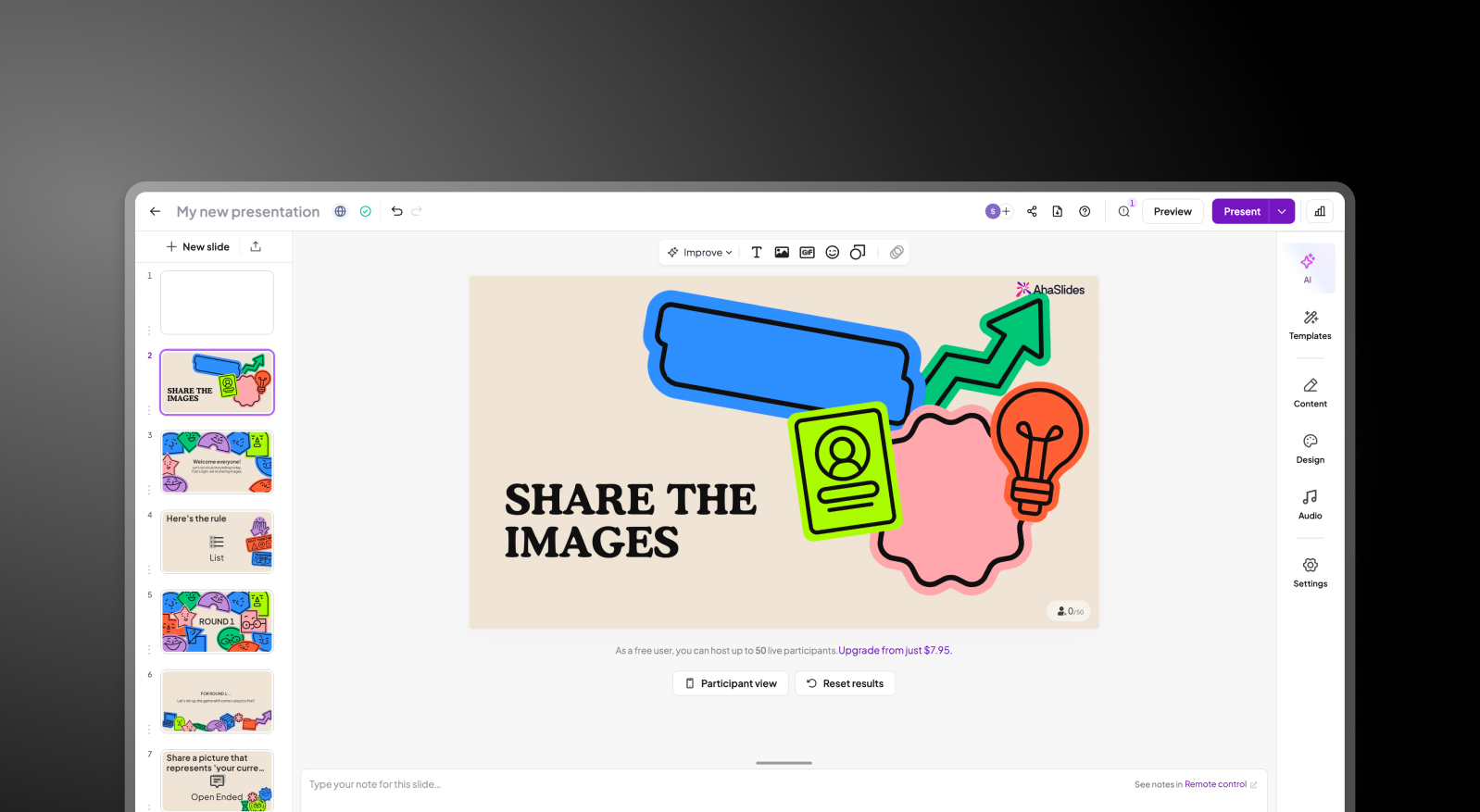
2단계: 슬라이드를 수동으로 만들기 – 텍스트, 설문, 퀴즈 또는 Q&A 슬라이드를 수동으로 추가합니다. 이 단계에서는 레이아웃, 디자인 또는 브랜드 자동화를 위한 AI 기능이 없습니다.

AhaSlides create slides step screenshot

3단계: 세션 시작하기 – 청중과 코드 또는 링크를 공유합니다. 참가자들은 프레젠테이션 중에 실시간으로 참여하고 상호작용합니다.
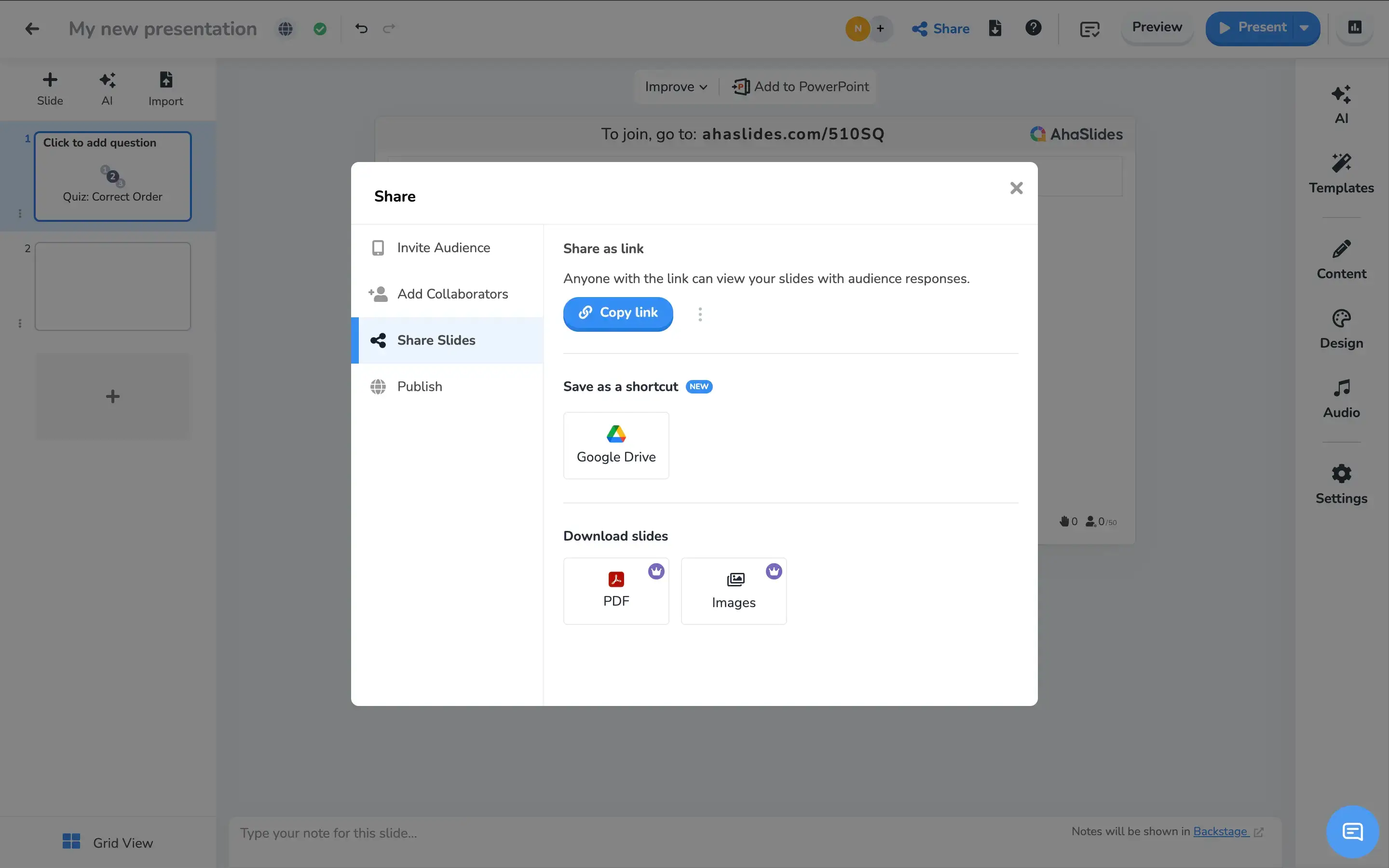
AhaSlides launch step screenshot

4단계: 기본 브랜딩 적용하기 – 테마 사용자 지정은 제한적입니다. 브랜드 일관성은 수동적이며 최소한으로 유지되며, 자동 브랜드 동기화는 지원되지 않습니다.


프레젠테이션 AI 작동 방식

1단계: 가입하기 – 무료 플랜에는 5개의 전체 AI 프레젠테이션이 포함됩니다. 신용카드 정보는 필요 없습니다.

2단계: 콘텐츠 입력 – PDF, Word 문서를 업로드하거나 개요를 입력하세요. Presentations.AI가 귀하의 자료를 문맥에 맞게 읽어들입니다.

3단계: AI가 전체 덱을 구축합니다 – 레이아웃, 브랜드 색상, 글꼴, 애니메이션 및 전환이 자동으로 적용되어 즉시 사용할 수 있는 완성된 프레젠테이션이 만들어집니다.

Presentations.AI automated deck step screenshot

4단계: 내보내기 또는 발표 – PowerPoint에서 깔끔하게 열리는 고품질 .pptx 파일을 다운로드하거나, 내장된 애니메이션으로 온라인에서 직접 발표할 수 있습니다. 다시 포맷할 필요가 없습니다.


팀이 AhaSlides 대신 Presentations.AI를 선택하는 다섯 가지 이유

어려운 부분 자동화: AhaSlides는 상호작용에 강하지만 고급 덱 디자인 자동화 기능은 부족합니다.

브랜드 통일성: AhaSlides는 레이아웃이나 디자인 자동화를 위한 AI 기능이 없습니다. Presentations AI는 브랜드 동기화를 통해 즉각적인 브랜드 규정 준수를 보장하며, 수동 테마 설정이 필요 없습니다.

확장성: 모든 종류의 비즈니스 또는 학술 프레젠테이션에 사용할 수 있으며, 필요한 경우 설문조사를 통합할 수 있습니다.

전문가 수준의 내보내기: AhaSlides는 PDF 또는 웹 기반 형식으로만 내보낼 수 있습니다. Presentations AI는 애니메이션이 그대로 유지된 고품질 .pptx 파일을 제공하여 PowerPoint, 이메일 또는 고객 전달에 바로 사용할 수 있습니다.

두 가지 모두의 장점: 서로 경쟁할 필요가 없습니다. Presentations AI에서 덱을 만들고, PowerPoint로 내보낸 다음, 나중에 AhaSlides 상호작용을 추가하세요. 전문적으로 디자인된 프레젠테이션과 실시간 청중 참여를 모두 얻을 수 있습니다 — 어느 하나도 포기할 필요 없이요.

먼저 상호작용할 가치가 있는 덱이 필요한 이유

AhaSlides는 프레젠테이션을 더욱 상호작용적으로 만드는 본연의 기능에 매우 뛰어납니다. 하지만 상호작용은 상호작용할 가치가 있는 프레젠테이션이 있을 때만 의미가 있습니다.

Presentations AI가 바로 그런 프레젠테이션을 만듭니다. 원시 문서나 개요에서 몇 분 만에 세련되고 브랜드에 맞는 PowerPoint를 만들 수 있습니다 — 완벽한 팀 협업과 디자인 작업 없이요. 합리적이라면 둘 다 사용하세요. 하지만 빠르고 대규모로 전문적인 덱을 만들 때는 Presentations AI가 제격입니다.

Divider Lines

자주 묻는 질문

What is the main difference between AhaSlides and Presentations.AI?

Down IconUp Icon

The main difference is the moment in the workflow each tool serves. AhaSlides is built for live audience engagement, adding polls, quizzes, word clouds, and Q&A during a presentation. Presentations.AI is built for creation, generating complete branded decks from documents or prompts before the presentation begins. AhaSlides activates an audience. Presentations.AI builds the deck that audience is responding to.

Is AhaSlides free?

Down IconUp Icon

Yes, AhaSlides has a free plan that supports up to 50 audience members per session, with access to interactive features like polls, quizzes, and word clouds. Paid plans expand audience size, branding controls, and exports. Presentations.AI offers a free plan with five complete AI-generated presentations, no audience size cap on the deck itself, and full PowerPoint export included.

Can you export from AhaSlides to PowerPoint?

Down IconUp Icon

AhaSlides integrates with PowerPoint and supports importing PowerPoint presentations or embedding AhaSlides interactions into existing decks. Direct PPTX export from AhaSlides is limited, with data exports available for polls and word clouds rather than full visual deck export. Presentations.AI exports a high-fidelity .pptx file natively, with layouts, fonts, animations, and brand styling preserved exactly as designed in the editor.

Does AhaSlides have AI for slide creation?

Down IconUp Icon

Yes, AhaSlides has an AI slide assistant that generates poll questions, quiz options, and basic slide content from a prompt. The AI is engagement-focused, designed to populate interactive elements rather than build full branded decks. Presentations.AI is AI-native for full presentation generation, producing complete decks with brand styling, animations, and layouts applied in a single pass from a document or prompt.

Can you use AhaSlides and Presentations.AI together?

Down IconUp Icon

Yes, the two tools work well together. Build a complete branded deck in Presentations.AI, export it to PowerPoint, then embed AhaSlides interactions into the file for live polls and Q&A. This combination delivers a professionally designed deck with audience engagement layered on top. Teams that need both creation and interactivity often run this exact workflow rather than choosing one over the other.